








Reviews and corrects ledger-to-subledger alignment in D365 by fixing posting configurations, inventory profiles, reconciliation logic, GL mapping, and critical reporting procedures.
Business Performance Planning vs. Traditional Budgeting: A Practical Comparison for CFOs
Posted on: June 18, 2026 | By: Heather Zhu | Microsoft Dynamics AX/365, Microsoft Dynamics AX/365|Microsoft Dynamics Manufacturing
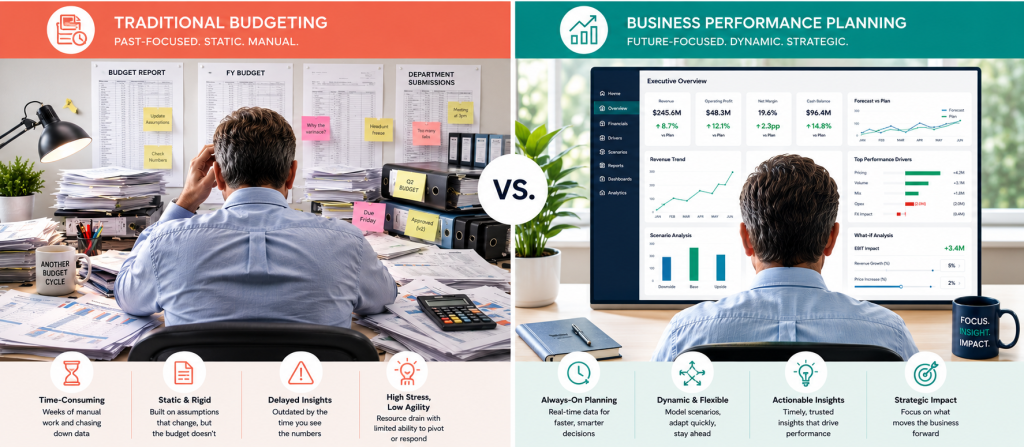
Every CFO knows the ritual.
Sometime in Q3, the spreadsheets come out. Department heads submit their numbers. Finance reconciles the conflicts, negotiates the gaps, adjusts the assumptions, and eventually produces a budget that everyone agrees to—right before the business starts changing again.
By February, the budget is usually still useful. It is just no longer entirely true.
That is not a criticism of finance teams. It is a criticism of the model. Traditional budgeting was built for a slower business environment: longer planning horizons, fewer data sources, and fewer sudden changes in labor, pricing, demand, supply, capital constraints, and executive priorities. Today, the business moves faster than the annual budget cycle can reasonably absorb.
Logan POV: Traditional budgeting gives you a number. Business performance planning gives you a working model. One gets approved. The other keeps working after the meeting ends.
Where Traditional Budgeting Actually Breaks Down
The annual budget is a point-in-time artifact. It captures assumptions made at a specific moment and turns them into a fixed benchmark. That can be useful for control, but it is not especially graceful when reality starts improvising.
Revenue shifts. Hiring plans change. Suppliers raise prices. A plant has downtime. A new customer ramps faster than expected. Finance then spends the next review cycle explaining why actuals diverged from assumptions everyone already knows are stale.
The second issue is data sprawl. Budgeting often pulls from ERP, HR, sales forecasts, departmental spreadsheets, and operational trackers. Someone in finance becomes the human integration layer, which sounds strategic until you realize it mostly means copying, pasting, reconciling, and wondering why one workbook has 13 tabs named “Final.”
What Business Performance Planning Changes
Business performance planning is not simply “budgeting with nicer screens.” It changes the operating model.
Instead of treating planning as an annual event, finance can operate in a more continuous rhythm: plan, act, analyze, adjust, and repeat. The budget becomes less of a frozen document and more of a living model that reflects what the business knows now.
In Dynamics 365 Finance, Business Performance Planning supports financial and operational planning using familiar Microsoft tools like Power BI and Excel. Microsoft documents that the solution lets teams create dimensions and cubes, load fact data into cubes, define dimension and cube access, create multiple plan versions, write back from Power BI to Dataverse, and collaborate through comments directly in the plan. Because it is Dataverse-native, Power Automate and other Power Platform capabilities can also support notifications, workflows, and custom fields.
That matters because CFOs do not need another reporting silo. They need a planning environment where finance, operations, and leadership can work from the same structure.
Where Business Performance Analytics Fits
Planning only gets better when the data underneath it is reliable.
Business Performance Analytics is Microsoft’s companion layer for turning Dynamics 365, Dataverse, and Power BI data into operational and financial insights. Microsoft describes it as a scalable, unified solution for consolidating performance metrics, automating reporting processes, and enabling custom analytics.
This is the practical connection: Business Performance Analytics helps finance understand what happened. Business Performance Planning helps finance model what should happen next.
That is the gap traditional budgeting struggles to close. The old model is excellent at preserving the baseline. The newer model is better at keeping the baseline useful.
What Is Changing in Dynamics 365 Finance 2026 Release Wave 1
Microsoft’s 2026 Release Wave 1 plan covers new Dynamics 365 Finance features planned from April through September 2026. Release plan details may change before release, which is worth keeping in mind when evaluating roadmap items against your implementation timeline.
The most relevant updates for CFOs sit in the Business Performance suite, which Microsoft describes as bringing analytics, planning, and insights together on a single extensible platform.
1. Quick-Start Templates for Planning
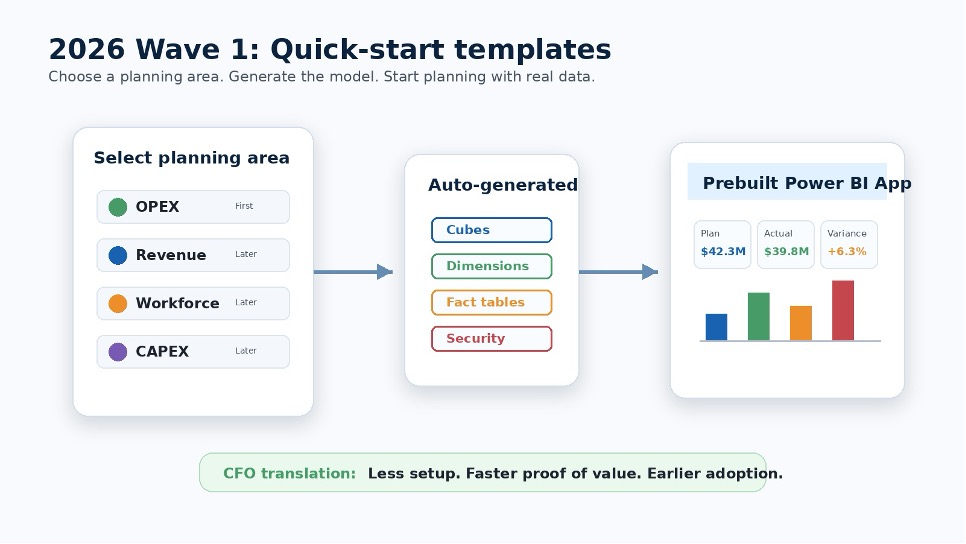
The biggest adoption barrier to continuous planning is often setup. Finance leaders may like the idea, but someone still has to build the model.
Quick-start templates are designed to reduce that blank-page problem. Microsoft’s 2026 Wave 1 plan says users can choose a planning area, starting with OPEX, with Revenue, Workforce, and CAPEX to follow, and Business Performance Planning automatically generates the required cubes and dimensions using recommended fact tables from Business Performance Analytics. A prebuilt Power BI app can then connect to the organization’s analytics environment with ready-to-use planning reports. Microsoft’s stated goal is to reduce proof-of-concept setup from weeks to clicks.
CFO translation: less setup theater, faster proof of value, and a better chance that finance users actually adopt the model before everyone retreats to Excel.
2. Acquire-to-Dispose Analytics
Microsoft’s 2026 Wave 1 release plan describes the Acquire-to-Dispose data model as improving asset tracking, valuation, financial visibility, depreciation, maintenance, and disposal insight across the full asset lifecycle.
For asset-heavy organizations, this is more than a reporting improvement. It gives finance a stronger analytical foundation for capital planning, asset utilization questions, maintenance cost trends, and disposal timing. In other words, it helps answer the question every CFO eventually asks about fixed assets: are we using the stuff we bought, or just depreciating it with confidence?
3. Data Refresh and Analytics Reliability
Continuous planning does not require every number to update every second. It does require finance to trust that planning and analytics are not working from stale information.
Microsoft’s Business Performance Analytics documentation shows ongoing improvements to refresh frequency and reliability, including changes that allow customers to schedule more frequent data refreshes. That nuance matters. CFOs should not assume “real time” means every data point is constantly live. The more practical goal is confidence: finance needs refresh timing that matches the decisions being made. Some decisions need daily confidence. Some need intra-day confidence. Some need governance more than speed.
4. Planning Visuals and Write-Back Inside Power BI
Microsoft’s Business Performance Planning custom visuals add planning and financial reporting functions directly into Power BI. The Matrix planning visual, for example, supports tabular planning and forecasting on a Power BI report page, write-back to Dataverse, drill-down, and top-down allocation capabilities.
This matters because Power BI is already where many executives and finance leaders expect to consume information. The more planning can happen where the business already looks, the less finance has to persuade people to visit yet another planning portal with a password they forgot in March.
The Practical CFO Question: Efficiency or Adaptability?
The easy business case for business performance planning is efficiency: less manual consolidation, fewer broken formulas, faster scenario modeling, better collaboration.
The more strategic case is adaptability.
Traditional budgeting asks: How did we perform against the plan?
Business performance planning asks: Given what we know now, what should we do next?
That shift moves finance from variance explanation to decision support. It gives leadership a planning model that can absorb change rather than merely report that change happened.

A Practical Adoption Path
Organizations do not need to rebuild financial planning all at once. The stronger move is to start with the planning area where friction is most visible and decision value is highest.
- Start with the decision. Define what finance needs to decide faster: OPEX, revenue, workforce, CAPEX, cash, margin, or asset investment.
- Stabilize dimensions. Make sure the planning model reflects how leadership actually manages the business.
- Connect actuals to plan. Use Business Performance Analytics to reduce manual reconciliation between what happened and what is being planned.
- Pilot with templates. Use quick-start templates where they fit, especially for OPEX.
- Set a planning cadence. Monthly or rolling cadence beats annual budget nostalgia.
- Govern ownership. Define who can adjust the model, approve changes, and explain assumptions.
Final Thought
The spreadsheet-driven budget cycle served its purpose. It created control. It forced alignment. It gave the business a financial baseline.
But for organizations operating across multiple entities, geographies, product lines, and cost structures, the traditional model is starting to show its age. Not because spreadsheets are useless—they are not—but because they were never designed to be the operating system for continuous financial planning.
Dynamics 365 Finance’s Business Performance suite gives CFOs a more modern path: connected analytics, structured planning, familiar Power BI and Excel experiences, Dataverse-backed collaboration, and emerging templates that lower the barrier to adoption.
The old budgeting cycle answers the question, “What did we agree to?”
Business performance planning helps answer the better question: “What should we do now?”
And in finance, that is where the real leverage is.


