









Reviews and corrects ledger-to-subledger alignment in D365 by fixing posting configurations, inventory profiles, reconciliation logic, GL mapping, and critical reporting procedures.
When Inventory and the General Ledger Do Not Match: A D365 Reconciliation Playbook
Posted on: August 5, 2026 | By: Heather Zhu | Microsoft Dynamics AX/365, Microsoft Dynamics AX/365|Microsoft Dynamics Manufacturing
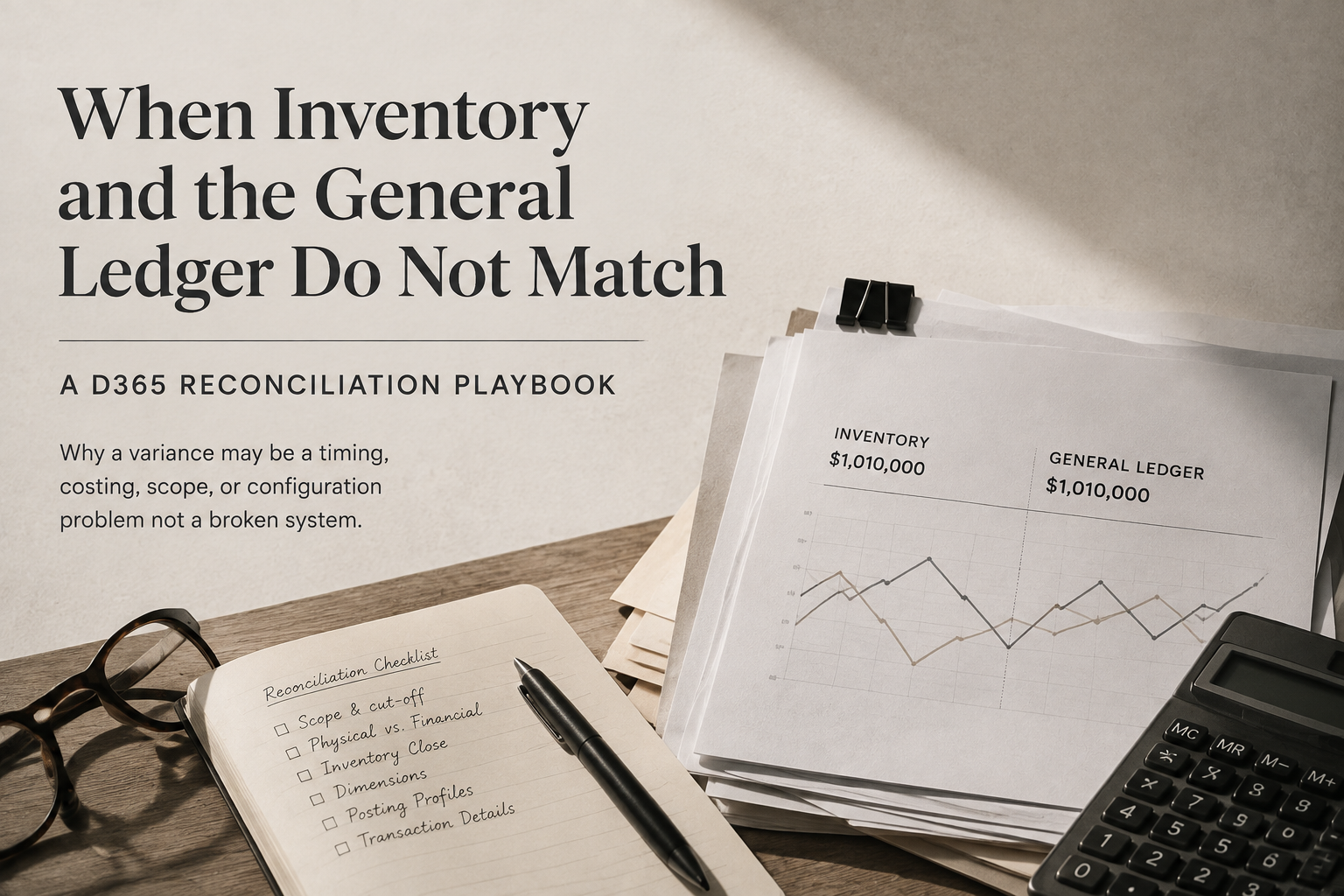
EXECUTIVE TAKEAWAY
An inventory-to-GL difference is not automatically a posting error. Reconciliation begins by defining what each number represents, then following the transaction from physical update to financial posting and cost settlement.
The mismatch that starts the meeting
Finance sees a $240,000 inventory variance. Operations says the on-hand inventory is correct. IT confirms the nightly jobs completed successfully. Cost accounting insists inventory close ran without failure.
Annoyingly, all three teams may be telling the truth.
An inventory-to-general-ledger difference in Microsoft Dynamics 365 Finance & Supply Chain Management is not automatically a posting error. It may be a timing difference, an unfinished costing event, a report-design issue, a financially untracked dimension, or a transaction posted under an earlier configuration.
That is why inventory reconciliation should not begin with “Which number is wrong?” It should begin with “What exactly does each number represent?”
LOGAN POV
By the third spreadsheet export, the problem has usually acquired three owners, six filters, and four versions of the truth.
The first mistake: comparing two reports that measure different things
The Inventory value report can show physical quantities, financial quantities, posted physical amounts, unposted physical amounts, work in process, deferred cost of goods sold, COGS, and profit-and-loss activity. That flexibility is useful – and it also gives teams several legitimate ways to compare the wrong totals.
The Inventory value report storage output does not include general-ledger balances, even when GL accounts are defined in the report configuration. Reconciliation must therefore use the appropriate trial-balance accounts.
More importantly, unposted physical amounts should not be included in a GL reconciliation. If the inventory report includes goods that have been physically received but never posted financially, the report can be correct while the trial balance excludes them – also correctly.
Before investigating individual transactions, lock down the legal entity, cutoff date, accounting currency, report configuration, and exact GL accounts in scope. Otherwise, you are not reconciling. You are introducing two numbers and hoping they discover they have something in common.
Physical inventory and financial inventory are different moments
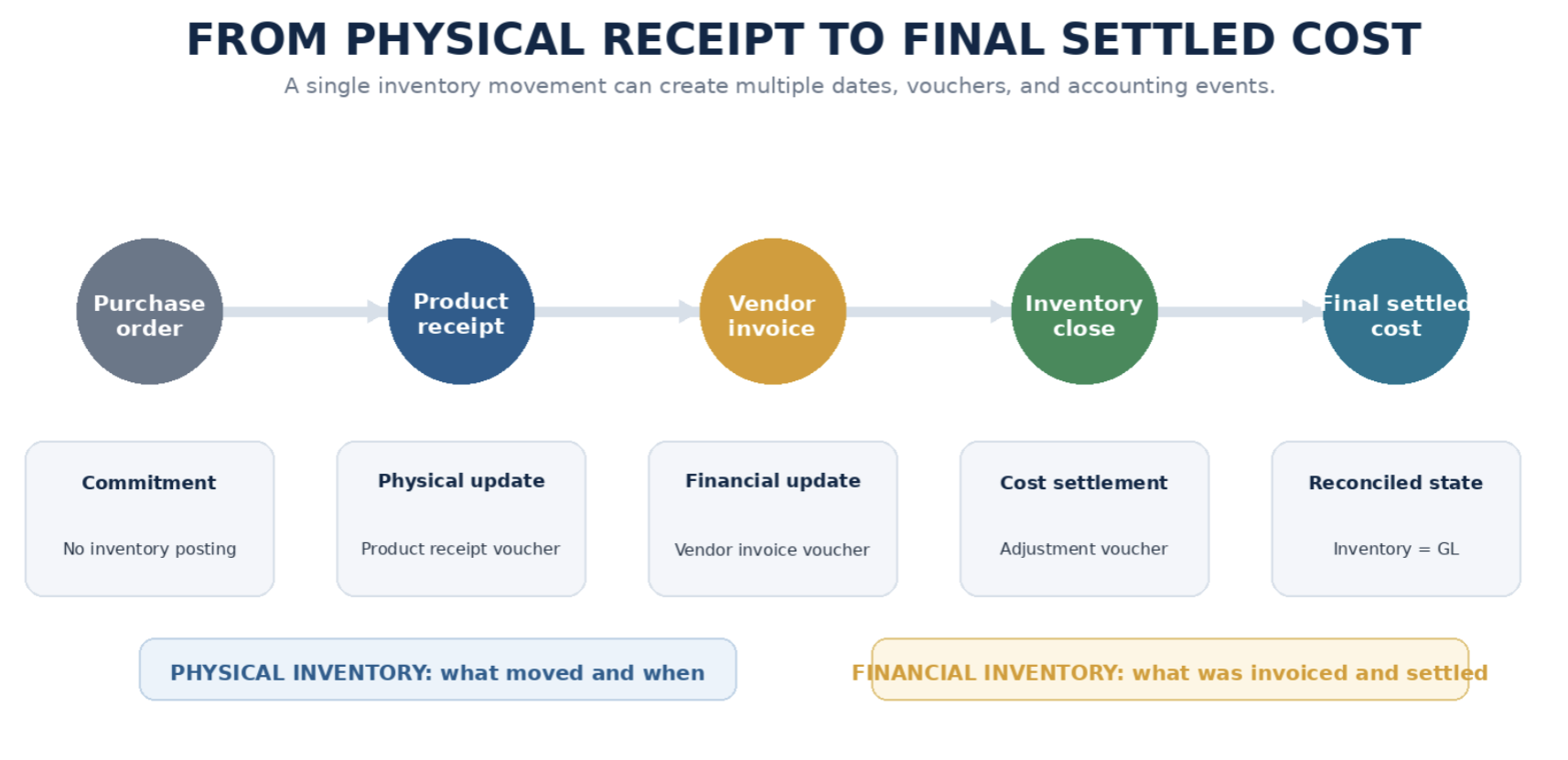
D365 separates physical and financial inventory updates because the business events happen at different times. For a purchase order, the product receipt is the physical event and the vendor invoice is the financial event. For a sales order, the packing slip and invoice follow the same pattern.
A single inventory movement can therefore carry a physical date, a financial date, a physical voucher, a financial voucher, a later cost adjustment, and different financial dimensions captured at each stage.
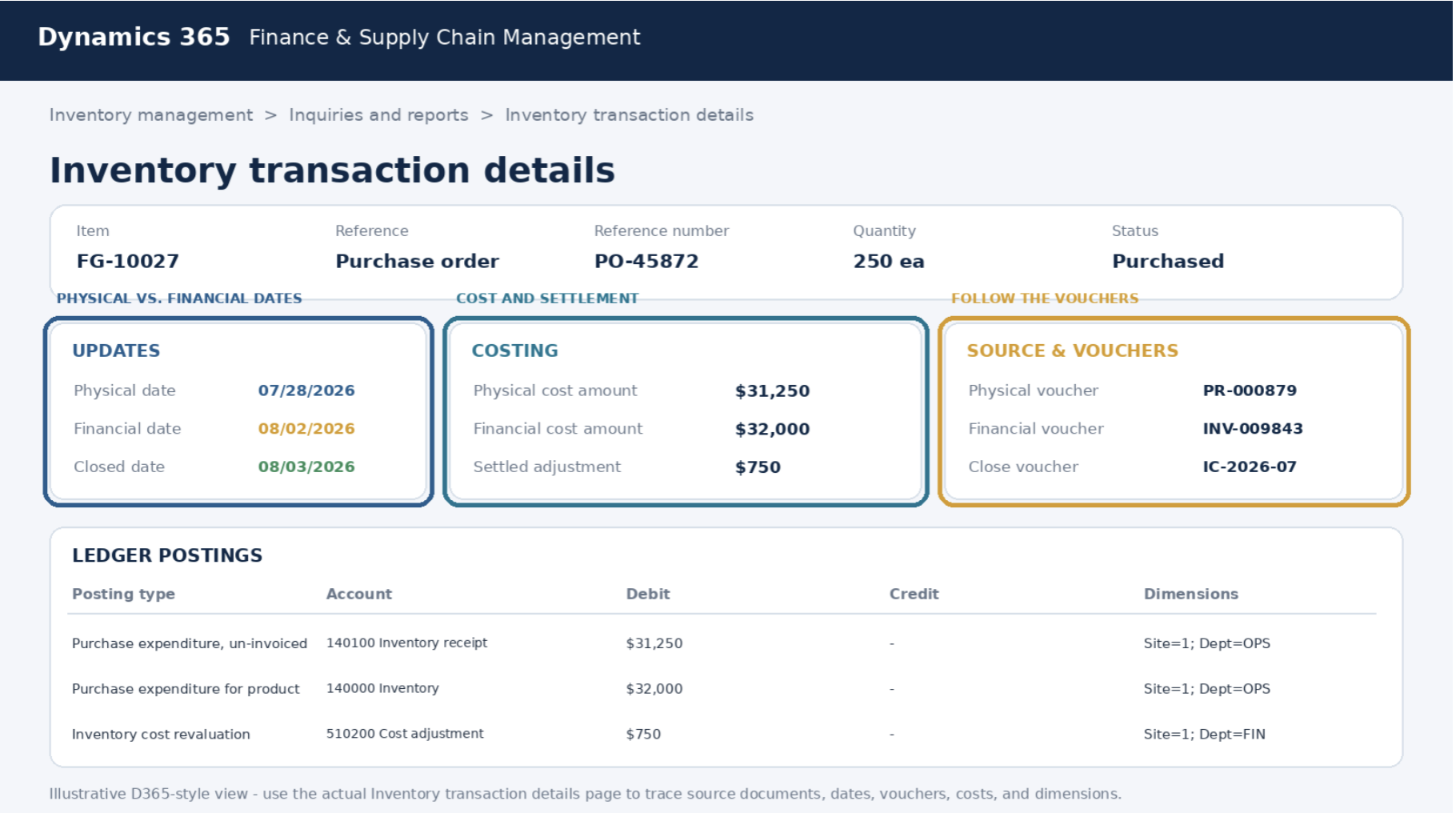
The Inventory transaction details page is one of the best places to unpack that history. Its sections expose physical and financial updates, cost amounts, source references, ledger postings, vouchers, and the dimensions used at each stage.
LOGAN POV
Inventory reconciliation fails when companies treat it as report matching instead of transaction-lifecycle analysis.
Inventory close may be the missing chapter
For most inventory models, the cost posted when inventory is issued is not necessarily the final settled cost. Until inventory close or recalculation runs, issue transactions use a calculated running-average cost. Inventory close then settles issues against receipts according to the item model and can post adjustments to the general ledger.
When the inventory value report and GL do not align, confirm that inventory close completed through the reconciliation date, ran after material receipts and invoices were posted, and did not produce unresolved warnings. For manufacturers, also confirm that production orders were financially ended.
There is one historical nuance that creates particularly good month-end mysteries: close and recalculation adjustments post back to the ledger accounts used by the original inventory transaction. If posting profiles changed afterward, the adjustment still follows the original accounting lineage – not the account visible in today’s setup.
LOGAN REALITY CHECK
Finance checks today’s posting profile. The adjustment posts to yesterday’s account. D365 has not developed free will; it is preserving the lineage of the original transaction.
Your missing warehouse value may not actually be missing
D365 can physically track site, warehouse, location, batch, serial number, inventory status, license plate, and owner. But an Inventory value report can show financial value only for dimensions where Financial inventory is enabled in the storage or tracking dimension group.
If site is financially tracked but warehouse and batch are not, the report can show the physical warehouse and batch activity while financial values remain summarized at site. Blank warehouse or batch values do not prove the inventory disappeared. They may show that the organization chose not to value inventory financially at that level.
The same principle affects transfer activity. A physical movement between dimensions that are not financially tracked may create no GL voucher. Sometimes the box moved and the balance sheet – quite correctly – did not care.
Posting profiles can create a historical maze
Inventory posting profiles determine how purchasing, sales, production, and inventory transactions reach the general ledger. Problems appear when setup changes after transactions have already posted.
Changing posting profiles does not rewrite historical vouchers. A later settlement or close adjustment can still post to accounts used by the original transaction. Reconcile before and after material posting-profile changes, test changes outside production, and preserve evidence of who changed what and when.
System-controlled inventory accounts should generally be blocked from manual entry. Direct GL journals into an inventory control account immediately disconnect the ledger from the inventory subledger. Correct the source transaction through the subledger or use a separate adjustment account.
Manufacturing adds WIP to the conversation
For manufacturers, inventory-to-GL reconciliation is rarely limited to raw materials and finished goods. Production introduces estimated material consumption, WIP, reported-as-finished inventory, absorbed labor and overhead, scrap, and final manufacturing-cost postings.
Picking-list and report-as-finished transactions can create physical inventory and WIP postings. When the production order is ended, D365 reverses estimated costs and financially updates the related inventory transactions using actual calculated costs.
If the reconciliation includes inventory accounts but omits the relevant WIP accounts – or compares a report after report-as-finished but before production end – the difference may be structural rather than erroneous.
LOGAN POV
In manufacturing, “inventory” is not one account. It is a financial journey with several layovers.
Do not use the consistency check as a reconciliation hammer
When numbers disagree, administrators may be tempted to run an inventory consistency check in Fix error mode. That should not be the first move.
Microsoft describes the on-hand consistency check as a corruption-recovery tool for cases where summarized on-hand quantities do not match the underlying inventory transactions, unexplained negative quantities exist, or inventory close fails because summary tables are out of sync with InventTrans.
It is not a routine maintenance job, should be scoped to the affected items, and should be run in Check mode before Fix error. A report-to-GL variance does not, by itself, prove data corruption.
Using a database repair utility before understanding the accounting difference is the ERP equivalent of replacing the smoke detector because dinner burned.
The Logan inventory-to-GL reconciliation playbook
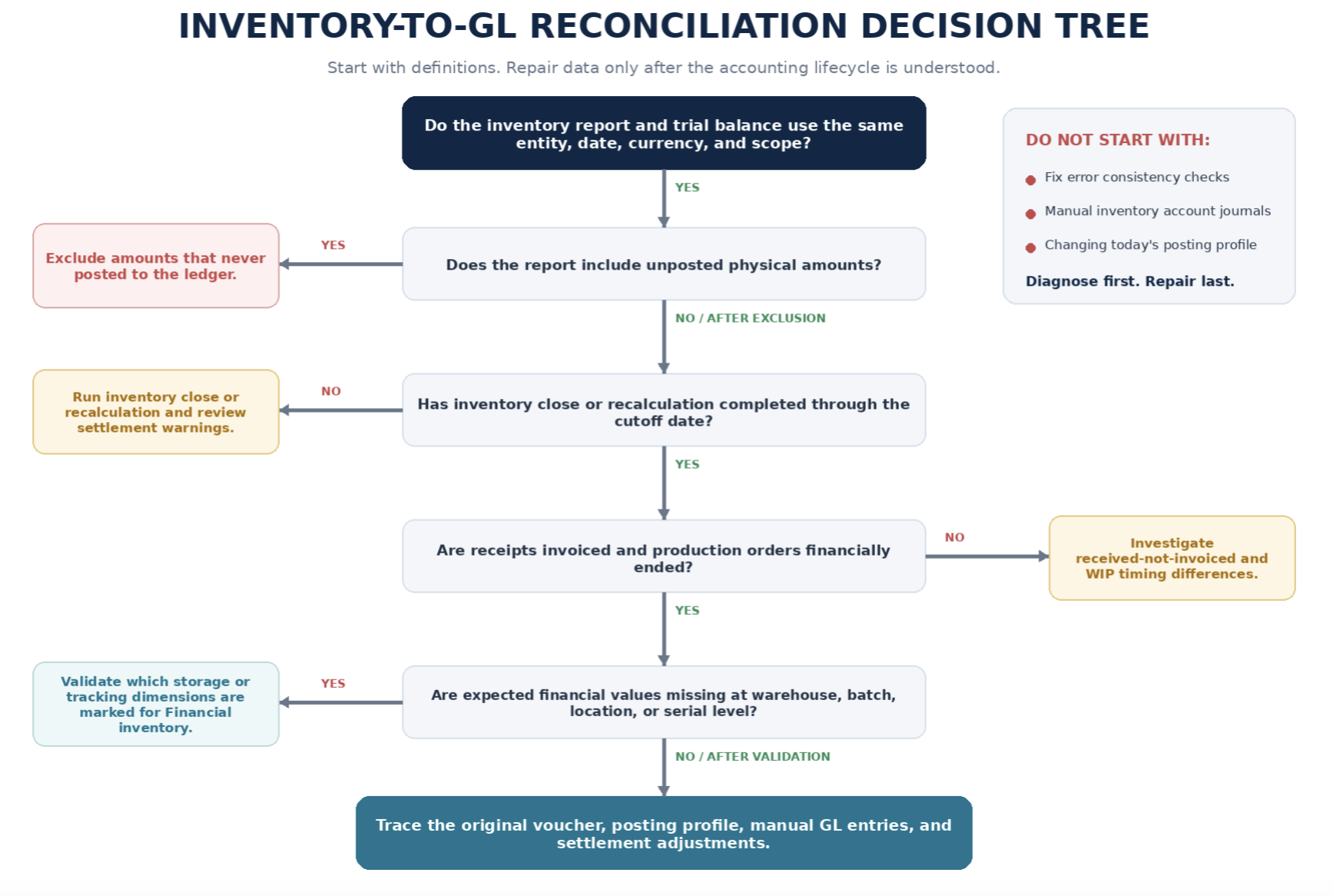
When the numbers do not match, follow the transaction lifecycle in a controlled sequence:
- Freeze the comparison: Use the same legal entity, cutoff date, currency, and financial-dimension scope.
- Validate the report definition: Confirm which inventory, WIP, COGS, deferred COGS, and profit-and-loss columns are enabled.
- Remove unposted physical values: Do not compare amounts that never posted to the ledger against the trial balance.
- Identify the correct GL accounts: Include inventory control, WIP, accrued inventory, received-not-invoiced, transit, and applicable variation accounts.
- Confirm close status: Verify inventory close or recalculation completed and review the warning log.
- Separate physical and financial activity: Look for receipts without invoices, shipments without invoices, and production activity not financially ended.
- Drill into Inventory transaction details: Review source references, dates, ledger postings, vouchers, cost amounts, and dimensions.
- Validate financially tracked dimensions: Do not expect financial value at warehouse, batch, location, or serial level unless configured.
- Review posting-profile history: Determine which account was in effect when the original transaction posted.
- Investigate manual GL entries: Protect inventory control accounts from direct manual posting.
- Treat data repair as the final branch: Run consistency checks only when symptoms point to actual summary-versus-transaction corruption.
- Assign monthly ownership: Finance, cost accounting, operations, and IT should own defined steps and exception categories.
What a good reconciliation bridge looks like
A reconciliation should show how the inventory report reaches the trial balance. The example below is illustrative and is not customer data.

Final thought
When inventory and the general ledger do not match, the most dangerous assumption is that one side must be wrong.
D365 records inventory through physical updates, financial updates, dimensions, posting profiles, costing settlements, production events, and close adjustments. A variance often means two teams are looking at different points in that chain.
The right response is not immediate correction. It is precise diagnosis: define the balances, remove unposted values, confirm inventory close, follow the transaction to its vouchers, review the original posting logic, and understand which dimensions are financially meaningful.
Because the strongest inventory reconciliation is not the one that eventually reaches zero. It is the one that can explain why it reached zero – and keeps the same mystery from returning next month wearing a different dollar amount.
THE CORE LOGAN POSITION
Inventory reconciliation is transaction-lifecycle analysis, not report matching. Fix the process that created the difference, not just the number that exposed it.
Need help diagnosing an inventory-to-GL difference?
The fastest path to a clean reconciliation is usually not another export. It is a controlled review of transaction timing, costing, posting history, dimensions, and ownership.
1. DEFINE
Lock the entity, date, currency, report scope, and GL accounts.
2. TRACE
Follow physical updates, financial updates, vouchers, and settlements.
3. FIX THE SOURCE
Correct the process or configuration that created the difference.
Technical note: Validate corrective actions in a nonproduction environment before changing production data or posting structures.
loganconsulting.com | info@loganconsulting.com | (312) 345-8817


