








Reviews and corrects ledger-to-subledger alignment in D365 by fixing posting configurations, inventory profiles, reconciliation logic, GL mapping, and critical reporting procedures.
What the Shift to PPAC Means for Dynamics 365 Finance and Supply Chain Environments
Posted on: September 10, 2026 | By: Heather Zhu | Microsoft Dynamics AX/365
Microsoft Dynamics 365 Insight
Logan Consulting | Technical guide by Craig Leska | September 2026
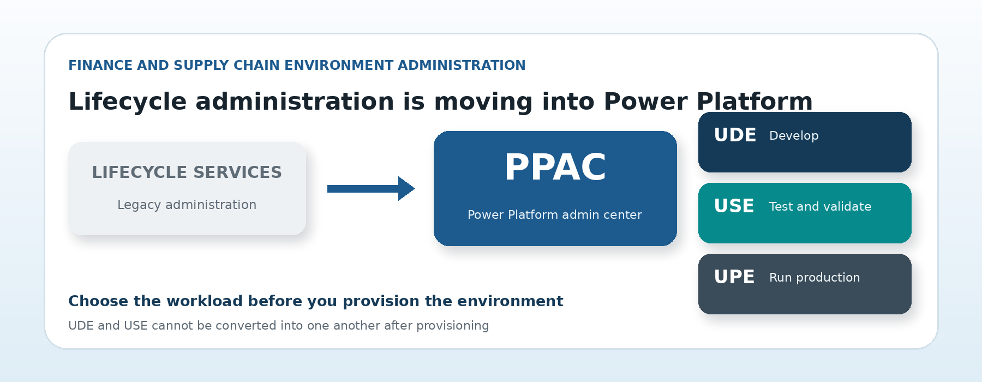
Lifecycle administration is shifting from Lifecycle Services to the Power Platform admin center.
Microsoft is changing where and how Dynamics 365 Finance and Supply Chain Management environments are provisioned. As lifecycle administration moves from Lifecycle Services toward the Power Platform admin center, implementation teams need to think beyond a different portal and a new set of buttons.
Finance and Supply Chain Management environments are becoming part of the broader Power Platform lifecycle. Dataverse, application installation, capacity, security, administrative ownership, and environment purpose must now be planned together. A team that treats PPAC as a portal swap can still reach a Ready status while creating the wrong environment for the work ahead.
Logan Consulting’s new technical guide, Deploying Dynamics 365 Finance and Supply Chain Management via PPAC, turns the current process into a practical field reference. It covers UDE and USE provisioning, the decisions that change the outcome, and the checks administrators should complete before handing an environment to the project team.
Start with the environment purpose
Both a Unified Developer Environment and a Unified Sandbox Environment begin as a Power Platform Sandbox with Dataverse. The crucial decision comes when Finance and Operations is provisioned.
A Unified Developer Environment is designed for X++ coding and extension development. Developer tools are enabled, Visual Studio connects to the cloud runtime, and source code and metadata are maintained on the developer workstation. The application runtime and business database execute in the cloud. Microsoft intends this model for a single developer, not a shared development server or performance testing platform.
A Unified Sandbox Environment is designed for configuration, integrations, testing, training, and user acceptance. Developer tools remain disabled. It supports production-like validation without becoming a coding environment.
Current Boundary
The choice is permanent. A UDE cannot be converted to a USE after provisioning, or vice versa. Calling both environments sandboxes can hide a decision that affects development, testing, support, and release management.
| Environment | Primary purpose | Developer tools |
|---|---|---|
| UDE | X++ coding, extensions, and unit testing | Enabled |
| USE | Configuration, integrations, testing, training, and UAT | Disabled |
| UPE | Live production operations | Not for development |
Note: table content preserved from source document. Confirm current UDE, USE, and UPE definitions against Microsoft’s latest PPAC documentation before publishing.

The Developer Tools setting is what determines whether an environment follows the UDE or USE path.
The Developer Tools setting determines whether the environment follows the UDE or USE path. Demo data is a separate decision.
Provisioning has four control points

PPAC provisioning follows a repeatable, four-step sequence.
PPAC provisioning follows a repeatable sequence. Create the Power Platform Sandbox and Dataverse store, install Finance and Operations Platform Tools, run the Finance and Operations Provisioning App, and then validate access, roles, URL, region, version, and ownership. For a UDE, setup continues on the developer workstation with Power Platform Tools for Visual Studio, source control, and a compile, deploy, synchronize, and debug test.
The guide walks through this sequence screen by screen. It also addresses a common source of false alarms: the provisioning app can take hours.
Accuracy Trap
A long-running installation is not itself evidence of failure. Administrators should monitor status and wait for an explicit error or an abnormal loss of progress before restarting or escalating.
The operating model matters after provisioning
A sustainable environment strategy is built before anyone clicks Install. The guide recommends confirming a dedicated administrative or service identity, region, security group, environment group, licensing, demo data policy, source control approach, release path, and ongoing maintenance ownership.
A typical implementation separates each stage by purpose: a UDE for development, USE environments for testing and user acceptance, and a UPE for production. This prevents the sandbox from becoming a catch-all and creates a clearer route for promoting validated changes.
Lifecycle Services will not disappear in a single cutover. Existing projects and functions may still matter during Microsoft’s transition. Teams should verify high-impact deployment, servicing, and production management procedures against current Microsoft documentation.
Use the guide before you provision
The full whitepaper includes prerequisites, annotated screenshots, UDE and USE workflows, local developer workstation requirements, post-provisioning checks, environment topology guidance, and an implementation checklist. It is designed for project leaders, administrators, developers, and internal IT teams that want a repeatable process rather than a collection of portal screenshots.
The objective is not merely to make the environment show Ready. It is to provision the right environment for the right workload, with clear ownership and a release path the team can support. If you are moving away from LCS-based administration or preparing a new Dynamics 365 Finance and Supply Chain Management deployment, Logan Consulting can help design, provision, and validate the environment strategy.


