









Reviews and corrects ledger-to-subledger alignment in D365 by fixing posting configurations, inventory profiles, reconciliation logic, GL mapping, and critical reporting procedures.
Static Slotting Is Dead: How Dynamic Item Placement Changes Warehouse Execution in D365
Posted on: July 23, 2026 | By: Heather Zhu | Uncategorized, Microsoft Dynamics AX/365
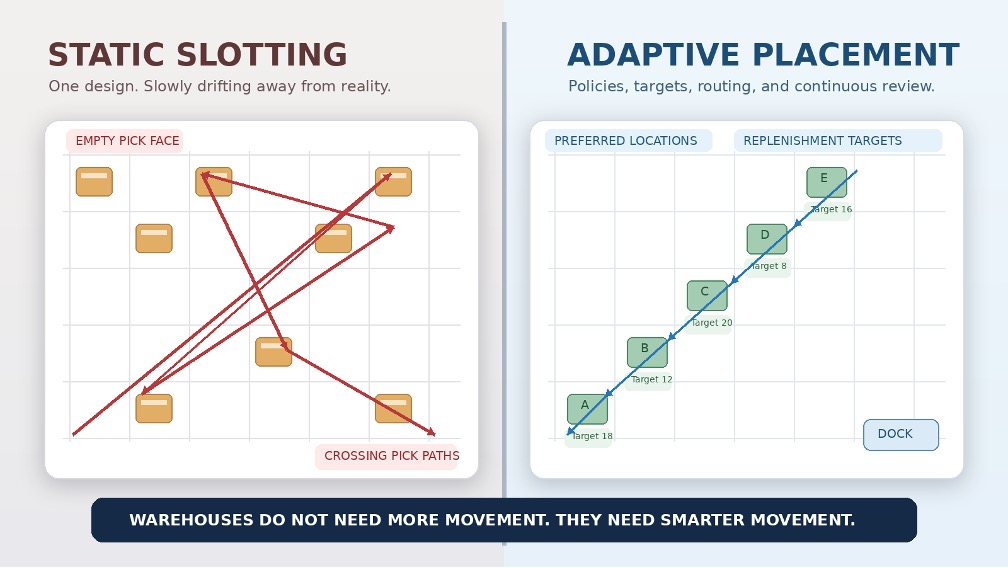
The position: The annual slotting project is no longer enough. D365 is moving toward an adaptive warehouse control model where placement, replenishment, routing, traceability, and work priority reinforce one another.
First, the truth check
Yes—the core technology claims in this article are researched and supportable. But the status labels matter. Microsoft’s release plan lists dynamic item placement and several related warehouse capabilities for the 2026 release wave, while the detailed spatial-location and dynamic-work-classification documentation still carries preview language. Roadmap dates are not the same thing as deployment proof.
This version therefore makes three distinctions explicit:
- Microsoft-documented capability: what the feature is designed to do.
- Current delivery status: release-plan item, preview, production-ready preview, or enabled-by-default enhancement.
- Illustrative business case: scenario math used to show how to think—not a promise of customer results.
Important: Dynamic item placement is currently documented most fully through the Microsoft release plan. Spatial location sorting remains labeled preview in detailed documentation, and dynamic work classification is labeled production-ready preview. Validate your application version, geography, Feature management, and actual tenant behavior before committing a production date.
Warehouses do not need more movement. They need smarter movement.
For years, warehouse slotting has followed a familiar rhythm. Analyze item velocity. Move the fast sellers closer to the front. Update a spreadsheet. Print a new location map. Congratulate everyone on the optimization initiative.
Then demand changes.
A promotion takes off. A customer shifts buying patterns. A product becomes seasonal. New SKUs arrive. Returns pile up. The carefully optimized warehouse slowly drifts back into a building where people walk impressive distances to find very ordinary products.
Static slotting is not inherently wrong. Some inventory should remain fixed because of weight, temperature, security, hazardous-material, equipment, or regulatory constraints. But treating fixed placement as the default operating model for every item has reached its expiration date.
Microsoft’s 2026 release plan describes dynamic item placement for Dynamics 365 Supply Chain Management using warehouse and item storage policies, preferred locations, target quantities, inbound inventory balancing, dynamic putaway, and automated replenishment. The more important idea is not a new screen. It is a shift from periodic slotting analysis to governed, ongoing placement decisions.
Logan POV: The real breakthrough is not “better slotting.” It is turning warehouse placement from a periodic project into an operating control loop.
Why static slotting quietly loses value
The problem with static slotting is not the initial analysis. It is everything that happens afterward.
A slotting model reflects demand, order profiles, product relationships, replenishment activity, and warehouse constraints at a particular moment. But the warehouse keeps moving after the analysis is finished.
Fast-moving items slow down. Slow movers become promotional stars. Products frequently ordered together end up three aisles apart. Pick faces run empty because replenishment targets no longer reflect actual consumption. Local teams create unofficial overflow locations because the official design cannot absorb reality.
Eventually, the warehouse still has a slotting strategy. It just happens to be one that no longer matches the business.
That mismatch is expensive because picking is a major warehouse cost lever. A 2025 MIT Center for Transportation and Logistics capstone for one Newell Brands distribution-center operation described order picking as approximately 50% of warehouse operating cost and estimated a 24% travel-distance reduction from an enhanced slotting model. That is a specific case study—not a universal benchmark—but it shows why placement deserves more attention than another motivational poster about productivity.
What dynamic item placement actually changes
Dynamic item placement is not a button labeled “Make Warehouse Better.”
Microsoft describes warehouse and item storage policies that define preferred locations and target quantities, maintained directly or imported at scale. Those policies are intended to help balance inventory during purchase-order and transfer-order inbound processing and support dynamic putaway and replenishment.
That makes policy the center of the design: which items may move, where they are allowed to live, how much belongs in each location, what constraints override velocity, and when the benefit of relocation justifies the movement cost.
A mature adaptive warehouse does not move every SKU every time demand twitches. That would simply replace picker travel with forklift travel and call it innovation. Dynamic does not mean restless. It means responsive inside governed boundaries.
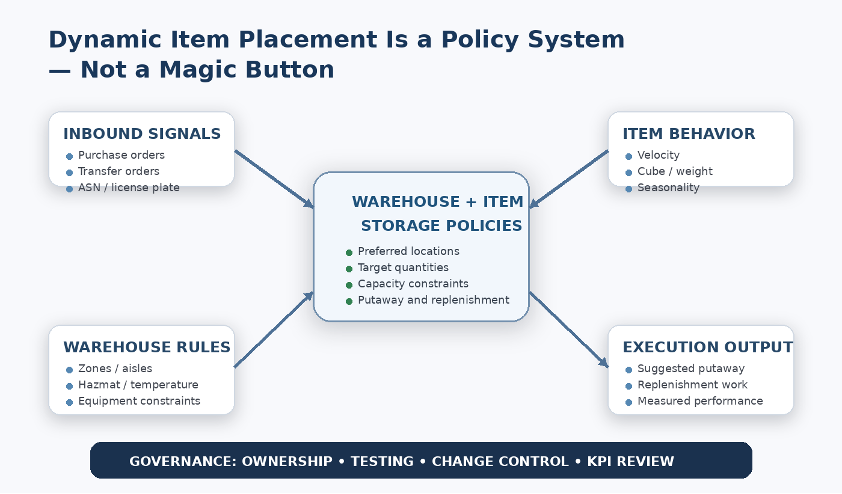
Placement is only one part of the control loop
Spatial intelligence addresses the walking problem
Microsoft’s warehouse spatial-location capability assigns X, Y, and Z coordinates to warehouse locations and uses those coordinates to sort pick work lines during wave processing. The detailed documentation supports straight-line and city-block distance strategies, plus fast-calculation and optimized-route algorithms.
The distinction is practical. Putting inventory in a better location reduces structural travel. Sorting the work path reduces execution travel. One improves where inventory waits; the other improves how labor reaches it.
The caveat matters: Microsoft’s current detailed documentation still labels warehouse spatial locations as preview and requires Supply Chain Management 10.0.49 or later. Preview functionality should not be positioned as ordinary production functionality without a deliberate risk decision.
Power Fx makes work priority adaptive
Placement determines where products go. Routing determines how workers travel. Dynamic work classification helps determine which work deserves attention.
Microsoft’s current detailed documentation labels dynamic work classification a production-ready preview for version 10.0.48 or later. Power Fx formulas can override work pool, priority, location-directive code, and work class when work is created. Rules can evaluate work, load, shipment, wave, and transportation-appointment data, and can reevaluate work after a load changes.[3]
That can reduce the number of static work templates required for carrier, priority, zone, cutoff, and item conditions. It also creates a governance obligation. Low-code is still code’s cousin: give it ownership, testing, version control, and change approval—or it will become a clever formula nobody is willing to touch.
Better traceability protects picking accuracy
Microsoft’s 2026 warehouse updates also add two strategies for serial- and batch-number capture during cluster picking when items are tracked below location in the reservation hierarchy: capture once before distribution, or capture separately for each cluster position.
The Supply Chain Management 10.0.48 release notes identify the cluster-picking strategy enhancement as enabled by default.[5] The operational value is straightforward: the exact tracked inventory is associated with the correct order at the moment of execution, not reconstructed later during a quality event or customer escalation.
Traceability is not created during the investigation. It is created during the scan.
ASN receiving makes the inbound side smarter
For Warehouse-only mode, Microsoft’s release plan describes transfer-order receiving with ASN packing structures and a single license-plate scan. That can reduce manual receiving steps and give the warehouse better information before putaway decisions are made.
The feature should still be treated as a release-plan capability until detailed availability is confirmed in the target environment. The design principle is nevertheless sound: dynamic putaway is only as intelligent as the inbound data available to it.
If the ASN is incomplete, the license plate is wrong, or item attributes are unreliable, the system is not adapting. It is making a faster decision with bad information, which is not generally the efficiency gain executives had in mind.
The business case: fewer non-value-added steps
Warehouse leaders should avoid building the business case around feature activation. The business case is labor capacity, space utilization, service, accuracy, and working capital.
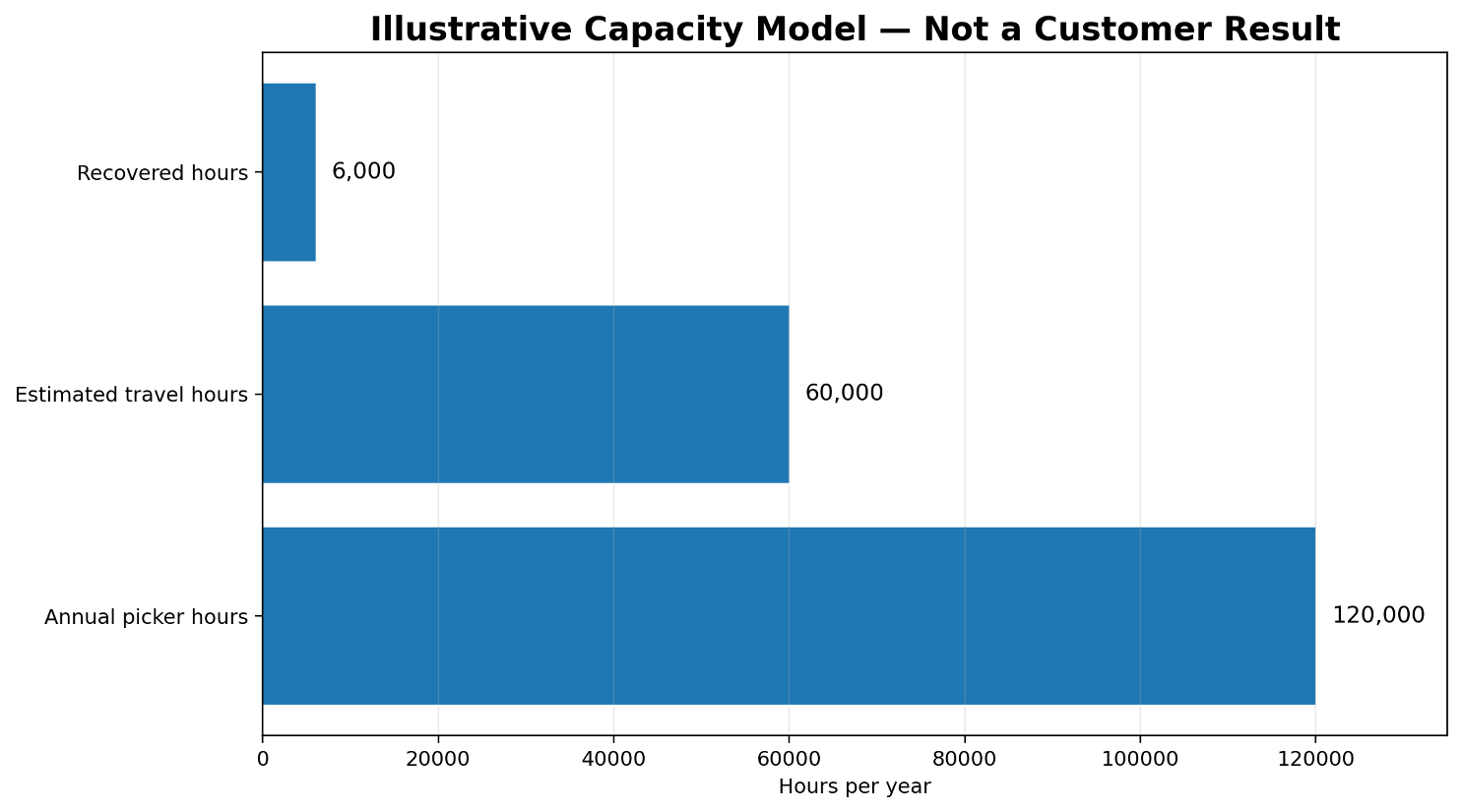
Consider an illustrative operation with 60 full-time-equivalent pickers and approximately 120,000 labor hours per year. If half of that effort is associated with travel and better placement plus routing reduces travel by a conservative 10%, the operation recovers roughly 6,000 hours. At a hypothetical fully loaded rate of $35 per hour, that represents $210,000 of annual productive capacity.
That is not a customer result and it does not automatically mean headcount reduction. Recovered capacity might absorb growth, reduce overtime, protect carrier cutoffs, or improve service without proportional labor growth. The point is to convert movement into economics.
A useful warehouse scorecard should include:
- Travel distance per pick line
- Picks per labor hour
- Replenishment moves per day
- Pick-face stockouts
- Order cycle time
- Congestion by zone
- Location utilization
- Re-slotting labor and equipment cost
- Mis-picks and traceability exceptions
- Peak-period overtime
Reality check: Measure both the benefit and the movement required to create it. A slotting change that saves four hours of picking but consumes six hours of relocation work is not adaptive intelligence. It is warehouse cardio.
How to deploy it properly
1. Establish the baseline
Measure travel, replenishment, congestion, pick rates, stockouts, cycle time, mis-picks, and overtime before changing anything. Without a baseline, every improvement becomes a testimonial.
2. Clean the location structure
Review zones, aisles, bays, levels, location profiles, capacity, unit handling, and license-plate behavior. For spatial routing, use a consistent coordinate convention.
3. Segment the inventory
Separate items by velocity, cube, weight, handling restrictions, batch or serial control, replenishment frequency, product affinity, and seasonality.
4. Define target quantities
Balance pick-face consumption, replenishment lead time, handling units, and capacity. Too little creates constant replenishment; too much consumes prime space.
5. Pilot one bounded area
Choose a high-volume, data-reliable zone. Compare before and after while monitoring ergonomics, congestion, replenishment impact, and supervisor workload.
6. Govern change frequency
Define when policies are reviewed and when physical relocation is justified. A promotion or season may warrant change. A two-day spike probably does not.
7. Treat preview features like previews
Use sandbox testing, clear rollback criteria, and explicit support decisions. Do not let a roadmap date quietly turn into a production commitment.
Static slotting is not gone—but it has a smaller job
Some inventory should remain in permanent or constrained locations. Gravity, chemistry, temperature, security, and specialized equipment remain stubbornly resistant to software trends.
The change is that fixed placement should become an explicit exception rather than an inherited default.
The broader D365 direction is toward a warehouse that can coordinate where inventory should be placed, how much should be held there, how workers should travel, which work should be prioritized, how tracked items should be captured, and how inbound information should shape execution.
That is more consequential than a new slotting screen. It is the beginning of an adaptive warehouse control model.
Final thought
Static slotting is dead—not because fixed locations have disappeared, but because the annual slotting project is no longer enough.
Demand moves too quickly. Product portfolios change too often. Labor is too valuable. Customer expectations are too unforgiving for warehouses to preserve a placement strategy long after its assumptions have expired.
Microsoft’s 2026 warehouse direction connects storage policy, dynamic putaway, replenishment, spatial routing, Power Fx work classification, cluster-picking traceability, and ASN-based receiving. Each capability can help on its own. The real value appears when the operating model makes them reinforce one another.
The warehouse of the future will not necessarily have more robots, more screens, or more technology hanging from every available surface. It will simply waste less motion.
And in warehouse execution, less motion usually means more margin.


