











Reviews and corrects ledger-to-subledger alignment in D365 by fixing posting configurations, inventory profiles, reconciliation logic, GL mapping, and critical reporting procedures.
Linked-Site Costing in QAD: Simplifying Cost Management Across Sites
Posted on: May 13, 2026 | By: Blake Moore | QAD Financials, QAD Business Process, ERP Selection|QAD Business Process, QAD Financials|QAD Business Process
Linked-Site Costing Rules
For manufacturers and distributors operating across multiple sites, maintaining accurate and consistent item costs can quickly become complex. This is where Linked-Site Costing in QAD becomes a powerful tool.
At its core, Linked-Site costing allows you to share item cost data across multiple sites within the same domain. Instead of maintaining separate cost records for each site, you can designate one site as the GL Cost Source Site and link other sites to it. This ensures consistency, reduces maintenance effort, and minimizes the risk of discrepancies.
In a typical setup, costs for an item such as material, labor, and overhead are defined at a primary site. Other sites are then configured to reference that site’s cost set. When costs are updated at the master site, those changes automatically apply to all linked sites.
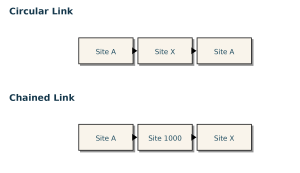
Item-Site costs cannot be linked across domains, maintained as circular links, or maintained as chained links.
Linking rules can be maintained in the Linked-Site Rules Maintenance screen. Linking rules can either be maintained for all items for a site, or the rules can be associated with a specific Product Line, Item Type, or Purchase/Manufacture Code. If an individual Item’s GL Source Cost site needs to be changed, it can be updated in Item-Site Cost Maintenance.
After your Linked-Site rules have been maintained, the Linked-Site Refresh Utility can be used to update the GL cost source site and GL cost set records. This utility should be run in simulation mode initially to review the results of the refresh. Once the results are reviewed, it can be re-run with the update check-box selected to perform the refresh.
QAD Linked-Site Costing feature streamlines cost management, improves data integrity, and supports operational efficiency. Like most ERP features, the key is aligning the setup with your business processes.
Next Steps
For more QAD implementation Tips and Tricks contact our experts here.


