








Reviews and corrects ledger-to-subledger alignment in D365 by fixing posting configurations, inventory profiles, reconciliation logic, GL mapping, and critical reporting procedures.
Derived Dimensions in Dynamics 365 for Finance and Operations
Posted on: March 29, 2019 | By: Jarrod Kraemer | Microsoft Dynamics AX/365
Authored by: Chris Rusing
Financial dimensions have always been a staple of the Microsoft Dynamics 365 for Finance and Operations for many years and in prior versions of what was formerly simply known as AX. The ability to add as many dimensions as you want, use dimension values from records created in the system, and build powerful account structures are a few of the reasons why the functionality is so well liked among the user base. So why fix something that isn’t broke?
Financial dimensions are certainly not something that needs to be fixed in D365FO, but there is always room for improvement. I’ve highlighted other improvements in previous blogs, but I wanted to discuss the concept of derived dimensions too. This new feature allows users to derive certain dimensions based on the previous dimension in the account string. This is different than account structure configuration because the derived the dimension is a suggestion as opposed to something mandatory. Let’s look at how this is setup and how this works in the system.
The first thing you want to do is go to General ledger> Chart of accounts> Dimensions> Financial dimensions and select a financial dimension. From there you will select the Derived dimensions button at the top of the form.

First, I’m going to add my business unit dimension 001.

Next, I’m going to click Add segment and add the Department financial dimension. I’m adding this dimension because this is the next financial dimension in my string for my Manufacturing B/S account structure.

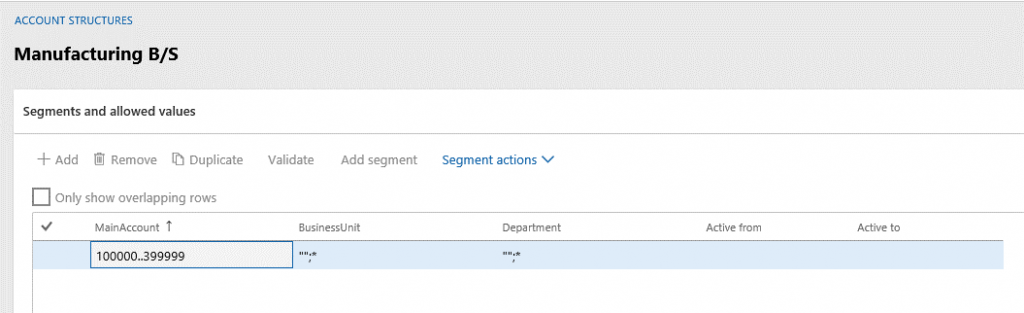
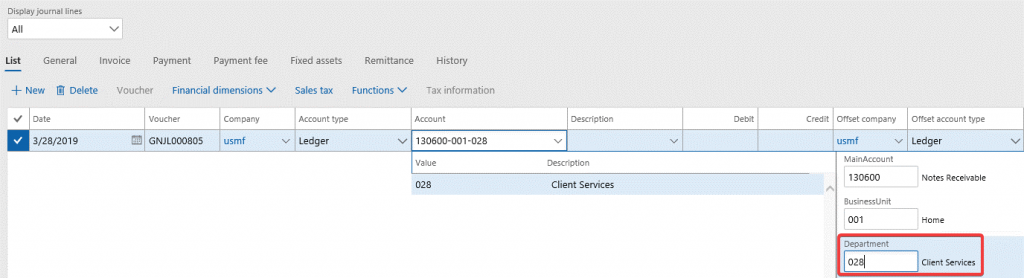
Next, I’m going to create a general journal batch to test this out. I selected a main account and then my business unit 001. Once that business unit is selected, the department 024 is automatically populated.

However, if I want to change this, I can simply delete that dimension value and choose a different one that is allowed in the account structure.
This feature is especially helpful in directing users towards the dimensions you want them to code to. Whether it’s general journal entries or manual AP invoices, this suggestion mechanism could greatly improve your company’s ability to hit the correct financial dimensions. Thus, providing more accurate and intelligent reporting. For additional information please feel free to reach out to us at info@loganconsulting.com or (312) 345-8817.
All the best!
Logan Consulting
www.loganconsulting.com


