








Reviews and corrects ledger-to-subledger alignment in D365 by fixing posting configurations, inventory profiles, reconciliation logic, GL mapping, and critical reporting procedures.
Is Your Month-End Close Still Taking Too Long? Five Ways Dynamics 365 Finance Can Help
Posted on: July 29, 2026 | By: Heather Zhu | Microsoft Dynamics AX/365, Microsoft Dynamics AX/365|Microsoft Dynamics Manufacturing

Executive takeaway
The position: Most organizations do not have a month-end close problem. They have a monthlong process problem that becomes visible at month-end.
Late vendor invoices arrive. Inventory transactions are still posting. Bank lines remain unmatched. Someone remembers an accrual after preliminary statements are distributed. Finance discovers that one legal entity interpreted “close by Friday” as more of a creative suggestion.
Dynamics 365 Finance cannot turn a disorderly close into a two-day close simply because someone enabled a workspace. What it can do is replace scattered checklists, repetitive journals, manual reconciliations, and mystery transactions with a more controlled operating model.
Microsoft’s period-end guidance is explicit that General ledger close depends on work across Accounts payable, Accounts receivable, Inventory, journals, foreign-currency revaluation, settlements, allocations, adjustments, consolidation, and financial reporting. Month-end is not just a Finance event. It is where the financial consequences of the entire business finally meet. [6]
Logan POV: A faster close is rarely created by asking accountants to work faster. It is created by giving them fewer surprises to investigate.
Five ways D365 Finance can help
1. Turn the close checklist into a controlled process
A surprising number of sophisticated organizations still manage close with a spreadsheet, recurring calendar invitations, and one heroic controller who knows which tasks are “actually done.” That works – until the controller takes vacation.
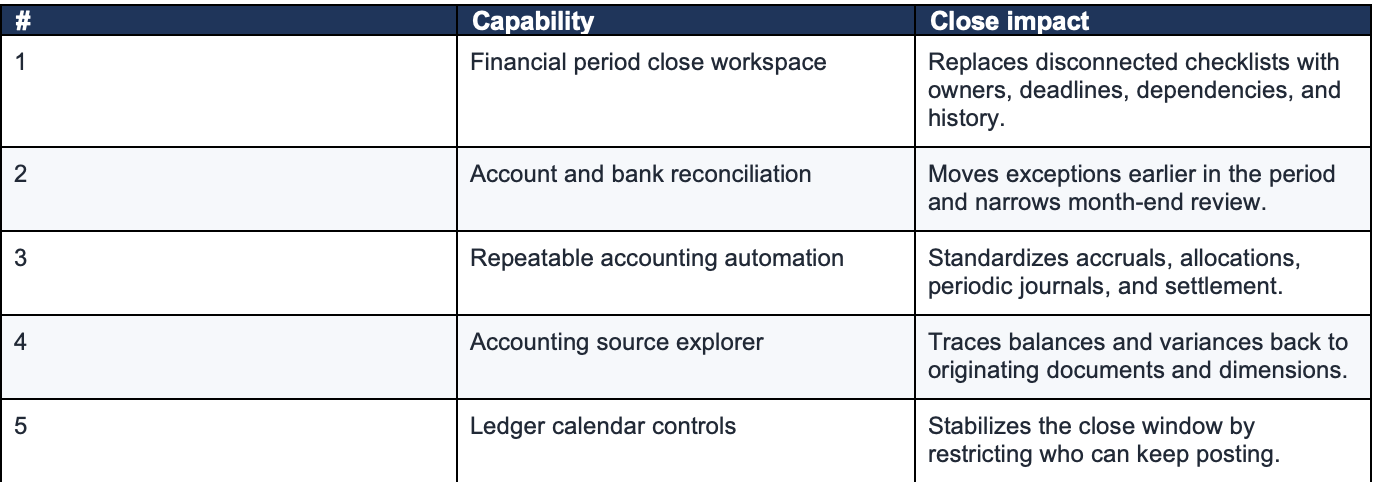
The Financial period close workspace lets organizations manage closing schedules across legal entities, functional areas, and responsible employees. Templates can define recurring tasks, relative deadlines, calendars, dependencies, owners, and direct links to the D365 pages where the work is completed. Summary tiles identify overdue tasks, work due today, blocked dependencies, and remaining activities. Files, notes, images, URLs, journal references, and reports can be attached to tasks.
The benefit is not merely a nicer checklist. It is operational accountability. Finance can see which entity is behind, which process area is blocking progress, who owns the task, and whether an upstream dependency is incomplete. Historical completion data also creates a basis for improving the close instead of reliving it.
Logan reality check: If the close depends on a spreadsheet named Close_Checklist_FINAL_v14_USE_THIS_ONE.xlsx, you do not have orchestration. You have folklore with conditional formatting.

2. Reconcile throughout the period – not after it
Traditional reconciliation is reactive. Finance waits until month-end, runs reports, identifies differences, and then begins the search for what went wrong.
The Account reconciliation workspace is designed to reconcile the general ledger against Accounts payable, Accounts receivable, tax, and bank subledgers on a defined schedule. It shows open exceptions and provides direct actions to match transactions, reverse entries, accept small differences, or create adjusting journals. If the Copilot-powered Account Reconciliation Agent is enabled, it can suggest an action and provide analysis and justification.
Bank reconciliation can follow the same philosophy. Advanced bank reconciliation uses configurable matching rules and rule sets to compare imported bank-statement lines with Finance bank transactions. A rule set can run automatically when a statement is imported or on demand from the reconciliation worksheet.
The practical goal is not the conference-friendly phrase “real-time close.” The goal is more useful: arrive at month-end with fewer unresolved differences.

3. Standardize the accounting work that repeats every month
Every close includes judgment. It should not include reinventing the same journal entries twelve times a year.
D365 Finance includes accrual schemes that spread revenue or expense recognition across defined periods. Finance teams can also use allocation rules, periodic journals, and ledger settlement to standardize recurring accounting patterns. These tools are useful for prepaids, insurance, shared services, corporate overhead, clearing accounts, and other stable close activities.
There are limits, and that is healthy. Automation should remove predictable work, not conceal accounting judgment. Material entries, allocation bases, and exceptions still need review. The system’s job is to stop highly qualified people from rebuilding the same calculation every month because “that is how the template works.”
4. Trace variances to the source without financial archaeology
One of the most expensive parts of close is not finding the variance. It is explaining it.
The Accounting source explorer shows detailed transactional postings behind General ledger balances. Users can trace balances to originating documents, review accounting distributions, analyze activity by financial dimension, and investigate items such as purchase-order and vendor-invoice variances. Starting in Finance 10.0.46, a background preprocessor can generate data through Process automations to improve load performance; version 10.0.45 added multiledger export for selected companies and periods.
A strong close process should let Finance move quickly from “the balance is wrong” to “here is the originating transaction, the posting logic, the responsible process, and the adjustment required.” That is a much better conversation than emailing six people with a screenshot and the subject line “Does anyone know what this is?”
Practical design point: Use appropriate date ranges and dimensions in Accounting source explorer. Microsoft recommends limiting retrieved transaction volume for performance and accuracy.
5. Control when – and who – can continue posting
A period is difficult to close when the underlying data keeps changing.
D365 Finance supports period controls through the ledger calendar. Organizations can put periods On hold, restrict posting by application module, or grant posting access only to a defined user group while close adjustments are completed. Microsoft cautions against setting periods to Permanently closed until adjustments and audit work are complete, because a permanently closed period cannot be reopened.
This creates a practical middle ground. Operational users can be prevented from introducing new transactions while a designated close team retains the ability to post approved adjustments. Once the close is complete, the period can remain controlled rather than being casually reopened every time someone finds an invoice in an inbox.
Logan POV: The close should end when the controlled process says it ends – not when receiving finally discovers a packing slip under someone’s keyboard.
What D365 cannot fix for you
D365 Finance can organize, automate, reconcile, trace, and control. It cannot compensate indefinitely for:
- Late operational posting
- Poor inventory discipline
- Unclear ownership
- Inconsistent master data
- Unapproved journal workarounds
- A culture where every deadline is negotiable
The system will make these problems visible. That is valuable – and occasionally uncomfortable. A shorter close usually requires Finance and operations to agree on cutoff rules, posting expectations, materiality thresholds, ownership, and escalation paths. The technology supports the process. It does not attend the difficult governance meeting on your behalf.
A practical Logan starting point
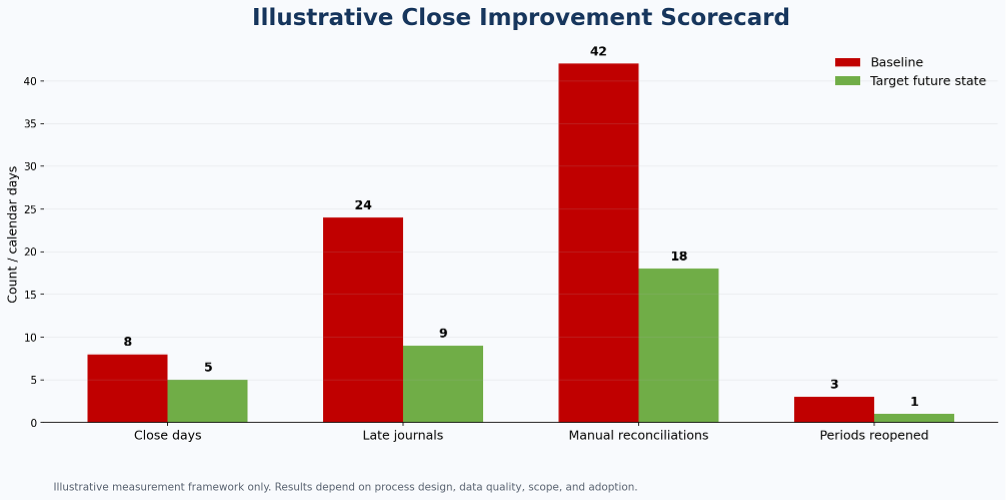
Before launching a broad finance-transformation program, baseline five measures:
- Calendar days required to close
- Number and value of late journal entries
- Reconciliation exceptions identified after period end
- Manual recurring journals and allocations
- Number of times closed periods are reopened
Then build one controlled close schedule for one representative legal entity. Configure task dependencies. Schedule account and bank reconciliation earlier in the period. Standardize recurring entries. Restrict period access during the final close window.
The objective is not to pursue an impressive-sounding “continuous close” on day one. It is to remove the avoidable work that makes the current close unpredictable.
Final thought
The fastest close is not necessarily the best close. A two-day close that leadership does not trust is merely an accelerated argument.
The better goal is a close that is faster, explainable, repeatable, and controlled. Dynamics 365 Finance provides the mechanics: close templates, scheduled reconciliation, bank matching, accrual schemes, allocation rules, settlement, source-level traceability, and period-access controls. The value comes from connecting those mechanics into one operating discipline.
Month-end should be a confirmation that the business operated correctly throughout the month. It should not be the first time anyone checks.


