










Reviews and corrects ledger-to-subledger alignment in D365 by fixing posting configurations, inventory profiles, reconciliation logic, GL mapping, and critical reporting procedures.
Future of Acumatica: 2024 Summit Recap
Posted on: February 20, 2024 | By: Page Wildridge | Acumatica
Acumatica hosted their annual summit last week in Las Vegas. While the three day summit was jam-packed with networking events and keynote speakers, the most exciting part was the announcement of what’s coming to Acumatica! Acumatica unveiled a variety of new features that will improve their already excellent usability and boost your experience of the ERP. In this blog, we will discuss what is to come, from the new user interface and a more personalizable experience.
New User Interface
At the summit, Acumatica rolled out and demoed their exciting new user interface. The new UI comes with a new design to improve readability of all screens across different devices. Below you can see an example of the new, cleaner display from the conference.
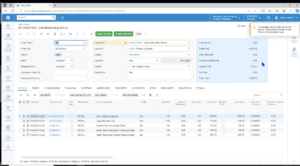
Everything within the ERP display is now customizable. To start, each section on the display now has collapsible drop-down menus to make the interface easier to read. Additionally, you can rearrange all the sections to make your ERP your own. You can utilize the “section configuration” menu to choose which elements are displayed on your homescreen. This includes displaying different broader “tabs” of information, like “Taxes” and “Shipping.” Additionally, you can specialize the fields displayed within each greater tab. Above all, the new UI allows for a high-level of personalization within your ERP. This allows you to view the information most important to you and your business.
Smoother Display Views
The new user display is highly adaptive to different resolution displays. There is now a smoother transition between users switching to different resolutions by reducing fonts and the density of the screen. This lets you shrink your screen to use your ERP split screen with another website, or to minimize the browser tab for a smaller view. Since the ERP can be used on any browser, this improved technology will improve the overall user experience. In the photos below, you can see Acumatica in different display sizes.
Calendar Board Changes
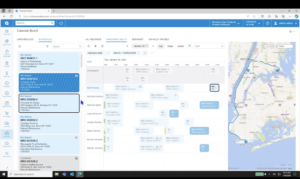
With Acumatica’s new calendar board display, managing the schedule of your team has never been easier. Within one simple screen, you can see all of your scheduled and unscheduled appointments while viewing a complete schedule of your team. From there, you can easily drag and drop appointments into the schedule. Also, you can even double click within the calendar to create a new appointment.
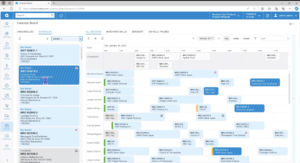
Now, you can configure your filters to see which specialist is available at certain times. Alternatively, you can flip to specialized tabs that display the schedules of specific team members. For example, you can view at once the complete schedule of all team members with hardware skills.
Additionally, you can ensure your team members are able to complete their tasks to optimize your resources. While remaining on the same scheduling team, you can double click an appointment to view all of its information, including the route on the GPS that the team member will take to complete the job. The new calendar features will help you optimize your team’s time by ensuring they are equipped with the right resources, have enough time, and in the right location.
Next Steps
While these new features are set to be part of the 2025 Release One to the public, Acumatica is doing controlled releases in their R2 of this year. This means that limited use of the features are coming soon, with full functionality following close behind. Above all, this exciting new technology is a sign of Acumatica’s continued improvement and emphasis on the user experience. Click here for Acumatica’s website to learn more about what you might have missed at the 2024 Summit.
As a proud partner of Acumatica, Logan Consulting is highly passionate about the ERP’s excellent usability and technology. Click here to contact an expert to find out what Acumatica can do for your business.


