








Reviews and corrects ledger-to-subledger alignment in D365 by fixing posting configurations, inventory profiles, reconciliation logic, GL mapping, and critical reporting procedures.
Collection Letter Automation in D365 Finance
Posted on: July 7, 2026 | By: Heather Zhu | Microsoft Dynamics AX/365
Executive Takeaway
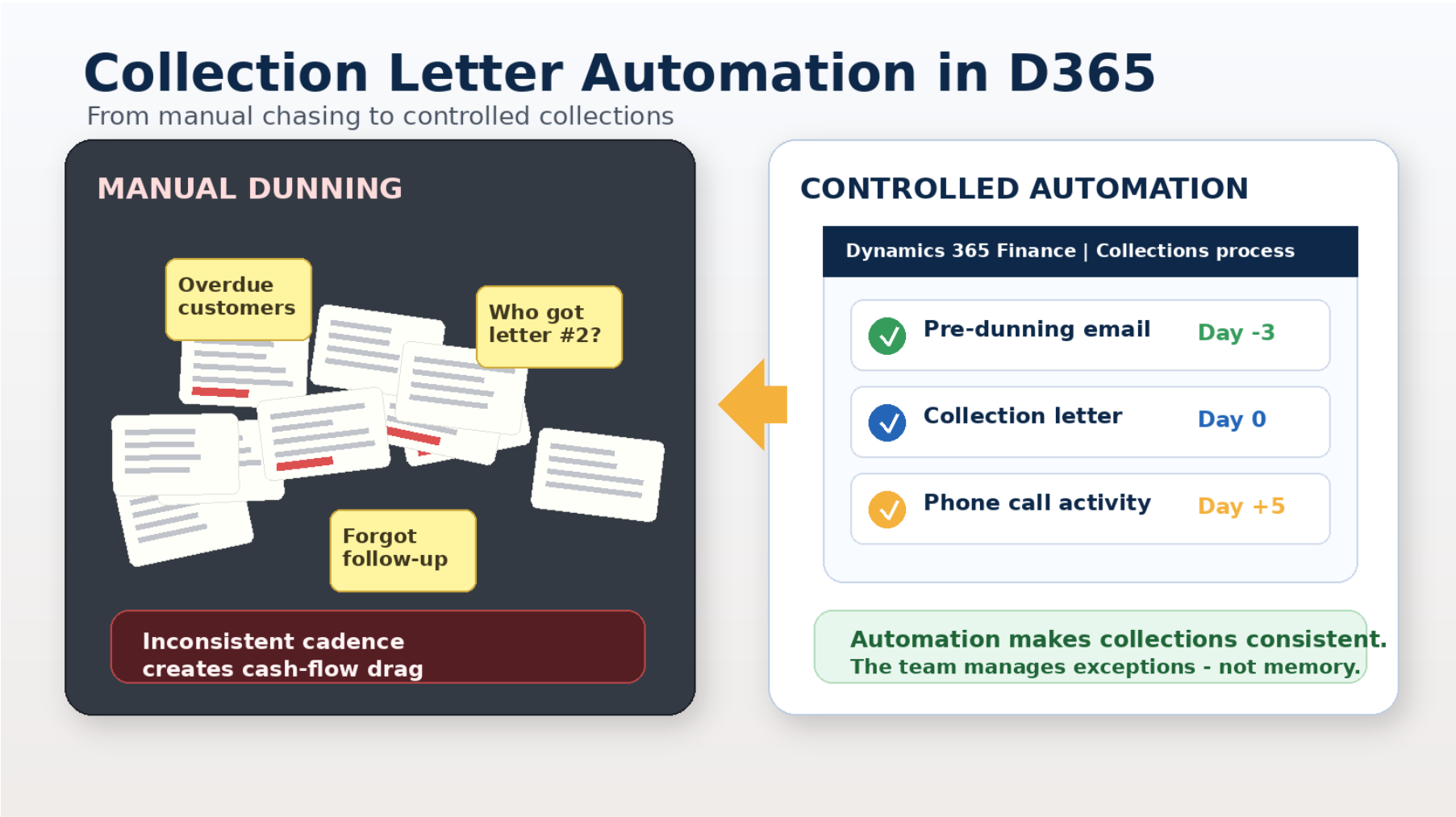
Late payments are normal. A collections process that depends on memory, spreadsheets, or inbox archaeology is optional. Dynamics 365 Finance can automate collection letters, reminder emails, and activities based on rules you define, but only if the setup reflects a disciplined collections strategy.
Late Payments Are Inevitable. Manual Chasing Is Not.
Every finance team knows the routine. An invoice goes past due. Someone checks aging. Someone sends an email. Someone else wonders whether the customer already received a reminder. A phone call is made, maybe. A note is entered, maybe. Then the same discussion happens again next week, now with more urgency and less joy.
Collections is one of those areas where small inconsistencies quietly turn into cash-flow drag. The problem is rarely that accounts receivable teams do not care. They care a lot. The problem is that manual dunning asks busy people to remember every overdue account, every prior communication, every grace period, every fee rule, and every promised follow-up. That is not a process. That is a memory test with revenue implications.
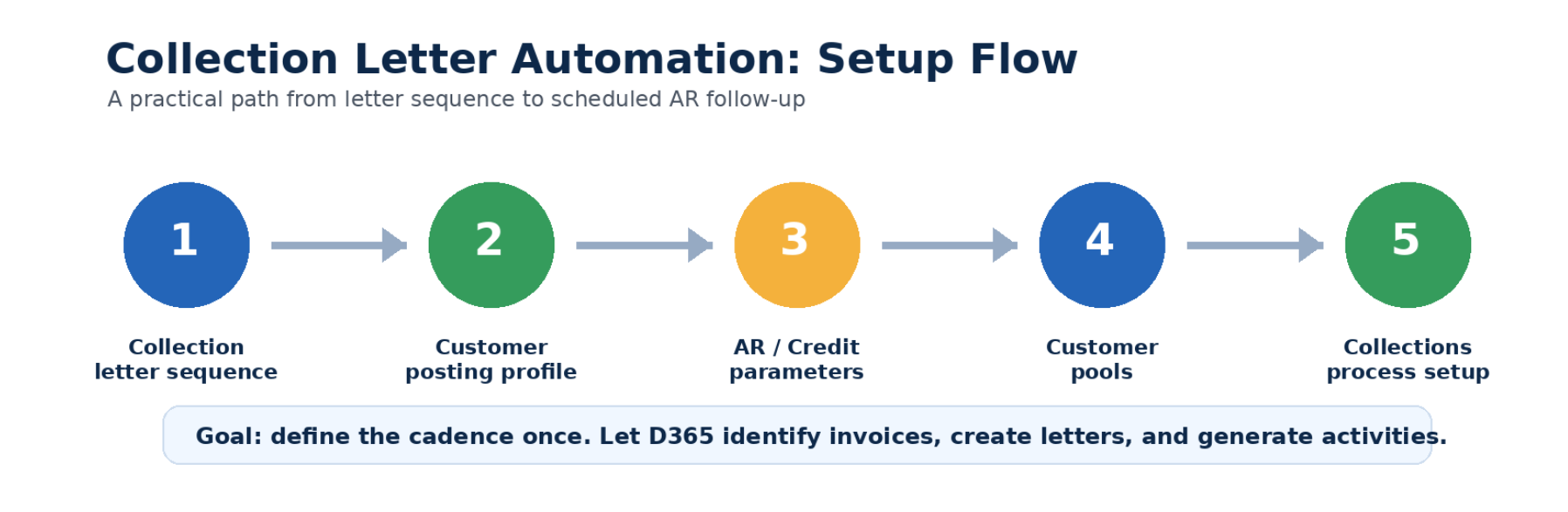
Microsoft Dynamics 365 Finance includes collection letter and collections process automation capabilities that help move collections from reactive follow-up to a controlled cadence. Microsoft describes collections process automation as a way to automatically identify customer invoices that require an email reminder, collection activity such as a phone call, or a collection letter. The consultant-provided setup guide this article is based on walks through the foundation: collection letter sequences, customer posting profiles, accounts receivable parameters, customer pools and collections process automation
Logan Reality Check
If your collections process depends on someone remembering who got which letter and when, your real control is not D365. It is Sheila in Accounts Receivable. Sheila is excellent. Sheila also deserves a vacation.
What D365 Collection Automation Actually Does
At a practical level, Dynamics 365 Finance helps define the rules of engagement. Which customers are included? How many days past due should trigger the first reminder? Should disputed invoices be excluded from fee calculations? Should letters be created per customer balance or per transaction? Should the system automatically create phone call activities? Should a pre-dunning email be sent before an invoice is technically overdue?
Those decisions matter because collections is not simply about escalation. It is about consistency. The tone, timing, and sequence of communication should not depend on who happened to run the aging report that morning.
Microsoft documentation also makes an important distinction: collections process automation determines when the system should act, while the collection letter sequence determines which collection letter is generated. The automation framework and the letter sequence must therefore be designed together. One tells the system when to act; the other controls how the staged collection process unfolds.
Step 1: Define the Collection Letter Sequence
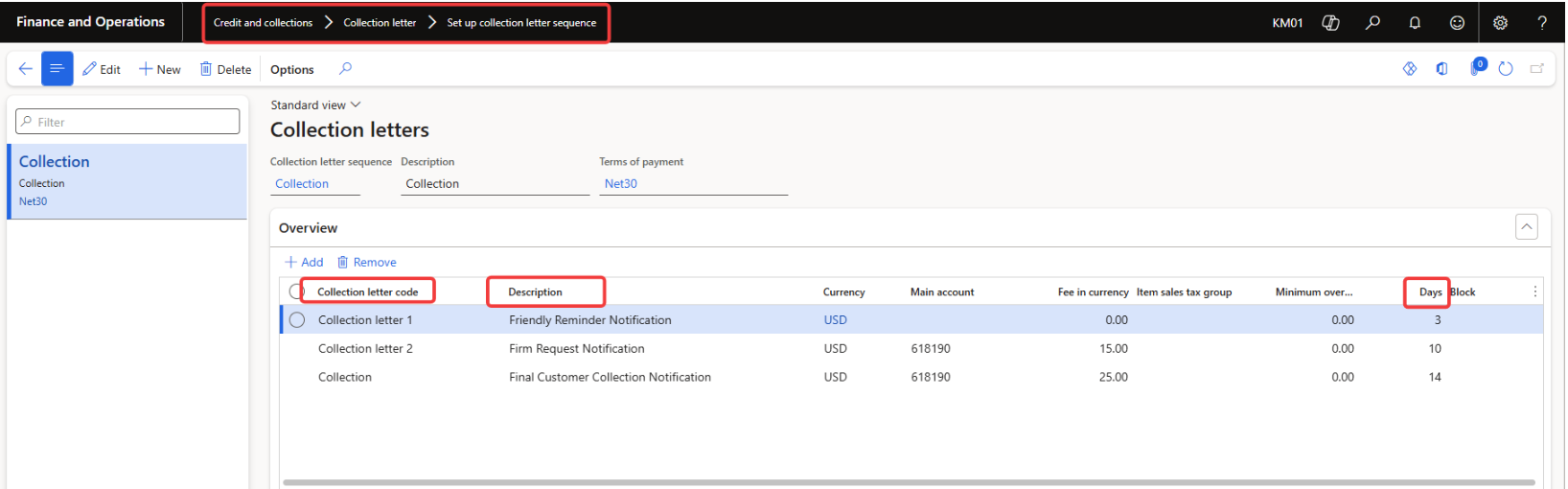
The first configuration begins with the collection letter sequence. Navigate to:
Credit and Collections → Collection Letter → Set Up Collection Letter Sequence
Microsoft notes that the sequence ID created here is later referenced within customer posting profiles. The sequence can also include payment terms and collection letter fees. This is where organizations establish their staged dunning approach: first reminder, second notice, final notice and applicable fee logic
The consultant guide also notes that collection letter text is maintained on the Notes FastTab, where it can be translated into multiple languages. This is especially valuable for organizations serving global customers or operating across multiple regions.
This is also where finance should slow down and think. The sequence should reflect your customer policy, legal guidance, customer experience expectations, and industry norms. A collections letter should feel professional, not like it was written by a printer with unresolved resentment.
Step 2: Tie the Sequence to Customer Posting Profiles
Next, the sequence must be linked to the customer posting profile. Microsoft documentation for processing collection letters notes that if you do not want to generate collection letters for transactions using a posting profile, the collection letter sequence field can be left blank; if processing is enabled, collection letters can be generated for that posting profile.
This is a quiet but important control point. Posting profiles determine which transactions participate in the dunning process. If this is configured inconsistently, some invoices may be included while others quietly sit outside the process. In collections, silence is rarely a feature.

Step 3: Configure Credit and Collections Parameters
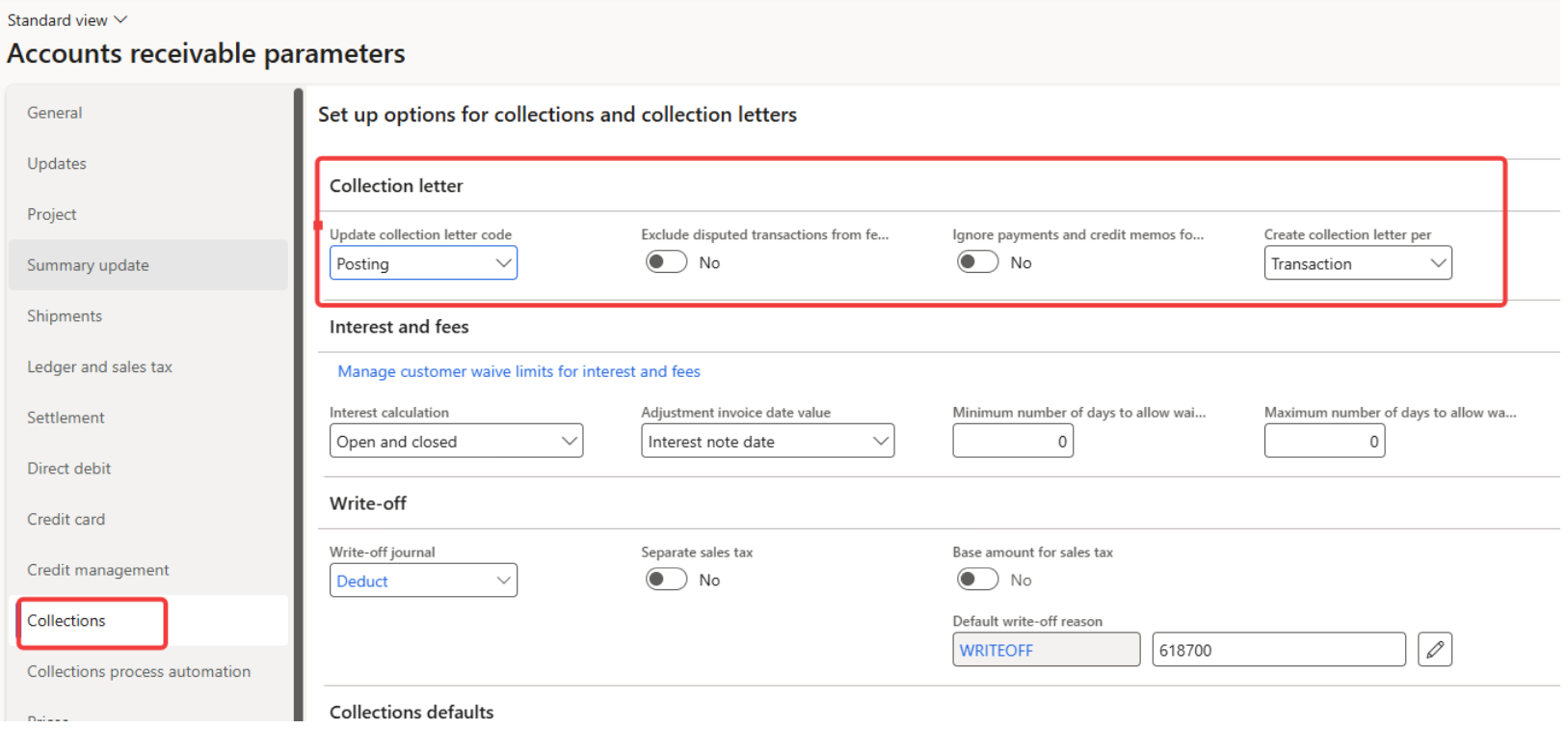
The Accounts receivable parameters page controls important collection-letter behavior. The consultant guide calls out settings such as whether disputed transactions should be excluded from fee calculations and whether collection letters should be created per transaction or per customer balance.
This configuration is not cosmetic. Microsoft notes that if collection letters are processed at the transaction level, multiple letters might be generated for the same customer when transactions fall into different overdue sequences. That may be correct for some businesses, but it should be an intentional policy decision, not an accidental customer communication strategy.
The collections process automation parameters also allow organizations to specify whether collection letters are automatically posted and whether activities are created automatically. In the consultant example, phone call activities are created for customers as part of the automated process.

Step 4: Segment Customers with Customer Pools
Customer pools allow organizations to group customers using query criteria. The consultant guide uses this step to define targeted groups for automation. This becomes more valuable as collections mature because not every customer should be handled the same way.
Strategic accounts, high-risk accounts, government customers, intercompany customers, disputed accounts, and low-dollar balances may need different handling. D365 gives you the structure to segment; finance still needs to define the business rules.

Step 5: Build the Process Cadence
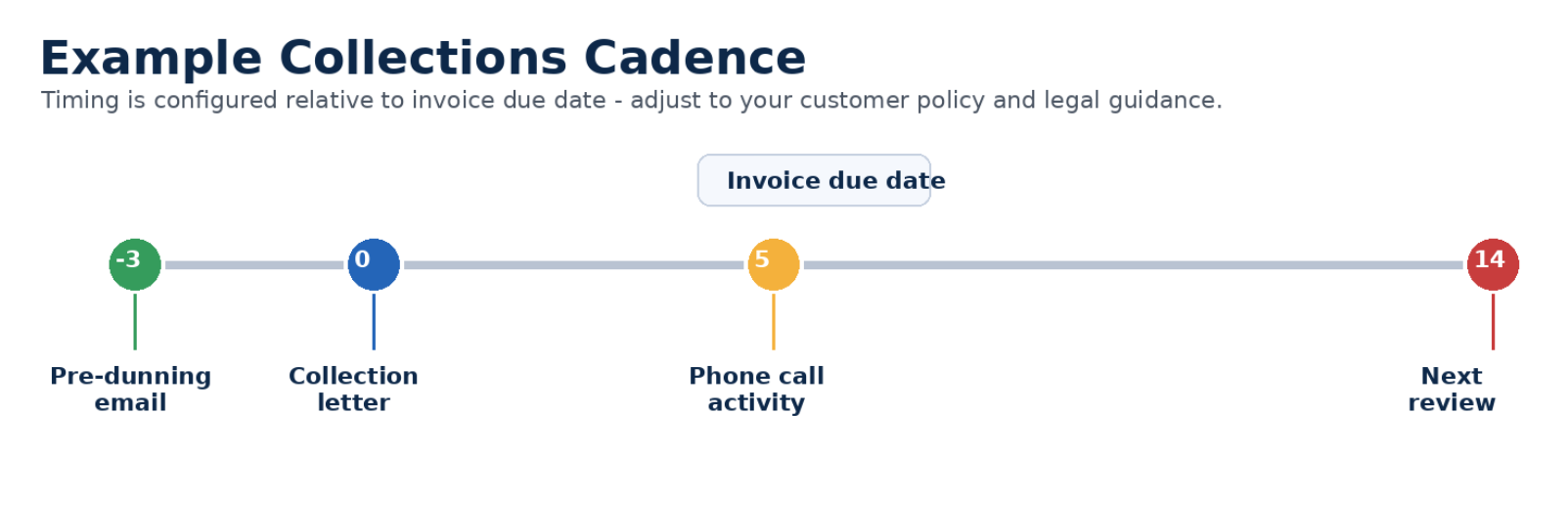
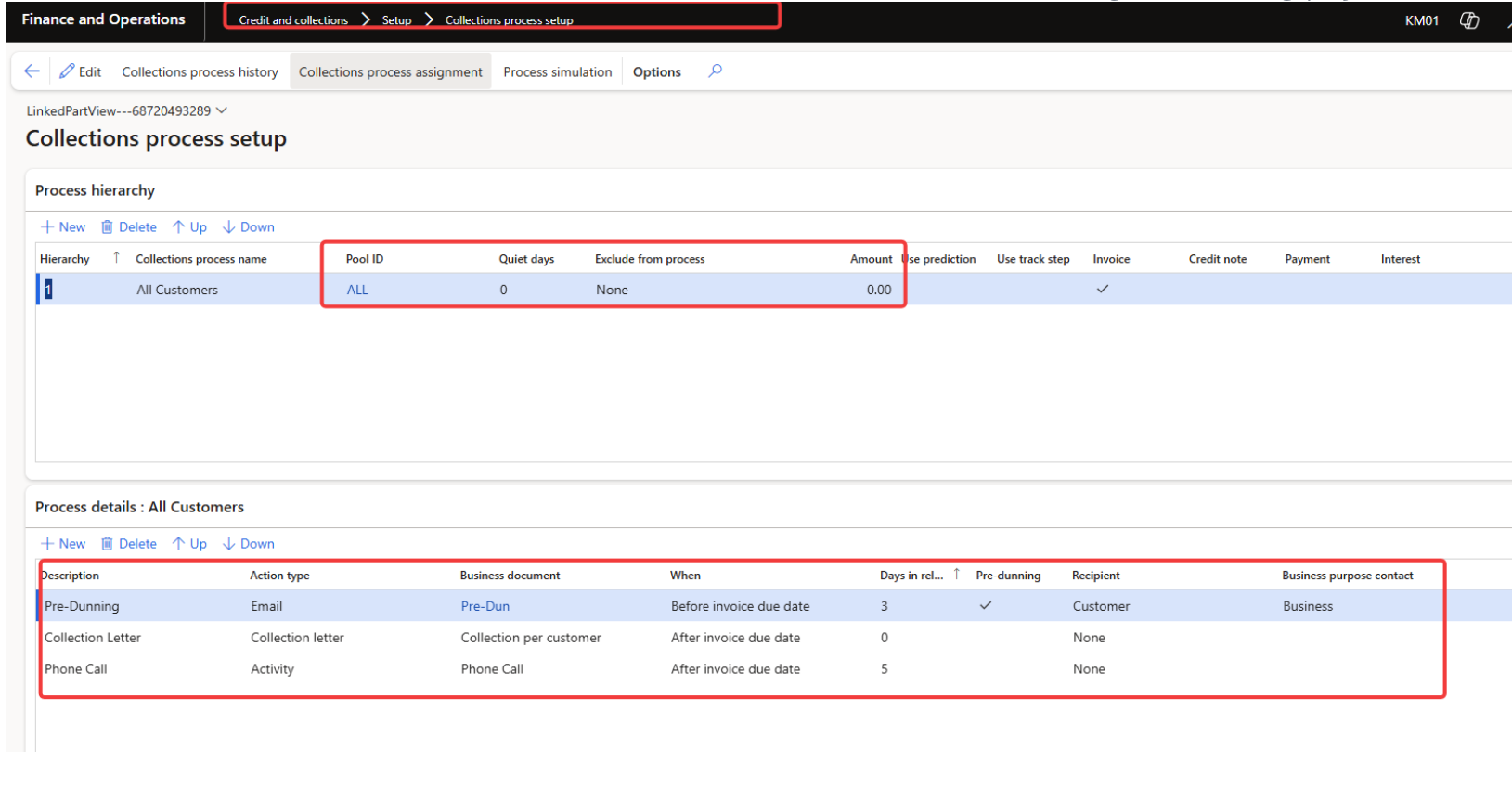
Collections process setup is where the automation becomes an operating cadence. The consultant guide creates a process hierarchy, assigns customer pools, sets quiet days, and defines the activity types: pre-dunning email, collection letter, and phone call activity. The days are configured relative to the invoice due date.
Quiet days are especially useful. They prevent customers from being contacted too frequently by the automated process. That matters because collections should be firm and consistent, not accidentally aggressive because three different rules fired in the same week.
For email actions like pre-dunning, the consultant guide notes that a business document email template is required. That template should be reviewed like any other customer-facing communication: clear, professional, legally appropriate, and aligned with your brand voice.
Where Payment Predictions Can Strengthen the Process
The setup above focuses on rules tied to invoice due dates. D365 can also support more proactive collections through customer payment predictions. Microsoft describes customer payment predictions as a machine learning feature that uses historical invoices, payments, and customer data to predict when outstanding invoices are likely to be paid.
Microsoft also documents that these predictions can be used with collections process automation to create collections activities when late payment is expected. That is an important shift. Instead of waiting for an invoice to become overdue, finance can start managing risk earlier when the data suggests trouble ahead.
This should be governed carefully. Predictive collections should not become automated customer annoyance. The best use case is prioritization: which accounts deserve earlier attention, which invoices are likely to need follow-up, and where AR time will have the highest impact.
The Operational Payoff: Less Chasing, Better Control
Collection letter automation does not eliminate the need for judgment. It eliminates avoidable inconsistency. AR staff still manage exceptions, customer relationships, disputes, and escalations. But the system can handle the repetitive cadence: identify the right invoices, create the right letter or activity, and keep the process moving.
That shift matters because collections work often gets trapped between urgency and ambiguity. Automation gives the team a rhythm. It also creates better evidence: who was contacted, when, through which step, and what remains open.

Best Practices Before Turning Automation Loose
A few practical Logan-style recommendations before enabling broad automation:
Start simple. Build one clean sequence before designing a dunning symphony with nine branches and a piccolo solo.
Review customer-facing language. Collection letters and emails should be clear, professional, and approved by finance/legal where needed.
Use customer pools intentionally. Segment customers by risk, geography, business unit, relationship type, or policy requirements.
Treat disputed invoices carefully. Exclude or handle disputes according to your policy so the system does not chase invoices that are genuinely under review.
Test with process simulation. Validate who receives what, when, before anything goes live.
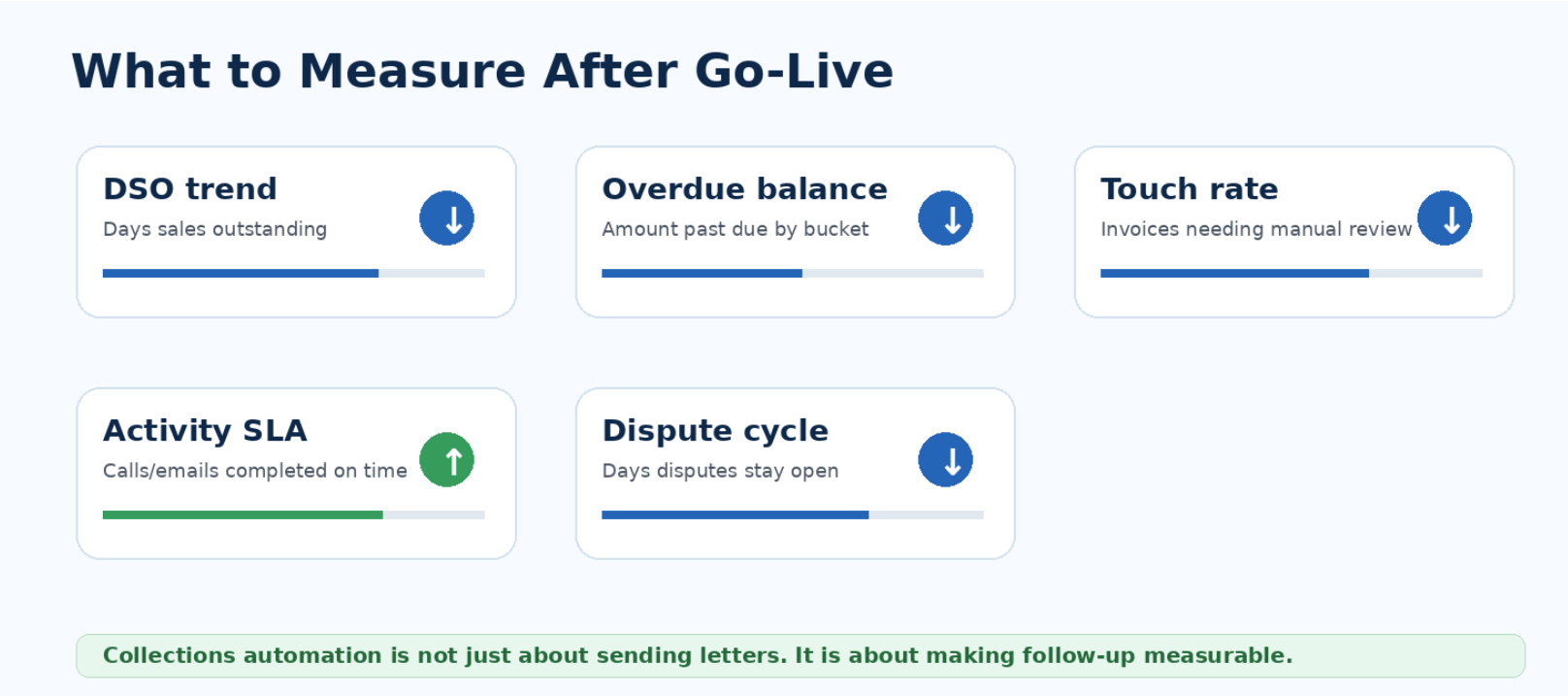
Measure outcomes. Track overdue balance, DSO trend, touch rate, activity SLA, and manual intervention volume.
Document ownership. Someone should own the cadence, templates, customer pools, and periodic review process.
Final Thought
Collection letter automation in Dynamics 365 Finance is not about making collections colder. It is about making collections more controlled.
Late payments are a fact of business life. Missed follow-ups, inconsistent messaging, manual tracking, and unclear escalation do not have to be. With the right setup, D365 can turn collections into a scheduled, repeatable, measurable process that supports cash flow and reduces administrative drag.
The key is to treat automation as a policy engine, not a button. Define the cadence. Segment customers. Govern the language. Test the process. Measure the outcomes.
Because the goal is not to send more letters. The goal is to collect more predictably, with fewer surprises and a lot less spreadsheet detective work.


