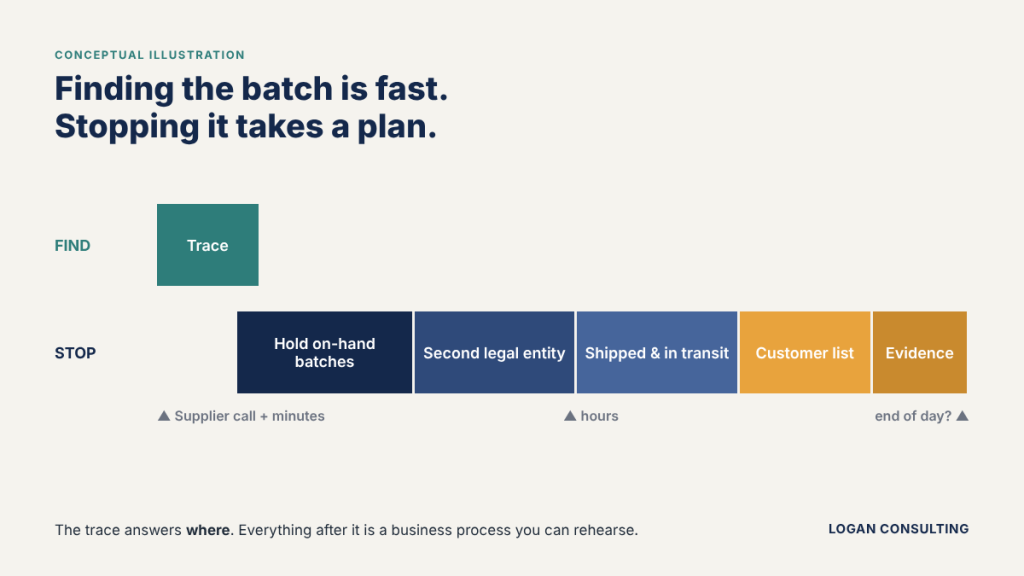
At 7:40 on a Tuesday, a spice supplier calls Dana, the quality manager at a mid-sized sauce maker. Lot SB-2291 of a seasoning blend may contain an undeclared allergen. Dana runs an item trace before her coffee cools. The lot went into six production batches of two finished sauces. Three batches have shipped to four customers. Two are in the warehouse. One is on a trailer at dock 3.
By 9:00 she has the list. By noon, the trailer has left, a second plant that runs as a separate company has used 40 kilograms of the same lot, and sales is still rebuilding customer contacts from email. The trace took fifteen minutes. The response took the rest of the day.
This is an illustrative scene with made-up names and figures, not a Logan client case.
What D365 does well: the trace
Item tracing follows historical inventory transactions for an item and a tracking dimension: a batch number, vendor batch number or serial number. You pick a direction. A backward trace looks for the source and what remains on hand. A forward trace finds the sales orders and customers the item was at least partially shipped to. Results appear in chronological order and include interim products.
If operators register component batches against finished goods on the floor, Tracked components links the two (version 10.0.40 or later, on by default from 10.0.45), and the item tracing report can use those registrations. Microsoft also offers a Traceability add-in with genealogy and where-used search. It is still labeled preview, so treat it as something to evaluate, not something to run a recall on.
Where the trace stops
Microsoft’s item tracing documentation lists limits worth knowing before you need them:
- Only tracked items trace. No batch or serial dimension, no trace.
- One legal entity at a time. There is no cross-company trace. If a second plant or a distribution company is its own entity, you start again there.
- By-products are not included. Co-products appear in the results; by-products do not.
- It is a snapshot. Results don’t update if transactions change after you run the trace.
- It can be noisy. Location-to-location warehouse moves are included, which is a lot to read under pressure.
None of these are defects. They are reasons the trace is the start of a recall, not the whole of it.
Finding is not stopping
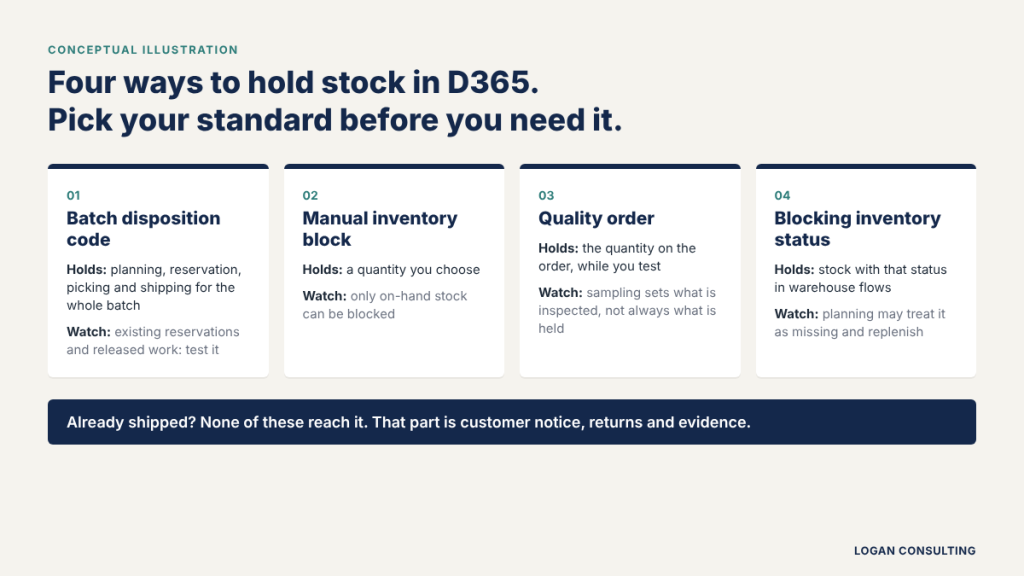
Once you know which batches are affected, the job is to make sure nobody plans, reserves, picks, ships or consumes them. D365 gives you several ways to hold stock, and they don’t behave the same way.
- Batch disposition codes. A code with an Unavailable status blocks the batch for master planning, reservation, picking and shipping, with exceptions you can configure by order type. For expired batches, Microsoft recommends disposition codes over inventory status.
- Manual inventory blocking. Holds a quantity you choose, but only stock that is available on hand.
- Quality orders. Creating one blocks the quantity on the order and gives you a place to record tests and results.
- Blocking inventory statuses. Useful in warehouse flows, with documented restrictions, including that master planning treats blocked-status stock as missing and may replenish it.
What the documentation does not spell out is what happens to reservations and released warehouse work that already exist when you reset a batch’s disposition code. That is exactly the moment that matters in a recall, so test it rather than assume it (test 1 below). And stock already on a truck is outside all four.
What the business has to supply
D365 can tell you which customers received a batch. It does not decide who declares a hold, call those customers or keep the evidence. Agree these before the phone rings:
- Who can declare a hold, and who can lift one. Two different people is better.
- Your standard hold mechanism, so nobody improvises at 8 a.m.
- How entities combine: who traces in each legal entity and who merges the lists.
- Where customer contacts live, current and reachable outside office hours.
- What evidence you keep: trace output, hold times, quantities, notices sent and final dispositions.
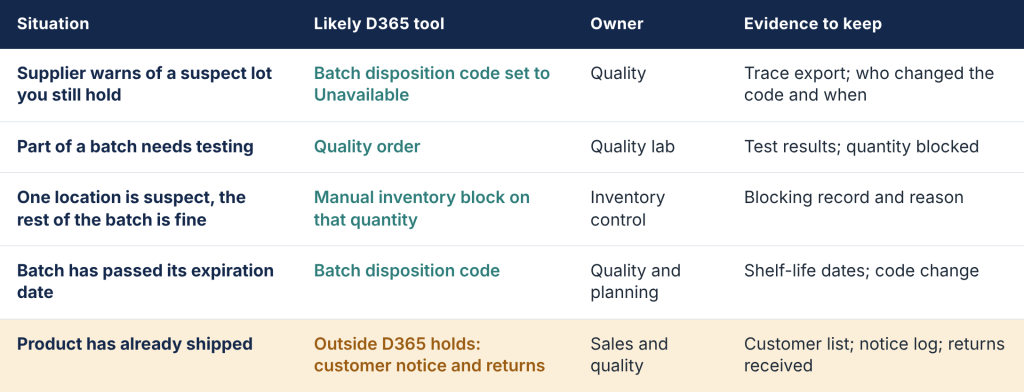
Decision table: which hold, when
Five tests to run in a sandbox
- Reset a reserved batch. Reserve a batch on a sales order and release picking work, then reset the batch to an Unavailable disposition code. Can the work still be picked and the order shipped?
- Trace a multi-level formula. Trace a raw lot that goes through an intermediate into two finished items, including a co-product and a by-product. Does every level you expect appear?
- Cross the entity line. Move the lot intercompany and trace in both companies. How long does it take to produce one merged customer list?
- Stack two holds. Create a quality order on a batch that already has an Unavailable code, then run master planning. Does planning exclude, double-count or replenish that stock?
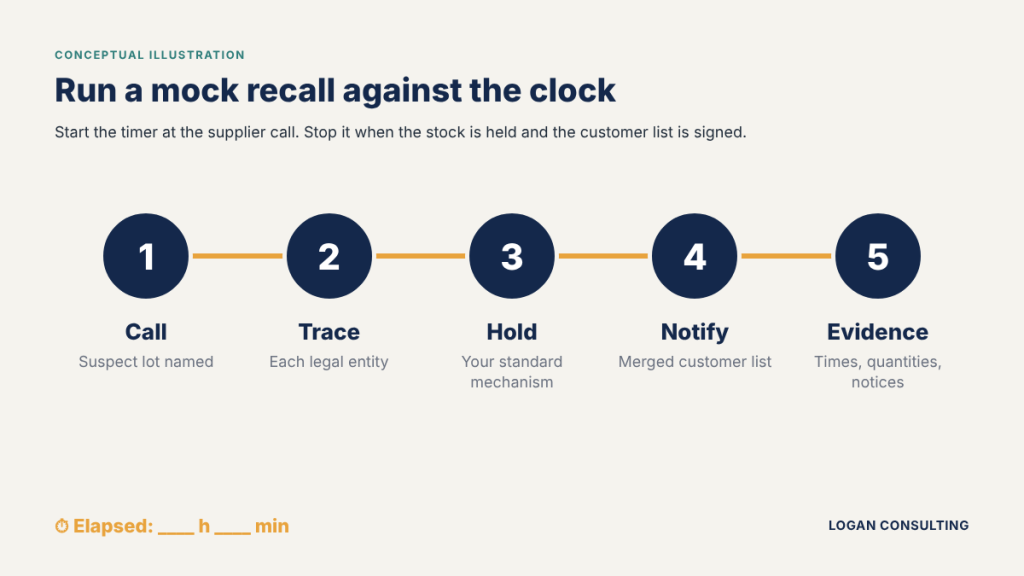
- Run the clock. Start at a pretend supplier call and stop when you have a held-stock count and a signed customer list. Record the time and every manual step.
The test of a good recall plan
If the call came at 7:40 tomorrow, could anything that touched the bad lot still ship at noon?
Where to start
Pick one high-risk ingredient and run test 5 this quarter, in a sandbox, with quality, warehouse, sales and IT in the room. The trace will probably be quick. Watch everything after it. That is the part to design.
If you would like a second set of eyes on traceability and recall readiness in Dynamics 365, talk to Logan Consulting.
This article is general information, not legal, regulatory or food-safety advice. Feature availability and behavior depend on your Dynamics 365 Supply Chain Management version and configuration, so confirm each point in your own environment. Scenarios and figures are illustrative.