








Reviews and corrects ledger-to-subledger alignment in D365 by fixing posting configurations, inventory profiles, reconciliation logic, GL mapping, and critical reporting procedures.
Managing Expenses in Dynamics 365
Posted on: March 19, 2026 | By: Ashley Xue | Microsoft Dynamics AX/365
Microsoft Dynamics 365 streamlines and automates the expense management processes for all businesses through the Expense Management Module. Expense Management includes functionalities to support the entire expense management lifecycle, from expense submission to reimbursement, helping increase efficiency through approval workflows, and ensuring compliance with financial policies and regulations by flagging out of policy expenses.
Expense Submissions Made Simple
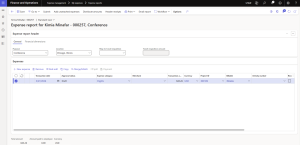
Employees can navigate to Expense Management > My Expenses > Expense Reports to create expense reports, attach receipts, categorize their expenses from travel, and even include additional details such as linking expenses directly to project codes.
Approval Workflow for Efficiency and Accuracy
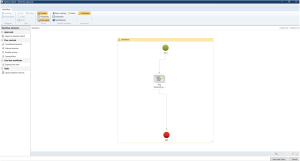
Customizable approval workflows can be created and set up based on organizational hierarchy to streamline all approval processes, avoiding approval delays and causing further reimbursement delays. Managers and approvers can review all expenses submitted in full detail, reviewing all receipts attached, any project IDs linked directly to expenses, and can even request further information regarding any charges that were expensed by an employee.
Company Policy Compliance
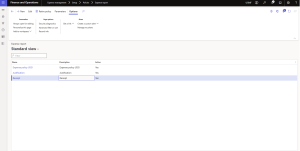
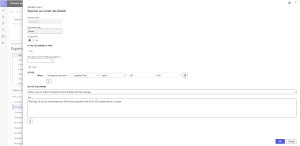
Expense Management module ensures all expense reports stay compliant with company set expense policies such as dollar amount restrictions on specific expenses such as airline tickets, or receipt requirements for expenses such as meals & ground transportation. All policies can be set up under Expense Management > Setup > Policies and can be as specific or broad as the organization requires.
 Expense Management is a great tool for organizations looking to streamline their expense processes and make expense reimbursements easy. The reporting tools available in Expense Management provide visibility, control, and cost saving opportunities by allowing businesses to gather their data in one place for all expense-related activities.
Next Steps
If you want more information on navigating the changes and impacts of Microsoft Dynamics 365 Supply Chain Management, contact us here. You can also email us at info@loganconsulting.com or call (312) 345-8817.


