










Reviews and corrects ledger-to-subledger alignment in D365 by fixing posting configurations, inventory profiles, reconciliation logic, GL mapping, and critical reporting procedures.
Dual-write in Dynamics 365: Treat It Like a Consistency Contract, Not a Data Pipe
Posted on: July 8, 2026 | By: Heather Zhu | Microsoft Dynamics AX/365
Treat It Like a Consistency Contract, Not a Data Pipe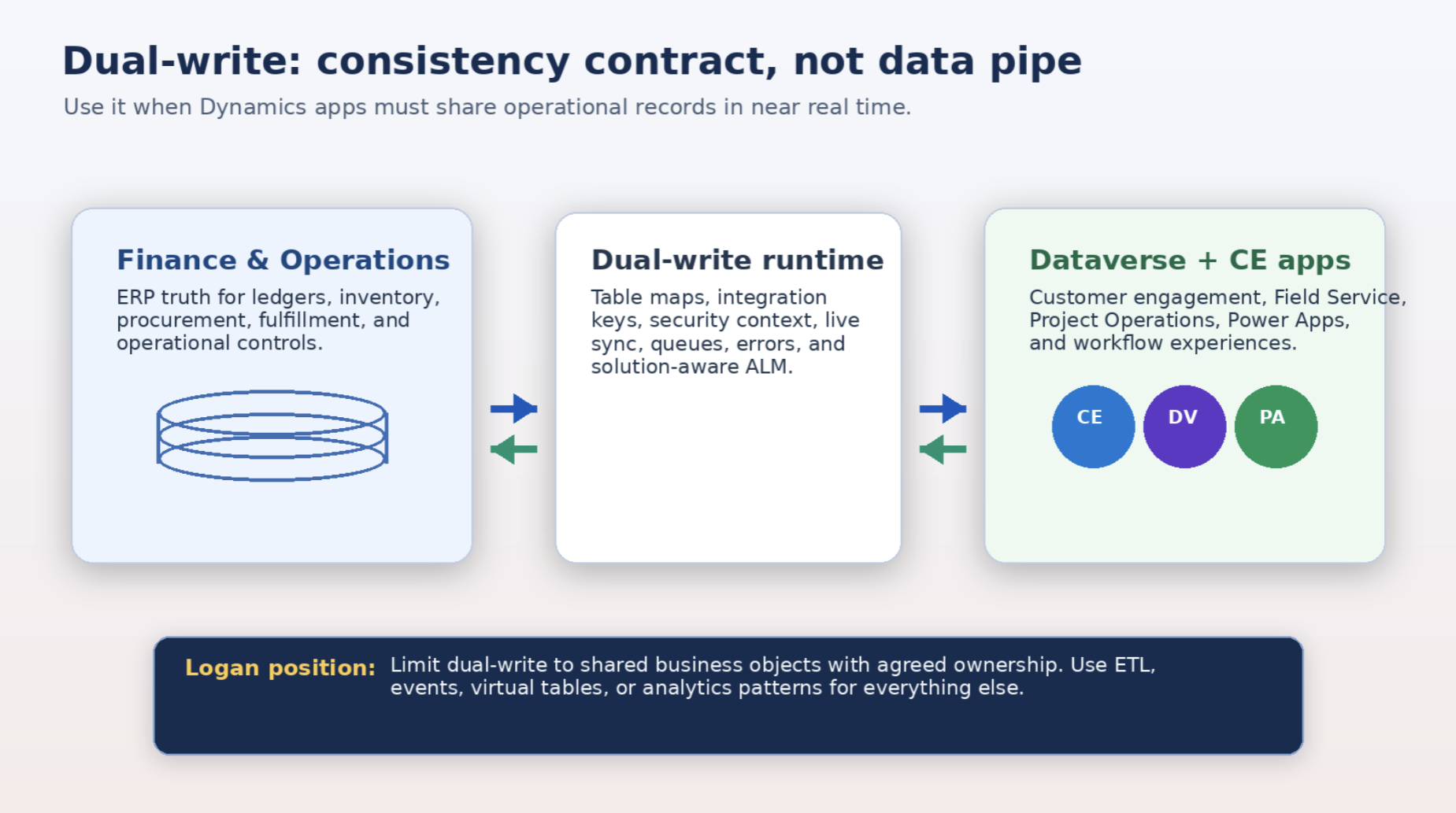
Figure 1. Dual-write is most valuable when it governs shared operational records between Dynamics 365 apps.
Technical thought leadership for IT leaders, solution architects, and Dynamics 365 platform owners.
The position
Dual-write is one of the most useful – and most commonly misunderstood – integration capabilities in the Dynamics 365 platform. It is not a general-purpose data replication engine. It is not a reporting pipeline. It is not a clever way to avoid an integration strategy. Dual-write is a bounded consistency mechanism for shared operational records between finance and operations apps and Dataverse-based customer engagement applications.
That wording matters. Microsoft defines dual-write as out-of-box infrastructure for near-real-time interaction between customer engagement apps and finance and operations apps, with tightly coupled, near-real-time, bidirectional integration. It expands Dataverse through Marketplace solutions, schema, plugins, workflows, and table maps so front-office and back-office processes can operate across application boundaries.
The Logan view is intentionally opinionated: dual-write works best when the business process truly requires the same operational object to be available and actionable in both ecosystems. Customers, vendors, addresses, products, quotes, orders, projects, assets, and related reference data can all fit that pattern. But the moment the requirement becomes analytics, bulk migration, loose eventing, or third-party hub integration, dual-write may be the wrong hammer. And yes, it is still possible to hit your thumb with a very expensive hammer.
Logan POV: The question is not, “Can we sync this table?” The better question is, “Should this record be governed as one business object across two application domains?”
Why dual-write deserves respect
Dual-write exists because the old front-office/back-office split creates a surprisingly expensive kind of friction. Sales teams want customer, quote, order, and product context in the applications where they work. Finance and operations teams need fiscal control, fulfillment, inventory, pricing, posting, and compliance in the system of record. Without a bridge, users duplicate data, reconcile fields manually, or rely on integrations that are technically alive but operationally suspicious.
When deployed correctly, dual-write provides several concrete benefits:
- Integrated user experience across Dynamics 365 apps. Users can work in Sales, Field Service, Project Operations, Finance, or Supply Chain Management without manually recreating the same business record.
- Reduced duplicate entry and reconciliation. Changes can flow bidirectionally where the business process allows it, reducing copy/paste operations and the inevitable “which system is right?” meeting.
- Power Platform extensibility. Because finance and operations data can be made available in Dataverse patterns, organizations can extend experiences through model-driven apps, Power Automate, Copilot Studio, and related platform capabilities.
- Operational consistency. Dual-write can support end-to-end processes such as prospect-to-cash, project-to-cash, product mastering, asset/service scenarios, and coordinated customer data management.
- Managed platform evolution. Microsoft has moved dual-write maps toward solution-aware ALM and split solution packages, which makes deployment and maintenance more deliberate than the early monolithic package model.
The benefit is not “data is synchronized.” The benefit is that the business process stops behaving like two separate systems politely emailing each other after the fact.
Where dual-write is the wrong tool
The fastest way to make dual-write painful is to use it for everything that looks like integration. Microsoft explicitly positions other patterns for other jobs: virtual tables show external data in Dataverse without storing it; business events notify downstream systems; OData and custom services handle service integration; and analytics patterns such as Azure Synapse Link or Fabric are better suited for downstream reporting and lakehouse use cases.
Use dual-write when the requirement is a shared operational record and the user experience depends on near-real-time consistency. Do not use it as the default answer for:
- High-volume reporting replication or analytics extracts.
- Bulk migration from one application to another.
- Third-party system hub-and-spoke integration.
- Loosely coupled event processing where a business event or message queue would be cleaner.
- Read-only access to finance and operations data where virtual tables can avoid copying records into Dataverse.
- Cross-company data sharing scenarios, which dual-write does not support.
This is not a limitation to complain about. It is a boundary to respect. The bridge is strongest when it carries the right traffic.
Recent platform changes IT teams should account for
Dual-write is not standing still. Three recent changes are especially important for technical planning.
First, Power Platform integration is no longer optional background furniture. Microsoft states that beginning May 1, 2025, all finance and operations environments are required to have Power Platform integration enabled; environments not linked after that date are automatically enabled, and environments that already use dual-write or virtual entities are linked to the existing Power Platform environment.
Second, Microsoft introduced an August 2025 dual-write security update that uses a new app ID for communication between finance and operations apps and Dataverse, replacing the legacy app ID and improving authentication handling and token exchange.
Third, dual-write async remains important but should be treated carefully. Microsoft describes dual-write async as a preview feature for eventual-consistency scenarios that need more scale and should not block live transactions. The docs are explicit that preview features are not meant for production use; async supports authoring table maps and error management, and prerequisites include finance and operations platform update 64 / version 10.0.40 with quality updates and Dual-write Core solution 1.0.24093.1 or later.
In plain English: the platform is becoming more secure, more solution-aware, and more flexible. But flexibility is not permission to skip architecture. That trick has never ended well.
Proper deployment: the architecture before the toggle
A proper dual-write deployment starts before any map is enabled. The sequence below is the deployment model we recommend for IT teams.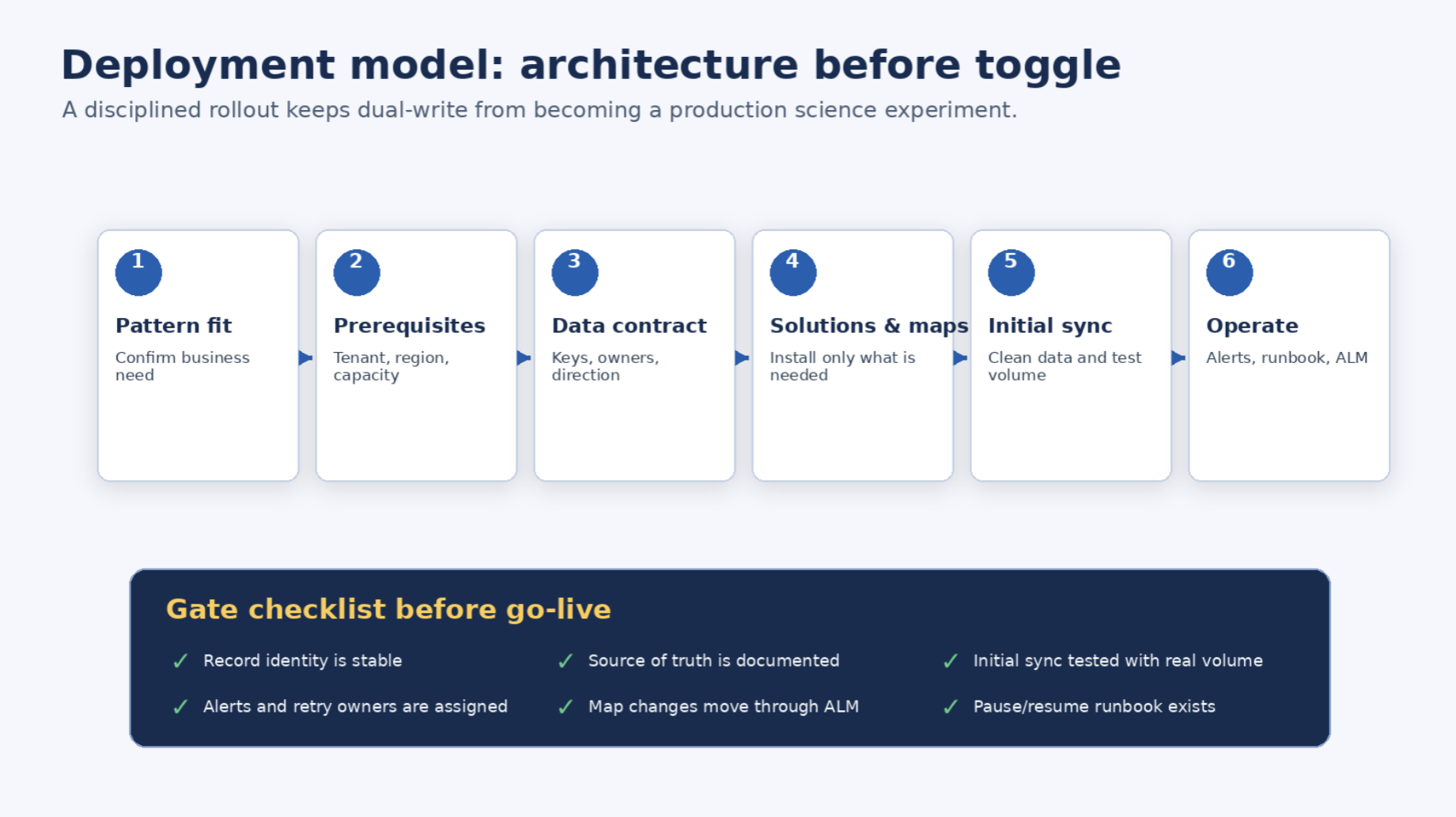
Figure 3. A gated deployment path reduces production surprises.
1. Confirm the pattern fit
Start with process ownership, not table names. Identify which business process needs the integration, which system owns which decision, and whether the user experience requires bidirectional near-real-time consistency. If the process only needs read-through access, consider virtual tables. If the need is downstream notification, use business events. If the requirement is analytics, use an analytics pipeline. Dual-write should earn its place.
2. Validate environment prerequisites
Dual-write has hard technical boundaries. Microsoft documents that finance and operations and customer engagement apps must be in the same Microsoft Entra tenant and deployed in the same Azure datacenter. Live synchronization has a limit of 250 legal entities, and cross-company data sharing is not supported.
Power Platform integration matters here too: Dataverse capacity, environment linkage, and Lifecycle Services alignment are not footnotes. Microsoft also warns that linking mismatch between LCS Power Platform integration and the Dataverse instance used by dual-write can cause unexpected behavior.
3. Design the data contract
A dual-write map is not just a field mapping. It is a contract about identity, ownership, directionality, and validation. Integration keys deserve special attention. Microsoft states that alternate keys used for dual-write integration keys should include only columns that application users cannot change, because changing a key effectively changes the identity of the record and breaks the relationship between finance and operations and Dataverse. Microsoft also requires all integration key fields to be mapped, lookup fields expanded, and key fields mapped bidirectionally when a table map is bidirectional.
This is where many projects quietly go sideways. If identity is unstable, everything else becomes detective work.
4. Choose solution packages and maps intentionally
Before March 2022, the dual-write Application Orchestration package was monolithic. Microsoft split it into smaller packages so teams can install the packages they actually need, such as Application Core, Finance, Supply Chain, Human Resources, Notes, and Asset Management. For a full prospect-to-cash flow, Microsoft lists multiple package dependencies, including Application Core, Finance, Human Resources, Dynamics 365 HR Common Tables, and Supply Chain.
The best practice is boring and correct: install the minimum required packages in lower environments first, regression test your use cases, then promote through ALM.
5. Treat initial synchronization as a cutover event
Initial sync is where clean architecture meets real data, and real data has a sense of humor. Microsoft recommends running initial synchronization before starting dual-write on a table to handle existing data on both sides, unless there is no need to sync existing records. The guidance also warns not to activate maps before data migration is complete because migration performance can suffer.
The constraints are not small: 500,000 rows per run; potential 24-hour timeouts; caution around Dataverse-to-finance-and-operations sync above 70,000 rows for single-threaded tables; a 40-legal-entity limit during environment linking; and problems with maps that have 10 or more lookups during initial sync.
This does not mean dual-write cannot handle enterprise scenarios. It means IT teams need a serious data migration and cutover plan, not a Friday-afternoon “let’s just run the maps” moment.
Best practices for technical teams
These are the practices we would insist on for a serious implementation.
Define the system of decision, not just the system of record.
A field can technically exist in both systems. That does not mean both systems should govern it. Define which application is authoritative for each process decision: credit limits, product attributes, pricing, customer classification, fulfillment status, vendor data, project information, and so on.
Do not over-customize standard maps.
Microsoft allows column mapping customization, transforms, and filters, but changes should be made carefully. The documentation notes that maps must be stopped before changing mappings or the changes are not saved. Use the standard maps wherever possible, document every deviation, and test regressions after every solution update.
Keep product directionality sacred unless you have a very good reason.
Microsoft says product maps are designed to flow from finance and operations apps to Dataverse in near real time. The infrastructure can be customized to be bidirectional, but Microsoft does not recommend that approach and says doing so is at your own risk. For most clients, product master belongs in Finance/Supply Chain. Let the ERP own the noun; let Sales and Service consume it.
Engineer security and ownership deliberately.
The Dataverse company model is not the same as a finance and operations legal entity. Microsoft introduced cdm_Company to help maintain visibility parity, and recommends creating a default business unit and a separate owner team with a “Dual Write” suffix for each company enabled for dual-write. Security roles also matter: users doing live synchronization need Dual-write runtime/app roles plus relevant Dataverse roles; makers who update maps need Dataverse System Customizer or System Administrator and Finance and Operations System Administrator.
Build monitoring before go-live.
Dual-write has error management and alert notifications. Microsoft documents that admins can set alerts by threshold, notify individuals or groups, and even have dual-write pause or stop when thresholds are hit. Errored records are held for one day before purge. This is not optional plumbing. It is the smoke detector. Install it before lighting the fireplace.
Use pause/resume consciously.
When a running table map is paused, created or updated records are queued in secure Azure storage and replayed when resumed. Microsoft documents important limits: pause can be active for only one day, and there is a maximum of 1 GB of queued records. After that, pending changes can be lost or additional records blocked until sync resumes and catches up. Every production environment should have a pause/resume runbook with owners and escalation paths.
Have an ALM story.
Microsoft states that making dual-write solution-aware enables ALM capabilities such as transport and backup/restore of table maps across environments. Customized maps can be exported as solutions and moved across environments.That means map changes belong in governance, not in heroic manual edits by the one person who remembers where the button lives.
Risk map: the predictable pain points
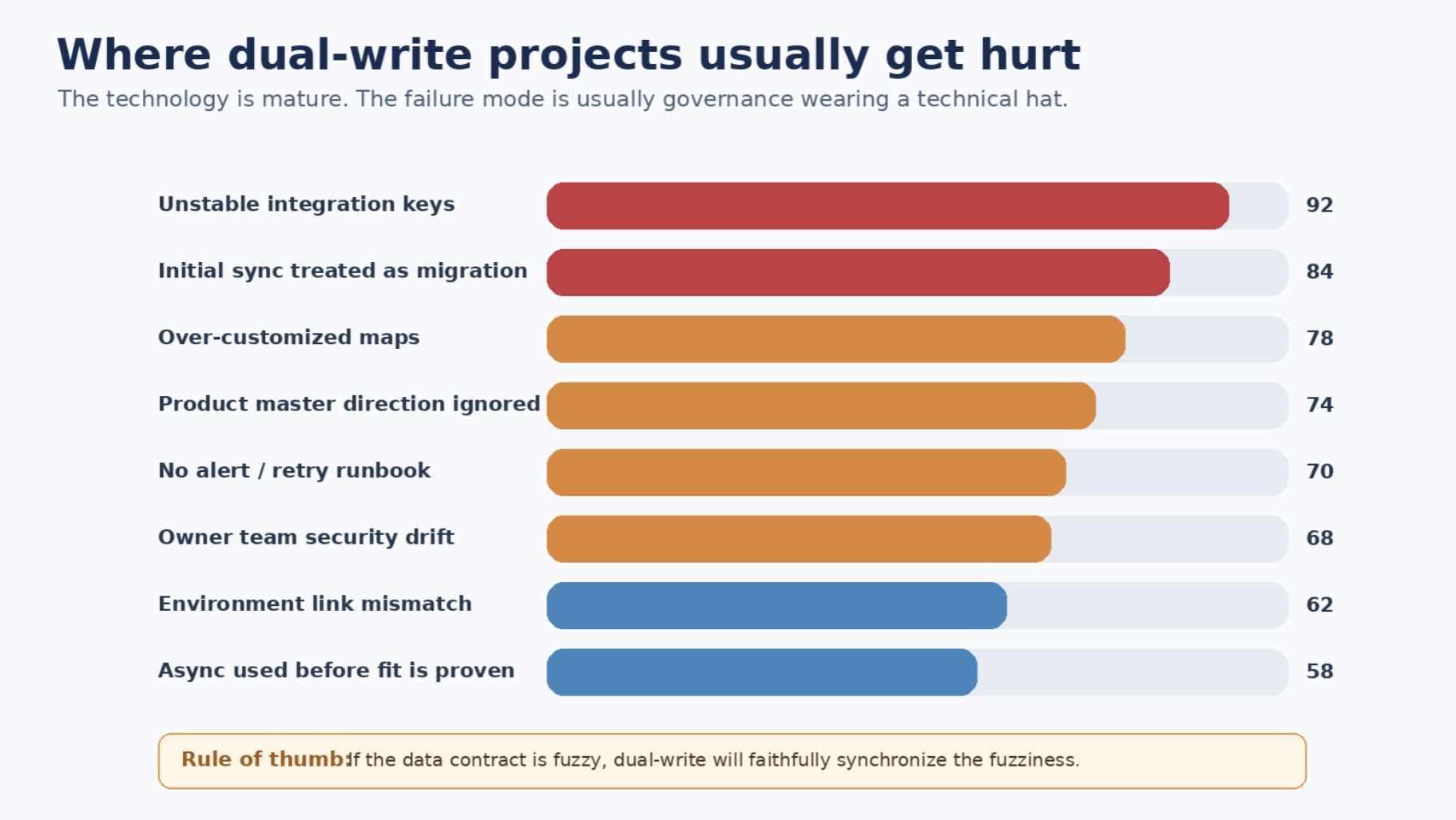
Figure 4. Common dual-write failure modes are usually preventable with governance and testing.
The risk pattern is consistent. Dual-write projects rarely fail because the platform is incapable. They fail when teams skip the data contract, underestimate initial sync, over-customize standard maps, ignore security ownership, or treat monitoring as a post-go-live luxury. That is the technical version of buying smoke alarms after the kitchen fire.
The IT leader’s test: should this be dual-write?
Before approving a dual-write map or scenario, ask five questions:
- Does the business process require near-real-time consistency across Dynamics applications, or would read-through/eventing/analytics suffice?
- Is there an agreed owner for each field and each record lifecycle event?
- Are the integration keys stable, immutable, and mapped correctly on both sides?
- Has initial sync been tested with realistic data volume, legal entities, security roles, plugins, and customizations?
- Is there an operational support model for alerts, retries, maintenance pauses, solution updates, and regression testing?
If any answer is “we will figure that out later,” later has already filed a ticket.
Final thought
Dual-write is a strategic capability when used with architectural discipline. It can make Dynamics 365 feel like one coordinated operating platform instead of a front-office system awkwardly shaking hands with a back-office system across a parking lot.
But it is not magic, and it is not forgiving of sloppy ownership. It synchronizes what you tell it to synchronize. If the business process is clear, the keys are stable, the maps are governed, and monitoring is real, dual-write can reduce friction and improve user experience across Dynamics 365. If those things are missing, it will simply make inconsistency faster.
The point is not to avoid dual-write. The point is to respect it. Treat it like a consistency contract. Keep the contract narrow. Make ownership explicit. Test the edge cases. Monitor the operation. Then let the platform do what it is designed to do: connect front office and back office without making users live in two versions of the truth.


