In Microsoft Dynamics 365 (D365), settling ledger transactions across different fiscal years can lead to complications during the year-end close. To address this, Microsoft introduced the Awareness between ledger settlement and year-end close features. This feature ensures that only unsettled transactions are included in the opening balances of the new fiscal year, thereby improving the accuracy of financial reports. The Review cross-year settlements page allows users to identify and manage transactions settled across fiscal years.
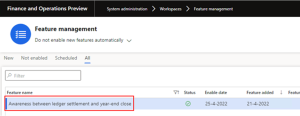
The awareness between ledger settlement and year-end close allows the system to have “unsettled” transactions across years. Enabling this feature provides the following functionality.
- When the Keep detail during year-end close parameter is turned on for a main account of type Balance, Asset, or Liability, a separate opening balance will be created for each ledger transaction from the old year that isn’t settled.
- The currently settled transactions will not be considered for the new year’s opening balances. Foreign currency revaluation in the new year will only run for transactions that have the status of not settled.
The following example outlines the process:
To start the process, we must enable the feature by going to General Ledger parameters > Settlement tab.
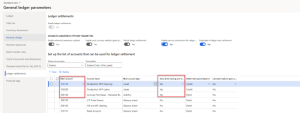
A new column labeled Keep detail during year-end close will be added to the account selection area by the main account section on the Settlement tab. By selecting yes on the account row, we can choose which accounts we want detailed opening balances for.
In this example, we selected detailed opening balances for these main accounts.
Now we can run the fiscal year close. Instead of creating a summary line for the accounts we selected, it will make detailed opening balances for these main account:
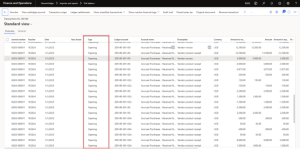
Enabling this feature will also affect the settlement functionality:
- Starting now, we can only settle transactions within one fiscal year. This is because now there is the possibility of settling with an opening balance transaction. We can try to settle between years, but D365 FO will give an error message:

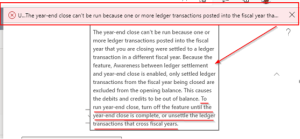
- Also, if we have already made ledger settlements on transactions between the year you want to close and other years, you need to unsettle these transactions before you close the fiscal year. If you don’t unsettle these transactions, you will get an error if you want to run the fiscal year close: