








Reviews and corrects ledger-to-subledger alignment in D365 by fixing posting configurations, inventory profiles, reconciliation logic, GL mapping, and critical reporting procedures.
Specific Features of the Latest QAD Production Orders Module
Posted on: March 7, 2022 | By: David Kwo | QAD Business Process, QAD Practice News, QAD Manufacturing
Since 2017, QAD has taken the Advanced Repetitive and the discrete Work Order modules and merged them together into one streamlined model, called Production Orders. The Production Orders module provides a single set of programs for setup and transaction processing. All of the features of the older modules exist within the new module but the single transaction set makes user training and adoption much easier. Additionally, you can still run in mixed mode, meaning you can run some items in your plant as discrete and others as repetitive, if that is a fit for your physical process. Lastly, the features of both are available within the Planning and Scheduling Workbenches.
Production Order Set-Up
Step 1: Define Control Parameters – Production Order Control
Step 2: Set up Production Resources
- Production Line Maintenance
- Item Production Line Maintenance
- Production Line Allocation Maintenance
Step 3: Set up Items and Engineering Data
- Item Inventory presents a new Item Picking Data frame
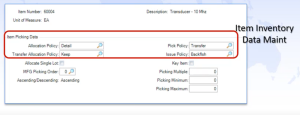
- Allocation Policy – General, Detail, None
- Pick Policy – Transfer, Issue, No Pick
- Transfer Allocation Policy – Keep, Drop
- Issue Policy – Backflush, Direct, No Issue
- Item Planning- Pur/Mfg flag (L or M) -> Order Type and Mfg Type on Production Orders
Step 4: Set up Location
- Reserved Location (by Production Line or Work Center)
- Backflush Locations (by Production Line or Work Center)
Note that the business chooses at the time of QAD install whether to install the Production Orders module. Once the Production Orders package is installed, the business cannot revert back to the Advanced Repetitive and discrete Work Order modules.
Next Steps
If you are interested in learning more the Production Orders module in QAD and/or maximizing the use of your QAD system, contact us here to find out how we can help you grow your business. You can also email us at info@loganconsulting.com or call (312) 345-8810.


