


Reviews and corrects ledger-to-subledger alignment in D365 by fixing posting configurations, inventory profiles, reconciliation logic, GL mapping, and critical reporting procedures.
Maximizing Your Data within Dynamics CRM, Part XIII
Posted on: August 27, 2025 | By: Page Wildridge | Microsoft Dynamics CRM
Forecasting with Confidence in Dynamics 365 CRM
In Episode 12 of our “Maximizing Your Data” series, we explored the benefits of Server-Side Synchronization and how it enhances data accuracy. This month, we turn our attention to forecasting in Dynamics 365 CRM – a powerful capability that helps organizations anticipate outcomes. We’ll discuss how forecasting empowers administrators with flexible configuration and enhances user experience through intuitive interfaces and real-time data.
Forecast Configuration and Customization
Forecasting begins with flexible configuration options that allow organizations to tailor forecast models to their unique business structures. Administrators can define forecast categories, set quotas, and establish hierarchies that reflect their team’s reporting needs.
Key Benefits Include:
- Custom Forecast Categories: Admins can map forecast categories to sales stages or service milestones, ensuring that projections align with business processes.
- Hierarchical Forecasting: Forecasts can be rolled-up across individuals, teams, and business units, providing leadership with a view of performance across the organization.
- Snapshot Tracking: Forecast snapshots allow users to capture and compare forecast data over time. This historical view helps identify trends, shifts, and areas for improvement.
Enhanced User Experience
Forecasting is designed for usability, offering intuitive interfaces and interactive features that make performance tracking accessible to all users.
Key Benefits Include:
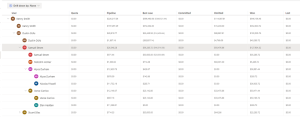
- Interactive Forecast Grid: The forecast grid provides a spreadsheet-like experience where users can view, edit, and analyze forecast data in real time.
- Visual Indicators: Progress bars, color-coded metrics, and goal attainment visuals help users quickly assess their performance against targets.
- Role-Based Views: Users can personalize their forecast views based on their role, whether they’re a sales rep tracking pipeline or a manager reviewing team performance.

Performance and Integration
Forecasting is also built for scalability and integration, ensuring reliable performance and seamless connectivity with other business intelligence platforms.
Key Benefits Include:
- Power BI Integration: Embed forecast data into Power BI dashboards for advanced visualization and analysis.
- Real-Time Updates: Forecasts automatically update as data changes, keeping projections current and relevant without manual intervention.
- Mobile Accessibility: Users can access and interact with forecasts on mobile devices.
AI-Driven Forecasting
Dynamics integrates AI capabilities to enhance forecast accuracy and provide predictive insights that support proactive decision-making.
Key Benefits Include:
- Predictive Forecast Models: AI analyzes historical data and current trends to generate forecasts that reflect likely outcomes.
- Opportunity Scoring: AI-driven scoring highlights deals most likely to close, allowing users to prioritize efforts and improve forecast reliability.
- Anomaly Detection: Automated alerts flag unexpected changes or outliers in forecast data, prompting timely investigation and response.

Next Steps
In this episode, we explored the benefits of forecasting in Dynamics 365 CRM and how it supports strategic planning, enhances user experience, and empowers administrative efficiency. By leveraging this feature, organizations can improve performance visibility, anticipate outcomes, and make data-driven decisions with confidence. Stay tuned for Episode 14, where we’ll continue to explore innovative strategies to maximize your automation capabilities. If you have any questions or would like to learn more, please reach out and schedule time with our team. We hope to speak with you soon!


