








Reviews and corrects ledger-to-subledger alignment in D365 by fixing posting configurations, inventory profiles, reconciliation logic, GL mapping, and critical reporting procedures.
Improving Retail Inventory Traceability and Accuracy
Posted on: March 16, 2026 | By: Ashley Xue | Microsoft Dynamics AX/365
Retailers do not have a visibility shortage. They have a traceability standard shortage.
With Dynamics 365 Commerce and Microsoft’s Inventory Visibility service, teams can view on-hand stock across stores and warehouses, check available-to-promise quantities, and support workflows like pickup in store and ship from store. That is useful. It is also why the harder question now matters more: not where is it, but what happened to it on the way there? Visibility tells you the current picture. Traceability tells you whether the picture deserves your trust.
Omnichannel made that distinction impossible to ignore. Microsoft’s current Commerce roadmap explicitly treats stores as fulfillment nodes for in-store, online, and curbside pickup, inventory management, and order fulfillment—not just sales floors with better lighting. POS inventory lookup can show stock across configured stores and warehouses and let associates see ATP by store. In plain English: products are no longer taking a polite little trip from DC to shelf. They are pinballing through stores, warehouses, customers, and back again.
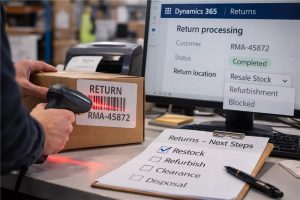
Returns make the plot thicker. NRF says retailers expect $849.9 billion in returns in 2025, with 19.3% of online sales expected to come back. D365 Commerce treats returns accordingly: POS returns are written back to headquarters as sales orders with negative lines, return quantities can be synchronized to stores to reduce duplicate or fraudulent returns, and return-location policies can route returned goods to specific locations and even block them from sale. That is not a customer-service side quest. It is reverse logistics with accounting consequences.
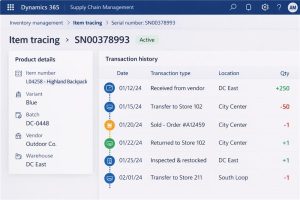
Where tracking breaks is usually boring, which is exactly why it is dangerous. Microsoft’s own item tracing documentation says tracing is based on historical inventory transactions plus a tracking dimension such as batch, serial, or vendor batch number. No transaction, no lineage. The same documentation also notes that tracing has limitations for Commerce scenarios. Microsoft further warns that Commerce applications do not support the full range of Supply Chain item configurations and provide only limited support for some dimensions in POS, including location, serial, and batch behaviors. Translation: if scanning is optional, if store and warehouse teams improvise, or if item setups were never tested end to end, the system will not heroically invent a clean product history later. ERP is many things. Psychic is not one of them.
For retailers on Microsoft, the cleanest mental model is this: Supply Chain Management is the traceability backbone; Commerce is the channel surface. SCM gives you item tracing and warehouse controls like batch, serial, license plate, and location confirmation on mobile device menu items. Inventory Visibility adds real-time on-hand change posting and visibility across channels and data sources. Commerce gives stores the operational tools—inventory lookup, inbound and outbound transfer processes, stock counts, and bar-code-optimized inventory operations. When those layers reinforce the same data model, traceability stops being a reporting exercise and becomes a byproduct of daily work.
This is also why AI raises the bar instead of lowering it. D365 Demand planning now includes automatic AI parameter tuning, external signals such as promotions or stockouts, and forecasting algorithms including auto-ARIMA, ETS, Prophet, and XGBoost. That is real capability. It is also deeply uninterested in cleaning up sloppy operating history for you. If product movements are skipped, returns are handled through side doors, or inventory adjustments drift outside governed workflows, the model does not become “smart enough” to compensate. It simply learns from bad memories faster than your old spreadsheet did.
The practical takeaway is not glamorous, but it is valuable: standardize the moments where movement is captured. Make bar-code scanning the default, not the polite suggestion. Treat returns as first-class inventory events. Test item configurations and store processes the way people will actually use them, not the way the design document hoped they would. Microsoft explicitly notes that store inventory operations are optimized for barcode scanning and that unsupported or untested configurations can create data failures that are hard to correct. Retail traceability does not usually fail because the dashboard was weak. It fails because the operating discipline was optional.
Final thought
Product tracking in retail is not a dashboard problem. It is an operating discipline.
When retailers standardize tracking dimensions, reinforce scanning in execution, design returns into the flow, and keep store and warehouse processes aligned, they get more than better visibility. They get faster recalls, cleaner inventory, stronger planning inputs, and fewer executive meetings that begin with, “Can someone pull the other spreadsheet?” In modern retail, knowing where a product is is helpful. Knowing exactly what happened to it is what makes the system believable



