



Reviews and corrects ledger-to-subledger alignment in D365 by fixing posting configurations, inventory profiles, reconciliation logic, GL mapping, and critical reporting procedures.
Importing Contacts to Vendors & Customers in D365 for Finance and Supply Chain
Posted on: June 15, 2020 | By: Christopher Rusing | Microsoft Dynamics AX/365
An important part of any ERP implementation is migrating data. It is especially imperative to make sure that you have correct and audited data that is going in the right place. In D365, there can be multiple areas in which information can be stored. Where the information lives in D365 can determine different uses of functionality and how your users can utilize their information to improve their efficiencies. I want to touch about contacts today as I’ve seen a lot of inquiries lately on where and how to import contacts for vendors/customers. Please note: this is for D365 version 10.0.9 and previous/future releases may have different data entities and fields.
There are two places in which it is typical to import contact information. The first is your basic contact information that is located directly on the vendor/customer record. This section is beneficial in that the contacts can be seen directly from the master record itself. Please note: this is identical on the customer side.
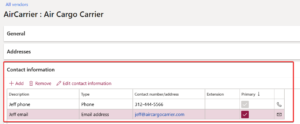
Also, through the purposes field and the print management functionality, you can easily send documents from D365 to the vendor/customer contact.
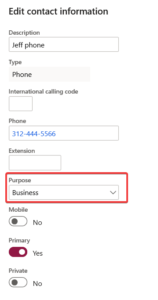
In order to import contacts for this section, you will need to use the data entity ‘Party contacts’. The key part of this import is relating the contact to the correct vendor/customer. In order to do this, you must know the ‘Party number’ of the vendor/customer you are importing the contact for. Obviously, the vendor/customer record must be imported prior to the contacts so you can then find the party number in the global address book.

The other area to import contacts is through the contacts form on the vendor/customer.
You can access through the vendor here.
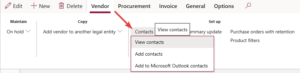
The contacts on the customer can be viewed here.

The advantage of this method is that the contact form offers much more detail as it creates a record in the global address book. You can add addresses, personal information, etc. all on this contact record. This same party record can be associated with multiple vendors/customers (or even both!) through relationships. In order to import these contacts, you must use the ‘Contacts V2’ entity and utilize the ‘Associated party number’ field to tie the contact to the vendor/customer master record. This is the same field as the party number mentioned for the previous import.
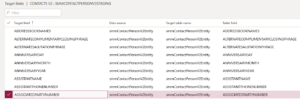
I hope this provides some clarity on where the contacts can live on a vendor/customer record and the data entities used to import. If you are looking for additional information, please feel free to reach out to us at info@loganconsulting.com or (312) 345-8817.
All the best!
Logan Consulting
www.loganconsulting.com


