










Reviews and corrects ledger-to-subledger alignment in D365 by fixing posting configurations, inventory profiles, reconciliation logic, GL mapping, and critical reporting procedures.
Business Central Wave One Release: Part Two
Posted on: April 30, 2024 | By: Page Wildridge | Microsoft Dynamics Business Central
Microsoft recently unrolled their first wave update of the year for Business Central, full of new updates and functionalities within the ERP. This wave release provides users with an improved overall experience through its new capabilities. In this blog, we will discuss three more of the best improvements to the ERP and what they can do for your business.

Integrate Field Service and Business Central
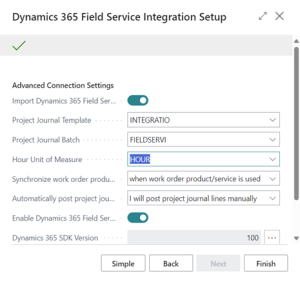
Businesses that utilize Microsoft’s professional services resources can benefit greatly from this new update. Now, you can link the two together, allowing you to work interchangeably with information from both resources at the same time. For example, you can create a work order within the Field Service module while using the Service and Billing Account information from Business Central. This improved capability allows for more flexibility in working with both Business Central and Field Service. To start the process of integration, navigate to the “Assisted Setup” page in Business Central, and select “Set up integration of Dynamics 365 Field Service.” Then, enable both “Import Dynamics 365 Field Service Solution” and “Import Field Service Connection.”:
For more information from Microsoft, click here.
Map E-Documents to Purchase Order Lines with Copilot
Microsoft’s AI assistant is able to reduce time spent on tedious tasks. Now, you can utilize Copilot to assist you in receiving and processing virtual documents from vendors. The AI can both map and match the information within the document to that of purchase orders. This feature will reduce wasted time on data lookup, instead providing you directly with all of the required information. Take advantage of the assistant to reduce tedious tasks by clicking “Map E-Document” within a specific purchase order.
Invoice Projects to Multiple Customers at Once
With projects that include multiple customers, billing and assigning the correct customer to their project task can be difficult and drain your time. Now, Business Central takes the hassle out of this process. You can specify specific bill-to and sell-to customers, allowing Business Central to automatically generate invoices for the right customers. To utilize this feature, navigate to the Projects Setup page and change the “default task billing method” to multiple customers.
Next Steps
If you are interested in learning about more features of this wave release, check out the first part of our blog here. As a proud Microsoft partner, Logan Consulting is committed to ensuring our clients get the most out of their ERP. Contact us to speak to an expert.


