


Reviews and corrects ledger-to-subledger alignment in D365 by fixing posting configurations, inventory profiles, reconciliation logic, GL mapping, and critical reporting procedures.
Efficient Tax Setup in QAD
Posted on: March 30, 2022 | By: Minela Covic | QAD Financials
This blog details the step-by-step process Logan Consulting went through when helping a Client set up taxes in their QAD system to address inefficiencies and errors in their preexisting method.
Logan’s team set up taxes in QAD to automatically calculate Canadian taxes on Customer Invoices based on where the Customer is located. This Client had issues in the past when their current system did not calculate taxes properly and they underpaid the tax they owed to the Canadian government. This setup allowed them to properly accrue taxes payable based upon province such that they were able remit the tax to each respective province.
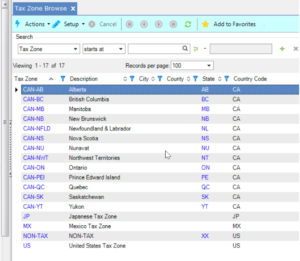
Step 1: Created Tax Zones to represent each Canadian province, which are assigned to Customers
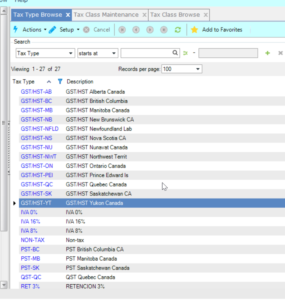
Step 2: Created Tax Type to represent each tax within each province
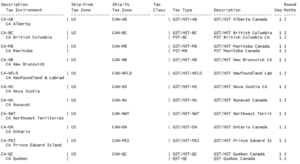
Step 3: Created Tax Environments to link the Ship-From Tax Zone to the Tax Zones above and Tax Types above
Step 4: Created Tax Rates to assign the appropriate Tax Rates to Tax Types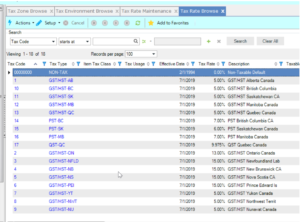
Read more about taxes in QAD:
Utilizing QAD’s Global Tax Management Tool
QAD EE Upgrade Global Tax Management Considerations
Next Steps
If you are interested in learning more about Taxes in QAD and/or maximizing the use of your QAD system, contact us here to find out how we can help you grow your business. You can also email us at info@loganconsulting.com or call (312) 345-8810.


