



Reviews and corrects ledger-to-subledger alignment in D365 by fixing posting configurations, inventory profiles, reconciliation logic, GL mapping, and critical reporting procedures.
Why Your Accounts Receivable Process Is Slowing Down Your Cash (And How D365 F&SCM Helps)
Posted on: February 11, 2026 | By: Ashley Xue | Microsoft Dynamics AX/365
Most organizations don’t realize they have an Accounts Receivable problem until cash gets tight and the CFO starts checking the bank balance like it’s a live sports score.
Revenue can look great. Sales can be growing. The pipeline can be “robust.”
But cash doesn’t move when revenue is booked. It moves when customers pay — and the space between invoice and payment is where control is either built… or quietly lost.
In Microsoft Dynamics 365 Finance & Supply Chain Management (D365 F&SCM), AR isn’t just a ledger function. It’s policies, workspaces, automation, and (when you enable it) predictive insights designed to make collection timing more consistent. Here are the breakdowns we see most often — and how D365 helps clean them up.

1) Invoices That Go Out Late (The Head Start You Gave Your DSO)
If invoicing slips by even a few days, your DSO climbs. Collections can’t “hustle” their way out of a clock you started late.
The usual suspects: manual invoice triggers, approval bottlenecks, rework from billing errors, and shipping/service events that aren’t tightly connected to billing.
D365 supports creating customer invoices based on sales orders or packing slips (once the operational step is posted). When invoicing is tied to real transactions instead of someone’s memory, the lag shrinks fast. Before you overhaul collections, measure “days to invoice.” It’s often the easiest cash win on the board.
2) Aging Buckets Don’t Predict Behavior
Aging reports are useful — like a rearview mirror. They tell you what happened, not what’s about to happen.
Customer payment predictions (part of Finance insights) uses a machine learning model trained on your historical invoices, payments, and customer data to estimate whether open invoices will be paid on time, late, or very late. That lets collections prioritize the invoices most likely to slip, earlier — instead of calling every 30‑day item and hoping for the best.
3) Credit Controls That Exist… But Aren’t Enforced
Many companies have credit limits. Fewer have credit limits that actually stop anything.
In D365 credit management, sales orders can be placed on credit hold using configurable blocking rules (for example: days overdue, overdue amount, credit limit expiration, sales order amount, or available credit used). You can also manage exceptions with exclusions and approvals, so overrides are intentional — not a reflex. Credit management isn’t about limiting growth; it’s about aligning growth with risk tolerance.
4) Collections Living in Email Instead of the System
If follow-ups, promises, and dispute context live in inboxes, visibility disappears — and “accountability” becomes a vibe, not a process.
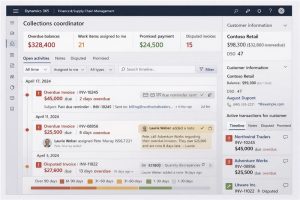
D365 collections workspaces centralize overdue balances, open transactions, and activity history. Collections process automation can run strategy-based steps that identify which customers need an email reminder, a task (like a call), or a collection letter — and then schedule or generate those actions. Less detective work, more consistent cadence.
5) Disputes That Sit Too Long
Disputes are DSO rocket fuel. Not the fun kind.
D365 collections tools let teams flag transactions with statuses like Disputed, Promised to pay, and Resolved, and surface disputed invoices in the collections workspace so they don’t vanish. Then you can track cycle time, see repeat patterns, and fix root causes upstream. If the same dispute shows up every month, it’s not “an AR issue” — it’s an operational issue wearing an AR costume.
6) AR Should Feed Cash Forecasting
AR shouldn’t run in a silo from liquidity planning. Expected payment timing is a cash input, not trivia.
Dynamics 365 supports cash flow forecasting, and Finance insights adds machine-learning-based cash flow forecasting that can incorporate payment predictions. When AR data is timely and governed, leadership can plan — instead of reacting to “surprises” everyone saw coming.
Final Thoughts
The goal of AR isn’t to collect eventually. It’s to collect predictably.
A practical starting point:
• Measure invoice lag
• Turn on payment predictions
• Review top exposures/credit holds weekly
• Automate reminder cadence
• Track dispute cycle time


