



Reviews and corrects ledger-to-subledger alignment in D365 by fixing posting configurations, inventory profiles, reconciliation logic, GL mapping, and critical reporting procedures.
Why Storage Capacity Matters: Managing Data Growth in Microsoft Dynamics 365 F&SCM
Posted on: December 8, 2025 | By: Maya Ikenberry | Uncategorized, Microsoft Dynamics AX/365
As businesses grow and operations scale, data accumulates fast, transactional records, historical ledger entries, attached documents, logs, audit trails, and more. In an ERP world like Microsoft Dynamics 365 Finance & Supply Chain Management (F&SCM), uncontrolled data growth can lead to unexpected costs, performance lags, and compliance risks unless storage usage is carefully monitored and managed.
To help admins and IT leaders stay on top of data growth, Microsoft provides the Finance and Operations storage capacity report in the Power Platform admin center. This report offers visibility into how much storage your organization is using versus what your license entitles you to.
Here’s why that matters, and what you can do about it.
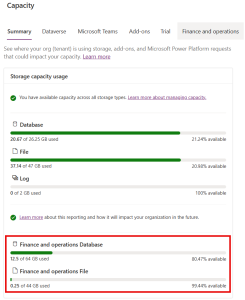
What Is the Storage Capacity Report?
-
The report shows storage use at both the tenant level and the environment level (production, sandbox, etc.) via the “Capacity → Finance and Operations” tab in the Power Platform admin center.
-
You can drill into specifics, database usage, file storage, logs, and even download the usage data (CSV format) for detailed analysis or audits.
-
For each environment, you get a near real-time snapshot of storage consumption by table or data type, and a historical view to track growth trends over time.
In short: it helps you answer, “How much data do we have, where is it, and how fast is our usage growing?”
Why You Should Care About Storage Usage
Ignoring storage growth can lead to several risks:
-
Unexpected costs: If usage exceeds your license entitlements, Microsoft may require you to purchase additional capacity add-ons.
-
Operational constraints: Environments may hit capacity limits that prevent administrative tasks like creating a new environment, restoring backups, or provisioning additional sandbox environments.
-
Performance degradation: As data volume grows, database maintenance, backups, and queries may slow down. Without archiving or cleanup, system responsiveness and user experience may suffer. This is why a deliberate data maintenance strategy is recommended.
-
Compliance and audit risk: For regulated industries, maintaining retention rules while preserving system performance and storage usage requires conscious data governance.
How to Use D365 + Power Platform Tools to Manage Storage
1. Monitor Usage Regularly
Make the storage report a regular check-in item (monthly or quarterly).
Use the capacity report to identify which environments or tables drive usage growth, so you can target cleanup or archiving efforts.
2. Archive or Clean Up Old / Unneeded Data
Implement a data maintenance strategy: identify old batch-job histories, completed transactions, logs, or audit data that you no longer actively use, and archive or delete them (after confirming audit/retention requirements).
Using sandbox or database export workflows can help offload old data safely.
3. Use Capacity Add-Ons or Extended Licenses If Needed
If your business legitimately needs to retain large volumes of data (historical, regulatory, audit, reporting), budget for additional storage capacity. Microsoft D365 licensing allows purchasing extra database or file capacity as needed.
4. Clean Up Non-Production Environments
Sandboxes, test environments, UAT boxes, these can quietly eat up storage. Regularly review and purge or reset environments that are no longer in use.
5. Combine Data Management With Governance
Coordinate with IT, audit, and business stakeholders to define data-retention policies: what must be kept, what can be archived, and when. This helps balance compliance with storage optimization.
Real-World Benefits of Active Storage Management
-
Avoid surprise fees or licensing overages
-
Maintain system performance and faster response times
-
Ensure consistent ability to create/restore environments
-
Reduce risks around audits or regulatory compliance
-
Make your ERP landscape more sustainable and scalable over time
Conclusion: Storage Is Data, And Data Needs Governance
As organizations scale and rely more heavily on digital systems for finance, operations, and supply-chain workflows, storage capacity is not a “set it and forget it” detail. It’s a critical part of data governance and operational health.
The storage-capacity reporting tools built into Microsoft D365 + Power Platform give admins transparency, accountability, and the mechanisms to manage growth proactively, but only if you make storage review a regular practice.
Next steps:


