








Reviews and corrects ledger-to-subledger alignment in D365 by fixing posting configurations, inventory profiles, reconciliation logic, GL mapping, and critical reporting procedures.
Using Planned Orders to Drive Purchasing in AUX
Posted on: July 11, 2024 | By: Meaghan Andrews | QAD Financials, QAD Manufacturing, QAD Business Process, QAD Distribution
QAD’s Adaptive UX provides a new Planned Orders view that can be used to drive Purchasing activities such as the creation of Requisitions (Approved or Unapproved) and Purchase Orders, or the releasing of Blanket Orders.
To access this functionality, go to the Planned Orders hybrid view in AUX, and from the Actions function, select Firm Purchasing. Note: you can use the view filtering functions to limit the Planned Orders (e.g. flitter based on Release Date that is less than 5 days from today’s date).

In the Options section of the workbench, you can select which Purchasing activities you want to execute.

The main options are:
- Always Approve Requisitions: this will represent the Planned Order as an Approved Requisition.
- Include Blanket Orders: this will generate a release from the Planned Order.
- Auto Release to Purchase Order: this means the Planned Order will be converted to a Purchase Order, with no Requisition process.
- Start PO Approval: this will route the PO for approval if you have Approvals configured for Purchase Orders.
You will then be able to update the selection criteria to determine which Planned Orders will be included in the selected Purchasing activities.
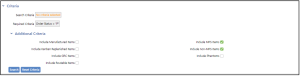
You can toggle the various criteria to determine which Planned Orders are selected. Once this is completed, click on the Search function and the Firm Purchasing section will be updated to reflect the selected Purchasing activities and Planned Orders.
Once the Search is completed, QAD will display the selected Planned Orders and the recommended activity based on the master data, selected Planned Orders, and chosen Purchasing activities. Note: this is just a simulation at this point, and nothing will be updated until you click on Submit.
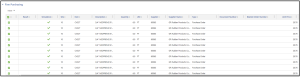
For each Planned Order, QAD will display the specific activity being executed, which could be a Blanket Order release or creation of a Requisition or Purchase Order. The relevant outcome information will appear in the Type (Purchase Order, Blanket Order Release, or Approved or Unapproved Requisition), Document Number (PO or Requisition number), and Blanket Order Number (if applicable). You can also manually modify data in the grid if anything is missing or incorrect.
Once the data is complete and accurate, click on Submit, and QAD will execute all the relevant activities.
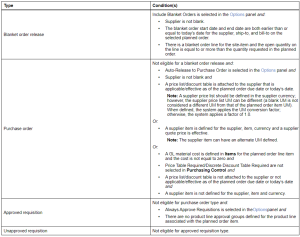
The Purchasing activities selected can only be properly executed if the master data is setup accordingly. The following table, provided in the QAD online help, shows how the activities are prioritized and executed based on master data and control file setups.
Conclusion
QAD’s Planned Orders view is a great way for companies and users to drive and automate Purchasing activities, reducing manual effort and time and ensuring greater accuracy based on established master data.
Next Steps
If you are interested in learning more about Planned Orders in AUX, contact us here to find out how we can help you grow your business. You can also email us at info@loganconsulting.com or call (312) 345-8817.


