








Reviews and corrects ledger-to-subledger alignment in D365 by fixing posting configurations, inventory profiles, reconciliation logic, GL mapping, and critical reporting procedures.
User Defined Fields In AUX
Posted on: July 2, 2024 | By: Meaghan Andrews | QAD Financials, QAD Manufacturing, QAD Business Process, QAD Distribution
This is the second blog in a series of four blogs about customizing business objects in AUX. This blog provides information about pulling forward User Defined Fields in AUX. QAD’s Adaptive UX offers many customizable options to meet the needs of any business. One way is offering User Defined Fields (UDFs) which are predefined fields in the database tables that are not used in QAD business logic. This means that these fields are available for customizing and storing information specific to one’s business requirements. User Defined Fields are not displayed in QAD’s generic layout but select fields can be displayed through screen design changes for certain screens. We will walk through below how to add these fields below, and what to do if the field you want is not available through screen design.
First, go to the screen you wish to add the UDF to and select “More” > “Design Layout”, and then select the layout you wish to update.

On the right-hand side there is a panel that has a tab called “Add to Layout” which has a list of all fields you can add to the layout through screen design. There is a User Defined Fields option under these fields that lists all UDF’s available to add to the screen.
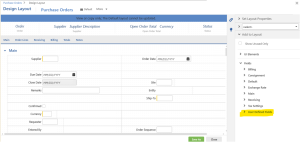

From this list you can drag and drop user defined fields to any section of the screen layout that you want. Once on the layout, you can manage the business component properties through the middle tab on the right-side panel of the screen. Within these properties you can give the field a custom name, manage overrides such as making it a required field or changing the default value.


This is a great way to easily customize screens to store additional information that helps drive business requirements. Most tables have over ten available fields broken into character fields, decimal fields, date fields, and user fields. Note that if you want to use a field that is not available within the screen design layout then you will need to work through the business component to add the fields you would like.
In conclusion, UDF’s are a great way to manage additional business requirements and can be easily added through a simple screen design layout.
Next Steps
If you are interested in learning more about User Defined Fields in AUX, contact us here to find out how we can help you grow your business. You can also email us at info@loganconsulting.com or call (312) 345-8817.


