


Reviews and corrects ledger-to-subledger alignment in D365 by fixing posting configurations, inventory profiles, reconciliation logic, GL mapping, and critical reporting procedures.
Unbilled Revenue versus Deferred Revenue in Microsoft Dynamics 365 Finance
Posted on: November 17, 2024 | By: Christopher Rusing | Microsoft Dynamics AX/365
The subscription billing module has replaced the revenue recognition module for handling all things related to deferred revenue in Microsoft Dynamics 365 Finance (D365). However, the module has not only replaced the functionality but also provides additional capabilities beyond revenue recognition. For example, in our previous blog post, we described how you can use this for prepaid expense amortization. This is just one example of the enhancements available and in this blog, we’re going to provide an insight into another piece, called unbilled revenue.
Handling Revenue Recognition
The subscription billing module handles all the different ways that you might bill a customer. One of those methods is revenue recognition. This method automatically defers revenue for sales to the customers, which can then be recognized when your company delivers the product and/or services. For these circumstances, the deferred revenue account is a liability as it represents products and/or services that your company has yet to deliver.
Understanding Unbilled Revenue
Another accounting concept is unbilled revenue. In this instance, your company might have already provided the product and/or service, so they need to record this as unbilled revenue. Unbilled revenue is an asset as it represents money yet to be earned for a product and/or service that your company has already provided. Let’s look at how this works in D365.
Configuring Unbilled Revenue in Microsoft Dynamics 365 Finance
Once you have your items set up for unbilled revenue, they will automatically be checked for the unbilled revenue option in your billing schedule.

Unbilled revenue operates differently than revenue recognition in that you must create a journal entry for the entire amount of the billing schedule line for the unbilled revenue before you can post your sales order invoices.
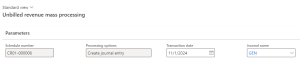
The voucher for unbilled revenue will debit the unbilled revenue account and credit your revenue account.
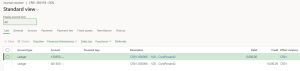
Once that journal entry is posted, you can generate your sales order invoices.

The voucher for the invoice will credit the unbilled revenue account and debit the accounts receivable related to your customer.

Summary of Unbilled Revenue
In summary, the unbilled revenue scenario is the opposite of revenue recognition in that you recognize the revenue first. The subsequent sales order invoices dwindle the balance of the unbilled revenue until it reaches zero.
All the best!


