










Reviews and corrects ledger-to-subledger alignment in D365 by fixing posting configurations, inventory profiles, reconciliation logic, GL mapping, and critical reporting procedures.
Top Three Updates to Subscription Billing
Posted on: February 20, 2025 | By: Page Wildridge | Microsoft Dynamics Business Central
Microsoft recently celebrated their second launch event of 2024, full of new features and improvements to their software solutions. With the launch event, they also released a series of video tutorials on YouTube to help Business Central users understand the updates. In this blog, we will cover our favorite improvements to subscription billing software within Business Central.
What’s New in Sales Orders?
Keeping track of your items has never been easier. Business Central added more features to make your sales orders highly customizable to ensure that all of your items are tracked. Now, you can manage within your sales order two different types of maintenance: external and internal vendors. Now that you can select one option within the sales process, you can ensure that your data stays completely up to date within the ERP. Another feature within the sales order is maintenance. Maintenance is defined as a “service commitment,” that will have a recurring bill within your sales order.
Assigning Service Commitments to Contracts
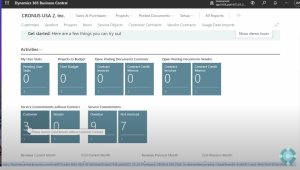
On the main page of your ERP, you will be notified of service commitments without contracts. Click on the box, navigate to “assigned to contract.” You will have the choice to assign it to an existing contract or create a new contract by hitting “+New.” Then, hit “assign selected services” on the top of the page, and that contract will disappear. One less item on your to do list!
Extending an Existing Contract With New Line Items
If your customer wants more services from you, you can add this to your ERP by either creating a new contract or adding to an existing one. You won’t be able to just add a line to your contract- instead you’ll need to hit the “extend contract” button within the contract itself. To view this added line entry, hit “create documents” under the recurring billing page. Navigate next to Sales and Purchases, hit Sales Invoices. You will now be able to view your recurring bill will appear on your invoices!
Next Steps
Microsoft is continuously striving to make advances to their software to ensure they are offering the best product to their customers. To follow the steps highlighted in this blog, click here to watch the Microsoft representative’s demo. As a proud Microsoft partner, Logan Consulting is committed to ensuring our clients get the most out of their ERPs. Contact us today to learn more about harnessing the power of Business Central.


