Obsolescence of the existing master planning engine
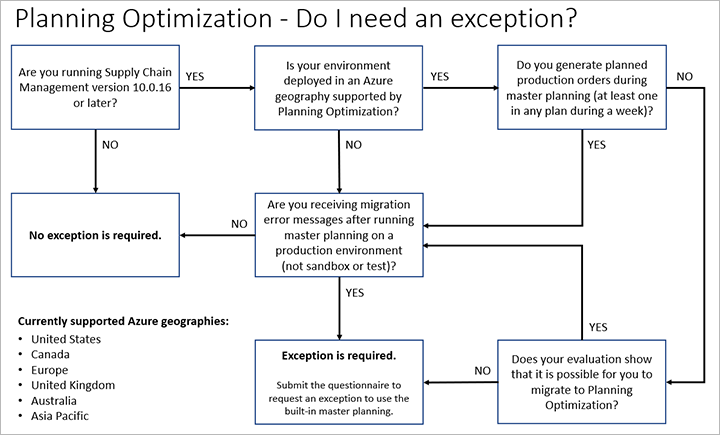
Microsoft is in the process of making the built-in planning engine obsolete in favor of Planning Optimization. This change affects all cloud environments. On-premises installations aren’t affected. In version 10.0.16 and later, you will receive an error message if you run the built-in master planning without generating planned production orders. However, the master planning run will be successfully completed despite the error message.
Migration, messages, and exceptions
Owners of existing environments who run the built-in master planning engine without generating planned production orders will receive an email that provides details about the exception process. We recommend that you work with a partner to evaluate and plan the migration to Planning Optimization.
As has been mentioned, you will receive an error message in version 10.0.16 and later if you run the built-in master planning without generating planned production orders. This error message includes guidance about migration and instructions for requesting an exception.
New deployments
Planning Optimization must be considered the default master planning engine for all new deployments in the cloud. In general, Planning Optimization should be used for all new deployments that don’t generate planned production orders during master planning. If a new deployment depends on functionality that Planning Optimization doesn’t currently support, you can request an exception so that you can continue to use the built-in master planning engine.
Existing deployments
Owners of existing cloud-based deployments that depend on master planning should plan to migrate to Planning Optimization. If your implementation depends on functionality that Planning Optimization doesn’t currently support, you can request an exception so that you can continue to use the built-in master planning engine.
For environments that currently use master planning processes that are being made obsolete, Microsoft will send an email to the environment admin. This email will provide information about the actions that are required to migrate or to request an exception.
The exception process
You can request an exception if you must continue to use the built-in master planning engine because your business processes depend heavily on at least one feature that isn’t currently implemented in Planning Optimization.
Currently, exceptions for Planning Optimization migration are only relevant if your master planning process doesn’t include production (that is, planned production orders that are generated by master planning), and you require the built-in master planning engine beyond version 10.0.15.
After the required features become available, Microsoft will provide a grace period until the exception expires. The environment admin will be informed when the required features have become available, and the grace period has started.



