








Reviews and corrects ledger-to-subledger alignment in D365 by fixing posting configurations, inventory profiles, reconciliation logic, GL mapping, and critical reporting procedures.
Supplier Risk Management: Building Resilient Procurement with D365 F&SCM
Posted on: February 16, 2026 | By: Ashley Xue | Microsoft Dynamics AX/365
Supplier risk used to be a “special topic” reserved for global disruptions. In 2026, it’s a daily operating condition, especially when a supplier’s “confirmed” date keeps moving like it’s on a treadmill.
If you’re running Microsoft Dynamics 365 Finance & Supply Chain Management (F&SCM), procurement isn’t just about price. It’s about keeping the business running predictably. And predictable beats “technically we had a contract” every time.
Here’s the Logan perspective: D365 can help you get proactive about supplier risk—but only if controls live inside the process, not in a spreadsheet called “FINAL_v7_REALLYFINAL.xlsx.”

1) Define supplier risk like a leader (not like a buyer)
Price and lead time matter. But the risk that hurts is broader:
• Delivery reliability (OT, IF, OTIF)
• Quality stability (inspections, nonconformances, repeat defects)
• Compliance proof (certifications/required docs)
• Master data integrity (who can change what, and when)
• Concentration (single-sourced parts, regional exposure)
D365 helps most when you treat the vendor master like a governed asset. Dynamics supports routing changes to selected vendor fields through a vendor approval workflow before updates are applied.
And Dynamics 365 Supply Chain Management includes a structured vendor onboarding process that provisions external users through a workflow (using Microsoft Entra B2B collaboration) and assigns the appropriate external security roles.
2) Stop guessing. Quantify risk with supply risk assessment
Supplier disruptions rarely happen “all at once.” They drip: dates slip, partials increase, expedites become normal.
Microsoft’s supply risk assessment capability in Dynamics 365 Supply Chain Management evaluates risk to future planned purchases using past supplier performance metrics like OTIF, on-time (OT), and in-full (IF). It can highlight vendors/items outside your targets, flag single-sourced products that underperform, and translate risk into quantity and amount at risk—before the shortage hits production.
Logan rule: scorecards only matter if they change decisions (sourcing, safety stock, order strategy).

3) Make “approved suppliers” real by enforcing it in the PO
Most companies have an approved supplier strategy. Fewer enforce it when the pressure’s on.
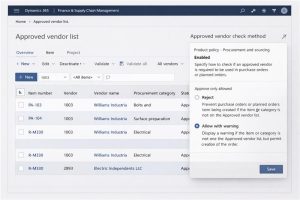
D365 supports approved vendor lists by item and approved/preferred vendors by procurement category. It also lets you define what happens if a buyer tries to add an item to a PO line with a vendor that isn’t approved.
 4) Treat vendor payments as part of supplier risk
Supplier risk isn’t only about parts arriving. It’s also about money going to the right place.
Dynamics 365 Finance supports a vendor bank account approval workflow, where protected fields require approval and approvers can review “proposed changes” before approving updates. This matters any time “please update our banking” emails start showing up.
5) Close the loop with collaboration, quality, and faster communication
D365’s vendor collaboration interface lets external vendors work with POs, RFQs, and consignment inventory in a shared workspace.
And Microsoft’s 2025 release wave 2 plan highlights a Supplier Communication Agent to help draft reminders (confirm the PO, explain a late delivery) and identify order changes sent via email and apply them to purchase orders. On the quality side, quality associations can automatically generate quality orders tied to purchasing (tests, AQL, sampling plan), so supplier quality becomes measurable—not anecdotal.

Final thought
Resilient procurement in 2026 isn’t about eliminating risk. It’s about seeing it early and responding fast, with governance that runs every day.
A practical starting set:
• Turn on vendor approvals + bank account approvals
• Review supply risk assessment weekly (“amount at risk”)
• Enforce approved vendor policies where it matters most
• Track repeat quality issues and act on them


