



Reviews and corrects ledger-to-subledger alignment in D365 by fixing posting configurations, inventory profiles, reconciliation logic, GL mapping, and critical reporting procedures.
Stop Fraud at the Door: Automating Sales Order Holds in D365 Retail and Commerce
Posted on: January 14, 2026 | By: Ashley Xue | Microsoft Dynamics AX/365
Businesses using a call center know it’s a vital sales channel for building personal customer relationships, but it also presents a unique vulnerability: fraudulent transactions. Unlike many e-commerce platforms with instant address verification services (AVS) and card security codes, call center agents are often relying on the information provided by the person at the other end of the line.
Manual review procedures for every order are slow, inefficient, and can lead to human error, which challenge call centers to find ways to protect revenue without grinding their processes to a screeching halt.
Leveraging the automatic fraud check feature in D365 for Finance and Supply Chain within the Retail and Commerce module can help alleviate manual work in the order entry process by automatically identifying risky orders and putting them on hold for review. Let’s dive into how an automated process can be set up to guard call center operations!The power of the automatic fraud check feature is its flexibility. A business can define exactly what constitutes a “risky” order for its own operations.
Criteria we’ve seen clients define includes:
- High value orders from new customers: Flag orders that exceed a specific monetary threshold from new customers that exceed a specific threshold (I.E> over $2000)
- High Risk Addresses or contact information: The order uses a known empty lot as a billing address or uses contact info likely to be erroneous
- Ordering high quantities of discontinued items: Orders for higher quantities of discontinued items than what is in stock and available for reservation
- Special payment terms requests: The customer requests special payment terms or pricing
- Specialized products requiring institutional affiliation: Flag orders with items such as specialized equipment or chemicals to verify customer credentials
This blog post will walk through setting up automatic fraud holds for call centers in D365’s retail and commerce module.
Ensure Proper Call Center Setup
Before taking advantage of the automated fraud checks, the call center must be configured to support order completion. In D365 for Finance and Operations, fraud evaluation occurs at the moment order completion is attempted, so if order completion isn’t enabled, the system will not know when to run the fraud logic.
Turn on Order Completion
Go to Retail and commerce > Channels > Call centers > All call centers. Open the call center in question. Verify that Order completion is enabled.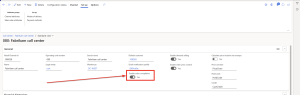 This ensures that every order entered through the call center follows a standardized lifecycle, giving the fraud engine a clear trigger point to evaluate a given order.
Configure Call Center Parameters
Once order completion on the call center itself is enabled, the next step is to activate the fraud-related parameters that tell D365 to score orders and apply holds when needed.
Enable Fraud Check and Fraud Score
Go to Retail and commerce > Channel setup > Call center setup > Call center parameters. Once in Call center parameters, click the Holds tab. Make sure the following settings are configured and turned on:
- Fraud check: activates the fraud evaluation process
- Fraud score: allows the system to assign a numeric score to each order
- Hold code: defines which hold type the system should apply when an order is flagged
- Submit when cleared: optionally enable this to automatically submit an order after any holds have been cleared
How the Fraud Scoring Process Works
When fraud scoring is enabled, D365 evaluates each order against the rules which have been defined and assigns a score based on the conditions which have been met. Here’s how the process works behind the scenes:
1. Each rule has a score value
When a fraud rule is created, a numeric score is assigned. This represents the severity or risk level of that condition. For example, a known suspicious email address might add 30 points, and a “High-value new customer” order might add 70 points.
2. Scores accumulate across rules
If multiple rules are triggered, their scores are added together. This allows businesses to capture nuanced scenarios where several small red flags can collectively indicate a risky order.
3. Thresholds determine whether a hold is applied
The Minimum score is defined and evaluated against the accumulated score across the triggered rules.
- If the total score is below the threshold, the order processes normally
- If the score meets or exceeds the threshold, the system automatically applies the configured hold code
4. The system logs which rules were triggered
When an order is placed on hold, the total fraud score, the specific rules that contributed to the score, and the hold code applied can be seen by navigating to the sales order in question and clicking on the Order holds button under the Functions submenu in the Sales order tab on the top ribbon, then expanding the Fraud Details fast tab on the Order holds screen.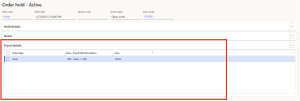 This helps reviewers quickly understand why the order was flagged and what needs to be validated before releasing it.
Set Up Static Fraud Data
Now that the essential call center parameters have been defined, navigate to Retail and commerce > Channel setup > Call center setup > Fraud > Static Fraud Data. Static fraud data is where the baseline information the system will use when evaluating orders will be configured. This can include:
- Known fraudulent addresses
- High-risk ZIP codes
- Suspicious phone numbers or email addresses
The fraud engine will check incoming orders against this data before applying more complex logic.
Define Variables
Navigate to Retail and commerce > Channel setup > Call center setup > Fraud > Variables. Variables allow dynamic information to be captured from the order, such as order value, customer age, item quantity, or payment method to be used in fraud rules.
Create Conditions
Navigate to Retail and commerce > Channel setup > Call center setup > Fraud > Conditions.
Conditions express the logic that determines whether an order should be considered risky. Conditions can leverage a table field, table instance method, or table static method against a defined variable or value. These are essentially “if” statements that power a business’s fraud strategy.
Build Fraud Rules
Navigate to Retail and commerce > Channel setup > Call center setup > Fraud > Rules.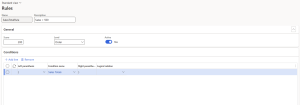 Rules combine configured conditions with actions. In this case, a score of 200 will be applied to any order with a sales total over $500, which will trigger a hold in the current setup. Each rule can also contribute to the overall fraud score, allowing a business to create a tiered approach where multiple small red flags add up to a hold.
Putting it all Together
Now that everything is configured, the process is streamlined for call center agents:
- The agent enters the order as usual
- When they click Complete on the sales order, the fraud engine evaluates the order
- If the accumulated fraud score meets or exceeds the defined minimum score, the order is automatically placed on hold
- The system displays which rules caused the hold, giving reviewers immediate insight to the risk factors which were triggered
This automation reduces manual review time, increases consistency, and helps protect revenue without slowing down call center operations.
Final Word
Automated fraud checks in D365 Retail and Commerce are a quick win for call center operations. They reduce the amount of manual review, strengthen order integrity, and create a more predictable workflow. With the system handling the initial screening, call center teams can focus their attention on building customer relationships while still maintaining tight controls.Many organizations already live on D365, or preparing to be, continue to rely on manual screening, ad hoc review steps, or inconsistent hold practices. Automated fraud holds often fill that gap. With the right configuration, the fraud engine becomes a reliable part of the order process and helps risky transactions surface early without slowing down legitimate orders.


