











Reviews and corrects ledger-to-subledger alignment in D365 by fixing posting configurations, inventory profiles, reconciliation logic, GL mapping, and critical reporting procedures.
Scaling EDI as You Grow with Dynamics 365 Business Central
Posted on: January 21, 2026 | By: Anika Dewjee | EDI
As organizations grow, so does the complexity of their supply chains. More customers, more vendors, more documents—and more pressure to move data accurately and on time. For companies running Microsoft Dynamics 365 Business Central, Electronic Data Interchange (EDI) often starts as a tactical requirement but quickly becomes a strategic capability. Scaling EDI effectively is critical to sustaining growth without adding operational friction.
Why EDI Scalability Matters in Business Central
Early-stage EDI implementations are often designed to “get one customer live.” Flat-file imports, manual exception handling, and one-off mappings may work at low volumes. However, as transaction counts increase and trading partner requirements diverge, these approaches break down. The result is delayed orders, invoice errors, chargebacks, and growing reliance on manual intervention.
D365 Business Central is built to support growth, but EDI must be architected with the same mindset. Scalability isn’t just about volume—it’s about flexibility, automation, and resilience.
Designing a Scalable EDI Architecture
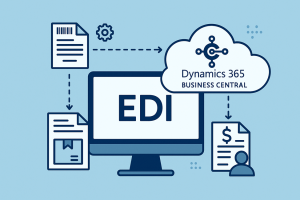
A scalable EDI strategy for Business Central typically relies on a modern integration layer rather than custom code embedded directly in Business Central. Leveraging APIs, event-driven triggers, and middleware or EDI platforms allows you to decouple trading partner complexity from core ERP processes.
This approach enables:
- Faster onboarding of new trading partners
- Reusable mappings across customers and vendors
- Easier upgrades as Business Central evolves
- Reduced technical debt compared to point-to-point integrations
By standardizing how documents like purchase orders, ASNs, and invoices flow into and out of Business Central, organizations can scale without reengineering for every connection.
Automation and Exception Management
As volumes grow, manual monitoring becomes unsustainable. Scalable EDI in D365 Business Central emphasizes automation—not just in data exchange, but in validation and exception handling. Automated checks for pricing, quantities, item numbers, and units of measure help catch issues before documents are posted in Business Central.
Equally important is visibility. Dashboards, alerts, and error queues allow teams to focus on true exceptions rather than routine transactions. This reduces operational costs while improving response times for customers and trading partners.
Master Data Alignment Is Key
One of the biggest barriers to scaling EDI is poor master data governance. As you add more partners, inconsistencies in item numbers, UOMs, locations, and customer/vendor records multiply. A scalable EDI model includes clear ownership of master data and rules for external data maps to Business Central.
Investing upfront in clean data and consistent mapping logic pays dividends as transaction volumes increase.
Preparing for Future Growth
Growth often brings new requirements—international partners, new document types, higher security standards, or real-time integrations. A scalable EDI solution for D365 Business Central should support multiple protocols (AS2, SFTP, APIs), evolving compliance needs, and increasing throughput without degrading performance.
Ultimately, scaling EDI is about enabling growth, not reacting to it. With the right architecture, automation, and governance, D365 Business Central becomes a platform that supports expansion rather than limits it.
Next Steps
As trusted EDI and Business Central partners, Logan Consulting can help EDI accelerate your business’s growth. Looking to better scale your EDI Solution with Dynamics 365 Business Central? Let’s discuss! Contact us at EDIInfo@loganconsulting.com for more information.


