









Reviews and corrects ledger-to-subledger alignment in D365 by fixing posting configurations, inventory profiles, reconciliation logic, GL mapping, and critical reporting procedures.
Regulatory Compliance in D365 Finance & Supply Chain: From Risk to Control
Posted on: February 25, 2026 | By: Ashley Xue | Microsoft Dynamics AX/365
Industrial and manufacturing organizations operate in a regulatory minefield. Indirect tax (sales tax, VAT, GST), SOX-style internal controls, cross-border trade rules, hazardous materials documentation, sustainability reporting, pick your flavor. The fun part is that “small” gaps rarely stay small. They turn into fines, delayed shipments, audit findings, and that special kind of meeting where everyone suddenly remembers they had “concerns for a while.”
Microsoft Dynamics 365 Finance and Supply Chain Management (D365 F&SCM) can do more than record compliance after the fact. When designed and governed intentionally, it enforces compliance through daily operational processes—so compliance isn’t an annual fire drill (or a quarterly tradition, depending on your audit calendar).
Logan POV: If your compliance rules live in emails, spreadsheets, or tribal knowledge instead of D365, you don’t have compliance, you have hope. Hope is not a control.
Why compliance usually fails (spoiler: it’s not ignorance)
Most organizations don’t fail compliance because they don’t care. They fail because controls are inconsistent, optional, or outside the workflow:
- Manual entries that bypass approvals
- Tax logic that depends on “the one person who knows”
- Export checks that happen after the shipment is staged
- Hazmat documentation assembled in a panic
- Subsidiaries doing the “same process” seven different ways
When the system doesn’t enforce the rules, people will. And people are brilliant… but also busy.
D365 as a compliance engine (what it can actually enforce)
1) Financial controls that behave like controls (not suggestions)
D365 uses role-based security (roles, duties, privileges, permissions) so access is structured and auditable, not improvised.
For SOX-style internal control environments, two features matter a lot:
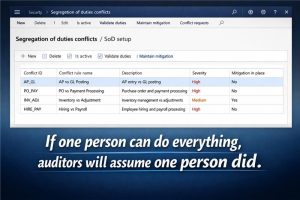
- Segregation of duties (SoD): You can define SoD rules (for example, separating receiving from vendor payment processing) to reduce fraud risk and detect irregularities. Conflicts are logged and must be resolved—not hand-waved.
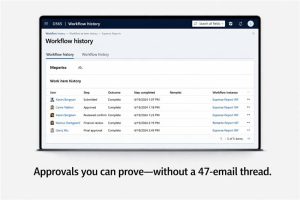
- Workflow approvals: D365’s workflow system supports configured approvals, including patterns like requiring a “final approver” if the submitter is also an approver (because auditors hate “self-approval,” and they are right to).
On the finance side, even general journal processing explicitly supports defining journal workflows with criteria such as materiality limits to increase internal control.
2) Auditability you can prove (without archaeology)
Two practical tools that turn “trust us” into “here’s the evidence”:
- Workflow history: You can view the status and history of documents submitted to workflow—who approved what and when.
- Database logging: D365 database logging tracks inserts/updates/deletes (and more) on selected tables/fields and stores those changes in the database log table. That’s real audit trail muscle when you need it.
Also worth calling out: audit policy rules can evaluate documents like vendor invoices and purchase orders against policy rules on a schedule. That’s compliance monitoring with a calendar invite.
3) Tax compliance that doesn’t depend on vibes
D365’s sales tax framework supports multiple types of indirect taxes (including sales tax, VAT, GST, unit-based fees, and withholding tax) and is designed around tax codes, settlement periods, authorities, posting groups, and tax groups.
For organizations that need more flexibility and centralized control, Tax Calculation provides a configurable tax engine designed to automate tax determination and calculation—configurable taxable data model, applicability, formulas, and the ability to share configurations across legal entities.
Logan POV: If you have a multi-entity footprint and every entity is “doing tax their own way,” you don’t have compliance—you have seven interpretations of reality.
4) Trade & export controls: stop bad shipments before they ship
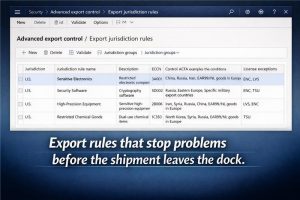
If you ship regulated products internationally, D365 Supply Chain Management includes advanced export management/export control capabilities (introduced in SCM 10.0.36) that let you define jurisdictions, classify products (including ECCN-style classification concepts), apply restrictions, and require licenses/exemptions—so you can block or control transactions before shipment.
For country-of-origin governance, D365 includes a Country of origin feature that links products to origin and can track vendor certificates. Important nuance: out of the box, it helps you track certificates, but printing certificate numbers on invoices/packing slips/order confirmations typically requires report extension.
And if you need restricted/denied party screening, that often involves integration with specialized screening data/providers. There are ISV solutions built specifically for D365 F&SCM to automate screening rather than doing it manually.
5) Hazardous materials and regulated product documentation (serious work, not clip art)
D365 Supply Chain Management includes a hazardous materials feature that stores dangerous goods info on released products and helps prepare shipping documentation; documents can be printed through Warehouse management. Microsoft is also very clear: the tool helps, but it doesn’t automatically make you compliant, and your organization remains responsible for complying with applicable regulations.
The hazardous materials functionality references common regulatory frameworks (ADR, CFR 49, IMDG, IATA) and includes inquiries/reports to help monitor the data you’re maintaining.
6) Sustainability reporting: where operations starts feeding ESG
If you’re being asked for carbon visibility (and in 2026, you are), D365 Supply Chain can integrate with Microsoft Sustainability Manager so transportation planners can calculate carbon emissions during rate and route planning in Transportation management.
Master data governance: compliance starts before the transaction
Compliance breaks fast when master data is messy. D365 supports workflow-driven governance for key master records, including:
- Vendor workflow (approval for changes to specific vendor fields)
- Customer workflow (approval for changes to specific customer fields)
- Vendor bank account workflow (changes to protected fields don’t update until approved)
Logan POV: Every “we’ll fix it later” master-data exception becomes a permanent compliance workaround later.
Regulatory reporting: build once, update without panic
For recurring regulatory files, payment formats, and electronic documents, Electronic Reporting (ER) is a configurable tool to create and maintain regulatory electronic reporting and payments—designed around configuration rather than custom code.
These capabilities live in the Globalization Studio ecosystem, and Microsoft has merged the Regulatory Configuration Service (RCS) functionality into Globalization Studio starting in Finance 10.0.39.
Logan’s practical compliance framework (a.k.a. controls without bureaucracy)
- Map regulations to process points (where you can block, not just report)
- Standardize workflows for journals, purchasing, master data, and shipments
- Enforce SoD rules and review conflicts routinely (monthly beats “never”)
- Centralize indirect tax logic (and decide whether Tax Calculation is the right fit)
- Enable export controls and origin tracking; integrate screening where required
- Treat hazmat as a data discipline, not a paperwork scramble
- Use ER/Globalization Studio for regulatory outputs—and assign ownership
Friendly note: This is operational guidance, not legal advice. Your compliance/legal team should define the requirements; D365 should enforce them.


