








Reviews and corrects ledger-to-subledger alignment in D365 by fixing posting configurations, inventory profiles, reconciliation logic, GL mapping, and critical reporting procedures.
Order Fulfillment in Industrials: Where Complexity Either Gets Controlled or Multiplied
Posted on: February 23, 2026 | By: Ashley Xue | Microsoft Dynamics AX/365
In industrial organizations, order fulfillment isn’t a single handoff. It’s a chain reaction.
Configured products. Long lead times. Partial shipments. Backorders. Engineering changes. Drop-ship orders. Intercompany fulfillment. Warehouse waves. Carrier appointments. And the occasional “we definitely have it… somewhere.”
Every step introduces risk—and every missed handoff shows up later as margin erosion, late revenue, invoice disputes, or a customer escalation that begins with: “Just checking in…” (Spoiler alert: they were not just checking in.)
If you’re running Microsoft Dynamics 365 Finance and Supply Chain Management, fulfillment isn’t just an operational workflow. It’s the control point that determines whether demand turns into revenue predictably, or painfully.

Why industrial fulfillment breaks down
Industrials don’t struggle because they lack systems. They struggle because complexity isn’t enforced consistently.
Common breakdowns we see:
- Sales promises that don’t reflect supply reality (aka “optimism-based delivery dates”)
- Engineering changes that don’t flow cleanly into execution
- Partial shipments that confuse what’s shipped vs. what’s billable
- Inventory that exists… but not where or when it’s needed
- Warehouse execution that depends on heroics instead of repeatable process
Logan POV: if fulfillment logic lives in tribal knowledge instead of your ERP, you don’t have a process, you have a tradition. And traditions don’t scale.
Fulfillment starts with how orders are structured in D365
Industrial orders aren’t all equal, and D365 supports that nuance if you design it intentionally.
For configured or engineered products, D365 supports product configuration models that let you configure variants with a unique bill of materials (BOM) and a unique route, and use those configurations on sales orders and production orders.
That matters because “configured product” isn’t just a sales step. It’s a supply and production commitment. If the variant logic is consistent, downstream execution is predictable. If not, every order becomes a custom project… by accident.
Promise dates you can defend, not dates you can “hope”
This is where fulfillment quietly wins or loses the week.
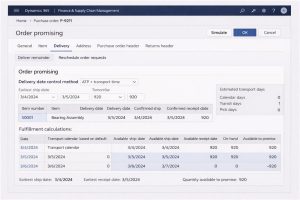
D365 includes order promising, designed to help you reliably promise delivery dates. It calculates earliest ship/receipt dates based on your delivery date control method and transport days, meaning your promise can be rooted in system logic, not vibes.

Then there’s the supply side: master planning uses pegging to determine what supply covers what demand, and D365 includes capabilities like make-to-order supply automation that give you more control over how pegging is applied.
If you want a practical way to validate whether an order is truly “covered,” D365 also provides a Net requirements view from items and sales order lines so you can see pegging/supply-demand signals and understand what’s driving availability (after master planning runs).
Logan rule of thumb: if customer commit dates aren’t backed by order promising + pegged supply logic, they’re guesses with consequences.
Warehouse execution: where “we’ll figure it out” becomes expensive
Industrial fulfillment often breaks in the warehouse, not because people aren’t trying, but because work isn’t shaped into executable chunks.
D365’s Release to warehouse process is built for this: when you release an order, the system can create load lines and shipments, and if automatic wave processing is enabled, it can also create loads and required work.
Wave processing is how you translate demand into warehouse work at scale. D365 wave processing supports creating picking work for loads/shipments (including sales orders).
And in the outbound process, D365 ties picking into shipments in a very concrete way: a picking list has a one-to-one relationship with a shipment, and the sales order packing slip can be processed from the shipment.
Translation: fewer “where are we on this order?” conversations, more “here’s the shipment, here’s the work, here’s what’s left.”
Partial fulfillment is normal. Uncontrolled partials are not.
Industrials rarely ship everything at once. Partial shipments are standard.
D365 supports managing this with delivery schedules, which are specifically designed to manage and track delivering order quantities in multiple shipments over time.
Where companies get hurt is when partial shipments happen… but billing, customer communication, and revenue timing don’t stay synchronized.
D365 supports invoicing from the “shipped but not invoiced” view, and it explicitly supports scenarios where a sales order has multiple packing slips associated with it.
Logan reality check: partials without discipline quietly inflate WIP, confuse AR, and frustrate customers because the customer experiences “uncertainty,” not “flexibility.”
Engineering changes: either controlled in the system, or absorbed as chaos
Engineering changes don’t just affect design. They affect cost, lead time, materials, and ship dates.
D365 includes Engineering change management, which is built to bring structure and discipline to product data management and enable controlled definition/release/revision supported by workflows. It includes product versioning, readiness checks, and workflow-supported engineering change requests and engineering change orders.
Logan POV: when engineering changes are governed inside the system, fulfillment adjusts. When they’re managed offline, fulfillment becomes the shock absorber.
Put guardrails between “picked,” “shipped,” and “invoiced”
One of the most underused fulfillment controls is simply preventing steps from happening out of order.
D365 Finance recognizes two primary posting events for sales orders, packing slip and invoice, with separate conditions for physical vs. financial posting.
And you can enforce sequencing: D365 provides options (via the item model group) to prevent posting a packing slip or invoice if a picking list isn’t posted, and prevent invoicing if the packing slip hasn’t been posted.
This is the unglamorous part of control… which is exactly why it works.

A practical Logan-style starting point
If you want momentum without boiling the ocean:
- Standardize order types and fulfillment strategies (configured vs. standard vs. intercompany vs. direct delivery)
- Use order promising for commit dates and review pegging coverage in Net requirements
- Implement delivery schedules where partial shipments are the norm
- Release to warehouse + wave processing so work is system-shaped (not human-shaped)
- Tie invoicing strictly to shipment/packing slip events, and enforce sequence controls
- Use Engineering change management workflows for changes that affect cost and promise dates
Because in industrials, the fastest way to lose control isn’t bad demand—it’s unmanaged fulfillment complexity.


