



Reviews and corrects ledger-to-subledger alignment in D365 by fixing posting configurations, inventory profiles, reconciliation logic, GL mapping, and critical reporting procedures.
Optimizing Multi‑Site Manufacturing in D365 F&SCM
Posted on: January 28, 2026 | By: Ashley Xue | Microsoft Dynamics AX/365
A Logan Consulting POV on synchronizing inventory, production, and quality — for today’s distributed manufacturers
In the modern supply chain, manufacturers rarely run a single plant with a single set of constraints. Whether it’s a domestic headquarter site plus regional facilities, contract manufacturers on the other side of the world, or a blend of owned and third‑party production, the multi‑site paradigm is now the norm, not the exception.
But while multi‑site manufacturing expands capacity and market reach, it also exposes four consistent pain points we see in the field:
- Inventory visibility gaps across sites
- Production order conflicts and planning blind spots
- Operational handoffs between plants and partners
- Quality process inconsistency
Microsoft Dynamics 365 Finance & Supply Chain Management (D365 F&SCM) can absolutely support complex multi‑site operations — but only if implemented with practical, business‑aligned design rather than “check‑the‑feature” configuration.

Below, we walk through Logan’s approach to optimizing multi‑site manufacturing with D365 F&SCM — complete with actionable guidance and real‑world priorities.
1) Start with One Source of Truth for Master Data
Logan POV: Inconsistent master data is the #1 root cause of multi‑site breakdowns.
Whether it’s product codes, routing steps, or vendor parts, inconsistencies create silent failures: unexpected substitutions, phantom stock, mismatched cost rollups, and planning failures.
What works in practice
- Establish a central Product Master in D365 and deploy controlled item sharing to satellite sites.
- Create global routing templates — with localized overrides only when operationally critical (not by default).
- Lock down key data edits to a small, accountable team using D365 Security + Workflow.
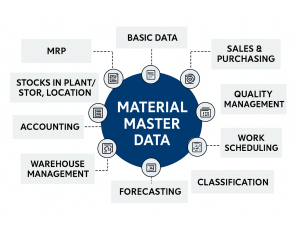
Practical Tip: Make the first week of onboarding for any new site a master data alignment sprint — not a customization sprint.
2) Sync Production Planning Across All Sites
Multi‑site planning isn’t just running Master Planning more often — it’s strategy‑aligned planning.
Key practices we implement
- Define production prioritization tiers (e.g., site A = fastest fulfillment capacity, site B = cost‑efficient base production, site C = specialized configured product).
- Use multi‑site demand forecasting and capacity models so D365 doesn’t plan in a silo.
- Run weekly planning sessions that combine D365 outputs with human judgment — and lock schedules before day 1 of the week.
Logan POV: The planning system should free planners from tactical firefighting — not create more work.
Practical Tip: Implement inter-company planning books and rules so D365 respects site capacities and transfer lanes without constant manual fiddling.

3) Make Inter‑Site Logistics Predictable
Nothing disrupts execution faster than erratic transfer lead times and unaccounted transit delays.
What we focus on
- Transfer order automation with lead time buffers that reflect reality, not theoretical transit days.
- Safety stock and allocation rules that adjust by site velocity, not global averages.
- Clear handoffs from plant to plant using site‑specific logistics workflows embedded in D365.
Logan POV: Logistics modeling isn’t a once‑and‑done setup — it’s living with execution data and adjusting buffers weekly during volatility.
Practical Tip: Create site dashboards for transfer exceptions — stockouts, overdue receipts, blocked inventory, and forecast miss alerts — so operations can act before customers feel it.
4) Lock Down Practical Quality Synchronization
Quality isn’t local. It’s enterprise‑wide. But we see most teams treat it as if each site is “a separate world.”
How to stabilize quality across sites
- Define enterprise quality standards in D365, then enforce with sampling, gates, and auto holds.
- Standardize inspection plans and failure codes so analytics tell the real story.
- Treat corrective actions as a workflow — not a comment on a record.
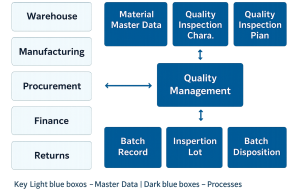
Logan POV: Quality data without action is noise. Use standard KPIs (defects per million, yield %, first pass quality) and lock them into operational reviews.
Practical Tip: Tie quality hold reasons to root causes, and roll them into operations planning — not just quality logs.
5) Enable Visibility — Don’t Wait for Reports
Across clients, the difference between “chaos” and “control” is visibility, not technology.
Real‑world visibility tactics
- Site dashboards tailored to roles (planners, plant managers, supply chain directors).
- Automated exception alerts for things that matter: transfer lags, scrap spikes, late operations, rework loops.
- Weekly cross‑site performance reviews driven by D365 data — not spreadsheets.
Logan POV: If a dashboard isn’t reviewed weekly, it’s just a pretty screen.
Practical Tip: Start with three metrics per audience — what matters most to that role — then expand as behaviors change.
Final Thoughts: Make D365 Your Operating System, Not a Silo
Most multi‑site manufacturers don’t fail because of software. They fail because:
- Master data isn’t governed
- Planning is reactive instead of aligned
- Logistics buffers aren’t updated with real outcomes
- Quality isn’t enforced consistently
- Visibility is optional
D365 F&SCM has the building blocks — but organizational practice is the mortar.
Logan Bottom Line: Build repeatable, measurable processes first — then configure D365 to enforce them. That’s where transformation happens.


