










Reviews and corrects ledger-to-subledger alignment in D365 by fixing posting configurations, inventory profiles, reconciliation logic, GL mapping, and critical reporting procedures.
Moving User Security from One Tenant to Another in Acumatica
Posted on: May 25, 2025 | By: Page Wildridge | Acumatica
Most companies will want to maintain and test new and current user security in a separate tenant than the main production tenant. When moving security from one tenant to another tenant users will find it is more difficult than the usual import scenario used commonly to import data into a new tenant. Users may find it easier to utilize a customization project to move security to different tenants.
In a client environment, Logan Consulting utilized this method to maintain and test security in one tenant and then created a customization project to move the user roles and permission to a new tenant. This allowed the client Acumatica team to test and validate all security prior to the go live.

How to: Move User Security
Step 1:
The customization project used to move security between tenants is a simple project. The Customization Project for User Security should be created in the main tenant that the security is modified in.
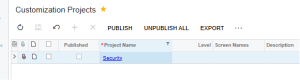
Step 2:
Once you create a new customization project you will need to add the access right to that project. You do this by selecting the access rights on the left side panel of the customization project.

For each access right that needs to be transferred from one tenant to another tenant, you will have to select the select check box. You must select a screen and it will then grab all User Roles that are related to that screen.
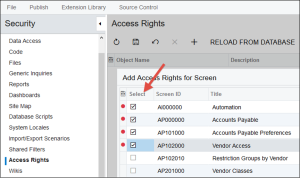
Step 3:
Once you have added all the desired screens you will see the number of screens that have been added on the left panel.
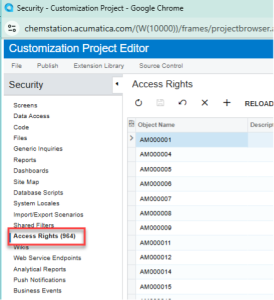
Step 4:
After all the screens that have security modification have been added to the customization panel, click the reload from database button to update the Customization Project with any current security.
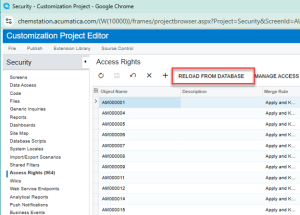
Step 5:
Finally, the user will publish the security to which tenants they want to move the security to. Select Publish then publish to multiple tenants.
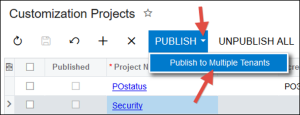
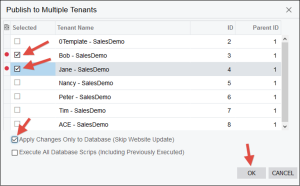
Once the customization project has been published, the users should validate and confirm the security transferred successfully.
Next Steps
Logan Consulting is a proud Acumatica partner. We are committed to ensuring our clients get the most out of their ERP. Contact us today to speak to an expert.


