










Reviews and corrects ledger-to-subledger alignment in D365 by fixing posting configurations, inventory profiles, reconciliation logic, GL mapping, and critical reporting procedures.
Maximizing Your Data with Dynamics CRM Power Platform: Part XI
Posted on: April 28, 2025 | By: Page Wildridge | Microsoft Dynamics CRM
Concurrency Control in Power Automate
In Episode 10 of our “Maximizing Your Data” series, we explored how embedded Teams phone calls and AI-based conversation intelligence insights can enhance communication and provide strategic insights. This month, we will review the practical aspects of concurrency control in Power Automate flows, examining its benefits, practical applications, and implementation strategies.
Enhanced Workflow Management
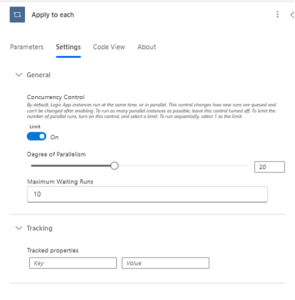
Concurrency control in Power Automate allows administrators to manage how many instances of a particular flow can run simultaneously. This feature is crucial for maintaining data integrity and system stability, ensuring that workflows run smoothly without conflicts or overloads.
Benefits for End Users
Reliable Data Processing: By controlling concurrency, users can trust that their data is processed accurately without conflicts, leading to more reliable outcomes.
Consistent Performance: Concurrency control helps maintain system performance, ensuring that workflows execute efficiently even during peak times.
Simplified Troubleshooting: With fewer concurrent processes, identifying and resolving issues within flows becomes easier, leading to quicker resolutions and less downtime.
Strategic Implementation
Parallel execution in Power Automate allows flows to run multiple actions simultaneously, significantly reducing execution time. This capability is particularly useful for tasks that don’t depend on each other and can be processed independently.
Use Cases for Parallel Execution
Nonblocking Approval Requests: Use parallel branches to send approval requests that don’t block other actions, speeding up decision-making processes.
Quorum-Based Approvals: Implement quorum-based approval processes where decisions are made based on most responses, enhancing efficiency.
Multi-System Record Updates: Ensure data consistency and reduce processing time by simultaneously creating or updating records across different systems.
Data Consolidation: Retrieve data from various sources in parallel and consolidate it into a single dataset for further processing, improving data accuracy and availability.

Practical Applications
Sales Management: Use concurrency control to ensure data integrity during high-volume sales processes and leverage parallel execution to streamline approval workflows, enhancing overall sales efficiency.
Customer Service: Monitor and analyze customer interactions efficiently by processing multiple actions simultaneously, improving service quality and addressing issues proactively.
Optimizing Workflow Execution
Centralized Communication: Keep all interactions within Power Automate to maintain a complete record of workflow execution, ensuring transparency and accountability.
Efficient Processing: Use parallel execution to reduce the overall execution time of your flows, ensuring timely and relevant follow-up actions, which enhances user satisfaction.
System Stability: Balance the degree of parallelism to optimize system resources and maintain consistent performance, providing reliable user experience.
Next Steps
In this episode, we explored the benefits of concurrency control in Power Automate and the advantages of implementing parallel execution. By leveraging these features, end users can experience enhanced workflow efficiency, improved data integrity, and better overall performance of the Power Platform. Stay tuned for Episode 12, where we’ll continue to explore innovative strategies to maximize your automation capabilities. If you have any questions or would like to learn more, please reach out and schedule time with our team. We hope to speak with you soon!


