





Reviews and corrects ledger-to-subledger alignment in D365 by fixing posting configurations, inventory profiles, reconciliation logic, GL mapping, and critical reporting procedures.
Maximizing Your Data with Dynamics CRM Power Platform: Part VIII
Posted on: February 4, 2025 | By: Page Wildridge | Microsoft Dynamics CRM
Streamlining Customer Interactions with the Relationship Assistant in Dynamics 365 CRM
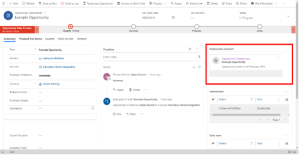
In Episode 7 of our “Maximizing Your Data” series, we explored how adding charts to forms in Power Apps can significantly enhance data visualization and improve user experience. This month, we will review the benefits of using the Relationship Assistant in Dynamics 365 and best practices to ensure you get the most out of this feature. Whether you’re looking to improve customer engagement, streamline sales processes, or manage tasks more effectively, the Relationship Assistant can provide valuable insights and reminders to help you stay on top of your interactions.
Proactive Insights and Reminders
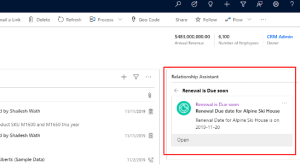
The Relationship Assistant leverages AI to provide proactive insights and reminders, helping users manage their daily activities more efficiently. By analyzing your interactions and activities, it can suggest follow-ups, remind you of upcoming meetings, and highlight important tasks. This approach ensures that you never miss a critical interaction or deadline, enhancing your productivity and customer relationships.
Enhanced User Experience
The Relationship Assistant improves user experience by reducing the cognitive load and helping users focus on high-priority tasks. By providing timely and relevant insights, it allows users to quickly grasp key information and take appropriate actions. This enhanced experience can lead to increased productivity and satisfaction, as users can manage their tasks and interactions more effectively.

Informed Decision-Making
The insights provided by the Relationship Assistant can help users make better decisions by offering contextually relevant information. For example, it can highlight recent interactions with a customer, suggest follow-up actions based on past behavior, and provide reminders for upcoming meetings. By enabling informed decision-making, the Relationship Assistant helps users build stronger customer relationships and achieve better business outcomes.
Practical Applications
- Sales Management: Use the Relationship Assistant to track customer interactions, manage follow-ups, and prioritize leads.
- Customer Service: Leverage the assistant to ensure timely responses to customer inquiries and track case resolution progress.
- Task Management: Utilize the assistant to stay on top of your tasks and deadlines, ensuring nothing falls through the cracks.
Tips for Maximizing the Relationship Assistant
- Customize Insights: Tailor the insights and reminders to your specific needs by configuring the Relationship Assistant settings.
- Stay Consistent: Regularly update your CRM data to ensure the assistant provides accurate and relevant insights.
- Leverage AI Capabilities: Take advantage of the AI-driven features to automate routine tasks and focus on high-value activities.
Next Steps
In this episode, we explored how the Relationship Assistant in Dynamics 365 CRM can enhance productivity and improve user experience by providing proactive insights and reminders. By leveraging this feature, you can stay organized, manage your interactions more effectively, and make better data-driven decisions. Stay tuned for Episode 9, where we’ll continue to explore innovative strategies to maximize your data capabilities. If you have any questions or would like to learn more, please reach out and schedule time with our team. We hope to speak with you soon!


