










Reviews and corrects ledger-to-subledger alignment in D365 by fixing posting configurations, inventory profiles, reconciliation logic, GL mapping, and critical reporting procedures.
Maximizing your Data with Dynamics CRM Power Automate: Part One
Posted on: May 28, 2024 | By: Page Wildridge | Microsoft Dynamics CRM
Power Apps Grid Control
In the realm of model-driven applications, effective data management plays a critical role in organizational success. Microsoft Power Apps offers a solution with its Grid Control feature, which aims to streamline data navigation and manipulation for users. Let’s explore how the Power Apps Grid Control is impacting data management and user experience within model-driven applications.
This blog is part of a series on the power automate in Dynamics CRM. Check our Logan Consulting website monthly for the next part!
Enhanced Data Visualization and Interaction
The Power Apps Grid Control offers a streamlined approach to data visualization and interaction within model-driven applications. Its tabular layout simplifies data navigation, resembling a spreadsheet for familiarity. The control provides a number of powerful capabilities aimed at enhancing productivity by facilitating seamless data exploration and manipulation, making tasks more efficient for users. Some key properties of the Power Apps Grid Control include:
Option Set Colors
This property enhances the visual representation of choice columns in tables by displaying each option set value with its configured background color. Tip: choose pastel colors to readability!

Nested Grids
The introduction of nested grids represents a significant enhancement in data visualization and user experience. Makers now have the capability to configure the main grid to display surface-related records. This means that users can view a primary set of data while also having the ability to expand individual rows to reveal a sub grid containing related records, streamlining their workflow, and improving efficiency. This provides a more visually appealing and interactive way to present hierarchical data structures, replacing traditional methods. For example, a user could view a list of Accounts in the main grid and expand a specific Account to see a sub grid of related Opportunities!
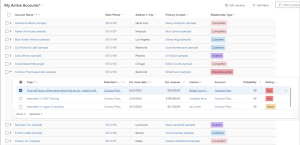
Grouping
The ability for users to organize data by grouping based on a single column is a valuable feature, providing a dynamic way to structure and navigate through datasets. With grouping functionality, users can categorize and organize their data into distinct groups based on a chosen column’s values. Users have the flexibility to expand and collapse individual groups as needed, allowing them to focus on specific subsets of data or gain a comprehensive overview of the entire dataset. This feature promotes efficient data exploration and analysis, enabling users to quickly identify patterns, trends, and relationships within their data.
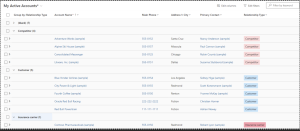
Seamless Data Editing
In addition to enhancing data visualization, the Power Apps Grid Control simplifies data editing with its inline editing functionality. Users can make real-time changes to data directly within the grid, eliminating the need to navigate to separate forms or screens. Less clicks! Another benefit is the reduction in errors and inconsistencies associated with manual data entry. By allowing users to edit data directly within the grid, the likelihood of transcription errors or discrepancies is minimized. Users can immediately visualize the impact of their changes on related data within the same view, facilitating better decision-making and data validation.

Performance and Scalability
Performance is paramount in today’s fast-paced business environment, and the Power Apps Grid Control doesn’t disappoint. Engineered for optimal performance and scalability, the Grid Control ensures smooth data interaction even with large datasets and complex queries. Whether accessing data from on-premises or cloud sources, users can rely on the Grid Control to deliver responsive and reliable performance, empowering them to make informed decisions without lag.
Next Steps
The Power Apps Grid Control offers a powerful yet user-friendly solution for model-driven applications. The Grid Control provides enhanced data visualization, customization options, seamless data editing, and optimal performance. It empowers users to unlock the full potential of their data, driving productivity, efficiency, and informed decision-making across the organization.
Logan Consulting is a proud partner of Microsoft. Contact us to speak to an expert today about harnessing the power of power automate in Dynamics CRM.


