


Reviews and corrects ledger-to-subledger alignment in D365 by fixing posting configurations, inventory profiles, reconciliation logic, GL mapping, and critical reporting procedures.
Improving Project Visibility and Simplifying Warehouse Set-up with Microsoft Dynamics 365 Supply Chain Management
Posted on: October 7, 2024 | By: Maya VanderWoude | Microsoft Dynamics AX/365, Microsoft Dynamics Manufacturing
Establishing a new warehouse is a challenging endeavor for any organization. Leaders must be carefully consider every detail to ensure smooth and efficient operations when customer orders begin shipping from the new location.

Planning for facility design, equipment needs, and staffing requirements demand such a high level of attention that they overshadow another critical aspect of the modern supply chain: Enterprise Resource Planning and Warehouse Management System (WMS) set up and implementation. This vital step is frequently delayed until the last minute, leading to poor system setup and operational inefficiencies.
For Dynamics 365 Supply Chain Management (SCM) users, Microsoft has introduced a new tool to support project managers and operations leaders in assigning WMS setup tasks and enhancing project visibility. The Warehouse Implementation Tasks Workspace is a key enhancement designed to improve the use of the Warehouse Management module in Dynamics 365.
The Warehouse Implementation Tasks Workspace is an interactive list of steps that are required to configure the warehouse management module, and other connected operations from the ground up. It is also a useful method for confirmation and updates to an environment during upgrade cycles or after a system migration activities.
CREATING A WAREHOUSE IMPLEMENTATION PROJECT
The default task list must be imported through the Framework parameters tile in the Data management workspace. Once this is completed for the entire organization users can create new, individual projects for each warehouse that is being configured.
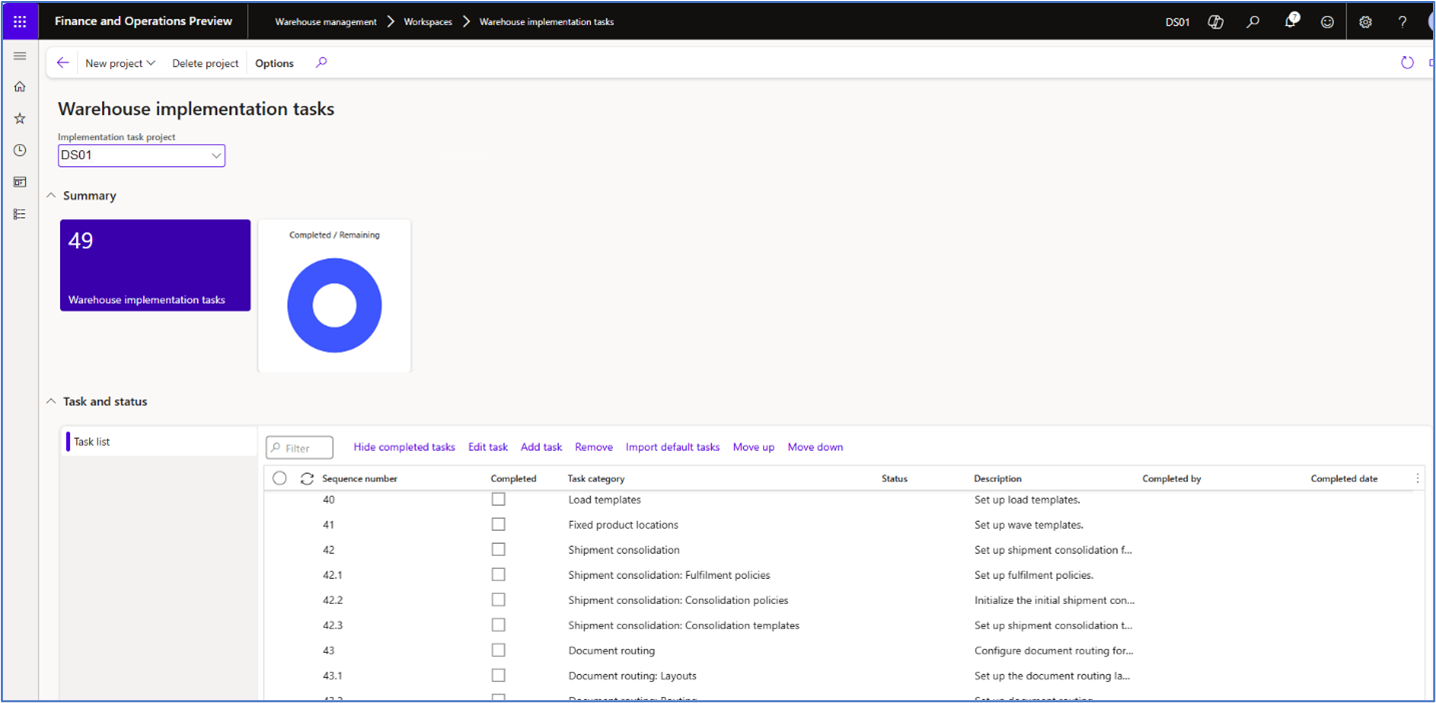
The task list in each project is highly customizable. Users can add new tasks, edit existing ones, change the order of operation, or completely remove unnecessary objects in the list. Highly complex operations, such as containerization set up, and document routing are also broken up into sequentially numbered subtasks that focus on each specific aspect of a bigger job.
USING THE WAREHOUSE IMPLEMENTAITON TASKS WORKSPACE
It’s very easy to use the Warehouse implementation task list once it’s created and customized for a specific warehouse. Users can navigate directly to each form where set up will be completed by clicking on the interactive link provided on each task category. Tasks include various parameters, as well as configuration wizards that facilitate efficient set up for Warehouse management initiation, as well as Inbound and Outbound configurations, along with tasks for testing location directives that direct movement of product within the warehouse.
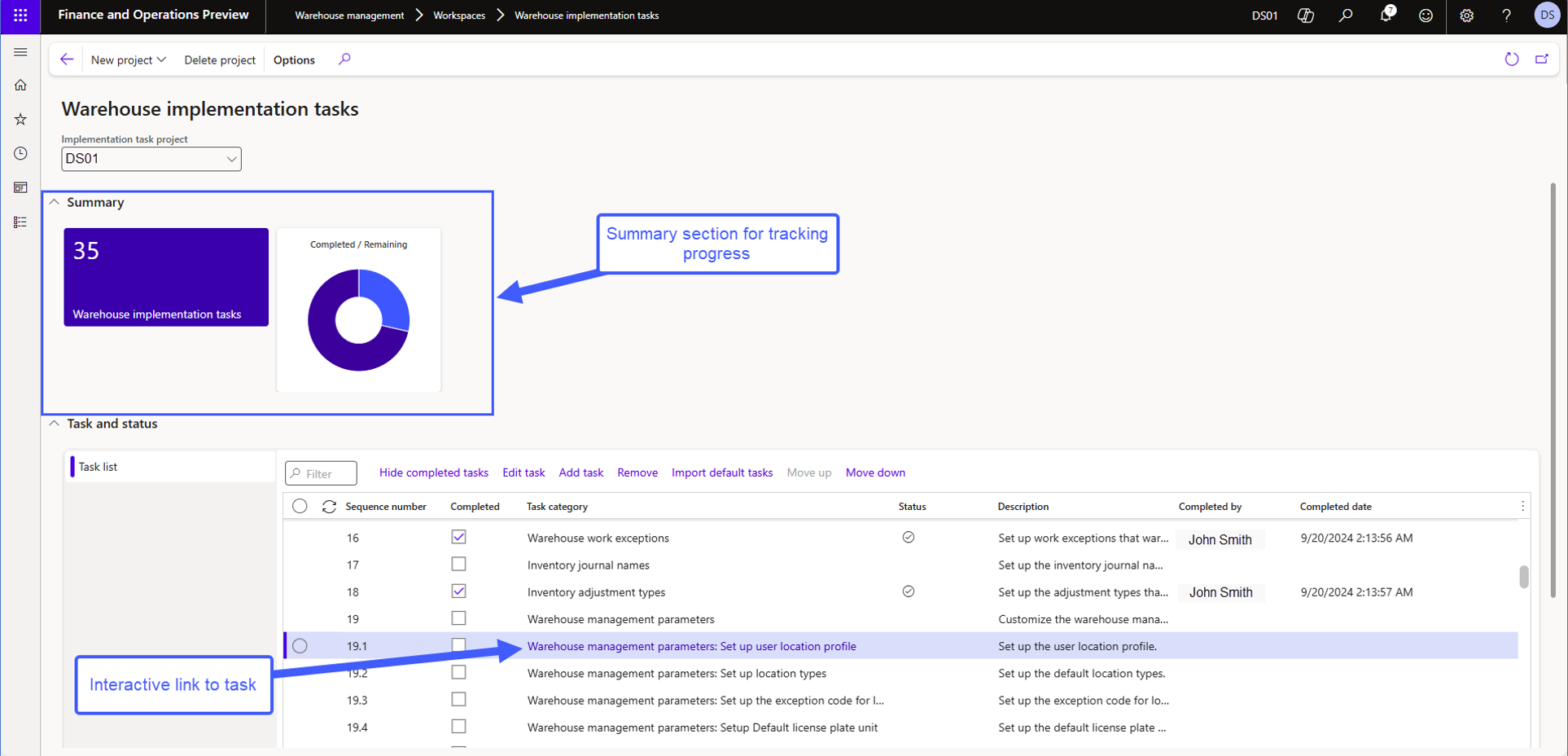
The Summary section at the top of the Warehouse implementation task workspace helps project and team managers quickly assess how much work is left using a visual indicator that changes as each line is marked complete in the list while the tile to the left shows how many tasks remain until the warehouse is completely configured.
The Warehouse Implementation Tasks Workspace is a new, user-friendly tool designed to simplify the setup of Dynamics 365 Supply Chain Management’s Warehouse Management functionality. It provides quick access to the forms where parameters and configurations are established, while offering real-time visibility into project progress for all stakeholders. This helps streamline operations, allowing team members to focus on other critical aspects of launching a new warehouse.
Next Steps:
If you want to learn more about EDI Automation with Microsoft Dynamics 365 Supply Chain Management, contact us here to learn how we can help you grow your business. You can also email us at info@loganconsulting.com or call (312) 345-8817.
Related Posts
-
Order Fulfillment in Industrials: Where Complexity Either Gets Controlled or Multiplied
Posted on: February 23, 2026
In industrial organizations, order fulfillment isn’t a single handoff. It’s a chain reaction. Configured products. Long lead times. Partial shipments....
-
Supplier Risk Management: Building Resilient Procurement with D365 F&SCM
Posted on: February 16, 2026
Supplier risk used to be a “special topic” reserved for global disruptions. In 2026, it’s a daily operating condition, especially...


