





Reviews and corrects ledger-to-subledger alignment in D365 by fixing posting configurations, inventory profiles, reconciliation logic, GL mapping, and critical reporting procedures.
High Quality Guaranteed in Microsoft Dynamics
Posted on: April 28, 2025 | By: Page Wildridge | Microsoft Dynamics GP
The Quality Management module in Microsoft Dynamics GP is a powerful solution designed to maintain and enhance quality standards across all operational levels, particularly within the manufacturing sector. By integrating seamlessly with all versions of Dynamics GP, this module ensures that raw materials meet the necessary manufacturing criteria before entering the production line. Key features, such as Defect Management and Destructive Testing procedures, prevent defective materials from advancing into production, thereby safeguarding the quality of the final products.

Test Results
A standout feature of this module is its ability to provide detailed Test Results, which summarize the sources of defects identified during inspections. This functionality enables swift corrective actions, ensuring consistent quality. The module’s dynamic guidelines adapt to complex manufacturing operations, providing clear standards for managing nonconforming orders on the production floor—crucial for maintaining consistency as production demands evolve.
Quality Management
The Microsoft Dynamics GP Quality Management module offers significant advantages, such as reliable testing tailored to specific merchandise needs and generating warning notifications for materials that fail to meet quality standards. It implements quality sampling procedures to monitor destructive testing and establishes systematic processes that minimize production delays, rework, and material waste. Additionally, the module allows for highly customized quality parameters for each customer and vendor.
Transparency Throughout
The module enhances collaboration with supply chain partners through automated reporting and provides consumers with visibility into the quality of finished products. This transparency is vital in today’s competitive market, where prompt issue resolution and consistent product quality are expected. With the ability to quickly backtrack and rectify mistakes, the Microsoft Dynamics GP Quality Management module empowers organizations to maintain high standards, improve efficiency, and deliver superior products.
Key Features and Functionality
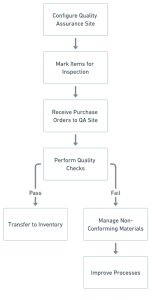
Quality Assurance Site: Configure a default Quality Assurance site where items requiring quality inspection are received.
Item Engineering Data: Designate items that require quality inspection in the Item Engineering Data window.
Quality Procedures: Establish quality procedures and link them to specific items.
Defect Management: Track and manage nonconforming materials.
Destructive Testing: Oversee destructive testing procedures to prevent defective materials from entering production.
Inventory Transfers: Transfer items from the quality assurance site to inventory if they meet quality requirements.
Integration: Seamless integration with all versions of Dynamics GP.
Nonconformance Management: Track issues, identify solutions, and manage turnaround times for nonconforming products.
KPI Tracking: Monitor key performance indicators (KPIs) for insights into nonconformance problems and the effectiveness of quality measures.
How It Works:
|
Next Steps
Logan Consulting, a proud Microsoft partner, is committed to ensuring our clients get the most out of their ERP. Contact us today to learn about your next steps with Microsoft Dynamics GP.


