


Reviews and corrects ledger-to-subledger alignment in D365 by fixing posting configurations, inventory profiles, reconciliation logic, GL mapping, and critical reporting procedures.
Handling Customer Returns (RMAs) In QAD
Posted on: May 14, 2025 | By: Alexa Leitner | QAD Business Process
In any business, returns are inevitable—whether due to defects, customer dissatisfaction, or order errors. Managing these returns efficiently can make a significant difference in customer satisfaction and operational efficiency. That’s where the RMA (Return Material Authorization) process in QAD comes into play.
What is an RMA?
RMA (Return Material Authorization) is a formal process used to manage the return of products from customers. It ensures that returns are tracked, validated, and processed systematically reducing errors, improving accountability, and maintaining inventory accuracy.
Initiating RMA’s in QAD
In QAD, there are two ways to initiate the creation of an RMA. The first option is to go to “Invoice History” screen in AUX and find the invoice the Customer is referring to for their return. Then select “Actions à Create Return” which will bring up the RMA’s screen with most of the information already filled out. Next, select the lines from the invoice the customer would like to return and select whether there will be replacement items or not.
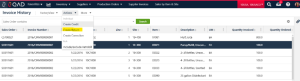

The second option to initiate an RMA in QAD is to manual create it using the “RMAs” screen in AUX. All the information related to the customer and site would need to be filled out by the user as they go through the RMA creation.

Functionality of QAD RMAs
RMA functionality in QAD allows for several different scenarios and flexibility of how RMAs are executed. There is the ability to tie in service orders, select different pricing dates from the RMA items, detail allocate line-item entries, consume forecasts, and send EDI PO Acknowledgements through QAD RMAs.
On the RMA there are two main sections for the line items: Return Lines and Replacement lines. Return lines allow the selection of items the customer wishes to return (this could be populated through Invoice History initiation). These return lines can be tied back to specific Lot/Serial numbers that were originally sent to the customer. The replacement lines allow entry of line items for things that have to be replaced for the customer. The return and replacement lines can be linked so that the system knows the two lines are related.
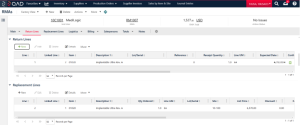
In QAD RMAs “Actions” functionality allows release to rework, release to production, ship allocated, and receive order. RMAs created with replacement lines also work with “Picklist & Pre-Shipper – Automatic” in order to generate Pre-Shippers to initiate the shipment process of the replacement lines.
Summary
A well-implemented RMA process is more than just a way to handle returns, it’s a vital part of customer service and quality assurance. QAD’s comprehensive RMA functionality ensures that you can manage returns efficiently, maintain inventory integrity, and provide timely resolutions.
If your organization handles frequent returns, investing in a well-defined RMA workflow in QAD could be a game-changer.
Next Steps
If you’re ready to elevate your team’s QAD expertise, we’re here to help. Logan Consulting specializes in QAD training tailored to your organization’s unique needs. Contact us today at info@loganconsulting.com or call (312) 345-8817 to learn more about how we can support your team’s growth and development.


