


Reviews and corrects ledger-to-subledger alignment in D365 by fixing posting configurations, inventory profiles, reconciliation logic, GL mapping, and critical reporting procedures.
Customer Consignment Using AUX
Posted on: May 21, 2024 | By: Meaghan Andrews | Uncategorized, QAD Manufacturing, QAD Business Process
Summary
QAD provides out-of-the box functionality to manage Customer Consignment inventory that integrates all aspects of the process including shipping, tracking consigned inventory, usage reporting, and deferred billing until usage. This blog discusses the setups of the Customer Consignment module and subsequent transaction processing.
Customer Consignment Setups
The following setup is required when using the Customer Consignment Module:
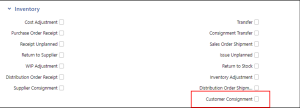
1. Enable the module in the Inventory section of the Base Control function.
2. Define locations to track consigned inventory through Locations in AUX (formerly Location Maintenance 1.1.18.1 in NETUI). It is important that the Status be non-nettable and non-available. Note: it is typical to assign the location code to match the Customer ship-to number.
3. For each Ship-to and Item combination that is under a consignment agreement create a record using the Customer & Consignment Settings screen in AUX (formerly Ship-To/Item Controls Maint 7.18.1 in NETUI). For the combination, you can also define the customer-specific In-Transit and Consignment tracking location.

Customer Consignment Processing
1. Create a Sales Order and flag the line as consigned. This will default from the Customer & Item Consignment Settings record but can also be manually updated. The following line order details will be defaulted when consignment is enabled.


2. Ship the Sales Order using standard QAD Shipping functions. On a consigned order, the material is transferred to the In-Transit location and no pending invoice is generated.
3. When the material arrives at the Customer, perform a Transfer using the Customer Consignment Inventory screen Actions drop down “Transfer” (formerly Consignment Inventory Transfer 7.18.7 in NETUI).
4. When the Customer uses the material, report the usage through the Customer Consignment Inventory screen Actions drop down “Record Usage” (formerly Inventory Usage Create 7.18.13 in NETUI).
Customer Consignment Reports
Below are reports in AUX that will help manage the consignment inventory process and can be ran in multiple different ways (focusing on order, part, or location).
- Aging Reports
- Aging Inventory Report by Part
- Aging Inventory Report by Order
- Consignment Inventory Reports
- Consignment Inventory Report
- Consignment Inventory Report by Order
- Consignment Inventory Report by Loc
- Consignment Inventory Usage Reports
- Consignment Inventory Usage Report
- Consignment Inventory Usage Report by Order
Next Steps
If you are interested in learning more about Customer Consignment, contact us here to find out how we can help you grow your business. You can also email us at info@loganconsulting.com or call (312) 345-8817.


