


Reviews and corrects ledger-to-subledger alignment in D365 by fixing posting configurations, inventory profiles, reconciliation logic, GL mapping, and critical reporting procedures.
Customer Activity Dashboard in AUX
Posted on: February 18, 2025 | By: Alexa Leitner | Uncategorized, QAD Business Process
The Customer Activity Dashboard in QAD AUX is a one stop shop for reviewing customer balances, invoices, and payments across entities. At a glance, the Dashboard also gives users the ability to review credit limits, open sales order amounts, and total exposure across entities. This is a powerful tool that can be used to avoid navigating through many screens to get the same information.
Here are some key features on how to best utilize the dashboard:
- Main tab – Here we can view:
- Credit limit info
- Open balances across entities
- Open sales order amounts across entities
- Currency filter – Calculate balances in alternate currencies:
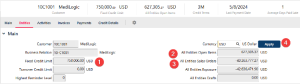
- Entities tab – This tab gives us much of the same info as shown in the Main tab, but broken down by entity
-
- Balances are shown in both the domain/entity base currency and the statutory currency for the workspace you are in
-
- The checkboxes on the left control the data in the remainder of this screen
-
-
- If an entity is selected, invoices and payment data from that entity will be shown in the Activities, Invoices, and Payment tabs below:
-

- Activities – Filter invoices by status, invoice date or due date and view applied payments.
-
- Payments applied to invoices will also be shown, if available.
-
- Again, invoices/payments from all entities selected in the Entities tab will be displayed here.

- Invoices tab – Filter invoices by status, invoice date or due date.
-
- To jump directly to an invoice, select the row and click Details.

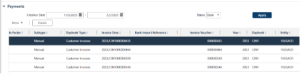
- Payments tab – Filter customer payments by creation date and status.

-
- If you scroll to the right, you can also see the invoice applied to the payment:
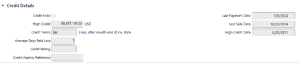
- Credit Details Tab – View additional credit details:
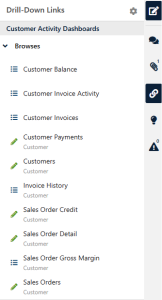
- Lastly, I’d like to highlighted the drill down links available to quickly access supplementary information filtered by the customer you came from:
-
- Customer balances – view additional credit detail
-
- Customer invoice activity – similar view to the Activities tab in the dashboard
-
- Customer Invoices – Customer invoice detail
-
- Invoice History – Line level invoice detail
-
- Sales Order Credit – Credit check detail for each open sales order
-
- Sales Order Detail – Open Sales order line level detail
-
- Sales Order Gross Margin – Open sales order line level detail which also shows profit margins
If you’re ready to elevate your team’s QAD expertise, we’re here to help. Logan Consulting specializes in QAD training tailored to your organization’s unique needs. Contact us today at info@loganconsulting.com or call (312) 345-8817 to learn more about how we can support your team’s growth and development.


