




Reviews and corrects ledger-to-subledger alignment in D365 by fixing posting configurations, inventory profiles, reconciliation logic, GL mapping, and critical reporting procedures.
Change Production Order Status Form in Business Central
Posted on: October 21, 2025 | By: Page Wildridge | Microsoft Dynamics Business Central
Typically, users within Business Central manage the status of their production orders in two places. This is either under “Firm Planned Production Orders,” or “Released Production Orders” pages. Both of these tools will give change the status for 1 production order.
In this blog, we will cover an underutilized tool within Business Central that allows you to bulk change production orders with just a few clicks. The tool, the Change Production Order Status page, has a few different features.
1. Bulk Change the Status from Firm Planned to Released
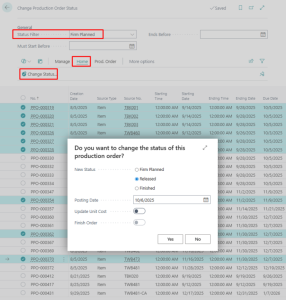
You can navigate to the form Change Production Order Status, filter on the Status = Firm Planned, select the prod. Orders that you want to release and click on Home > Change Status and choose new Status = Released
2. Bulk Change the Status from Released to Finished
You can navigate to the form Change Production Order Status, filter on the Status = Released, select the prod. Orders that you want to release and click on Home > Change Status and choose new Status = Finished

3. Bulk Delete Firm Planned Orders
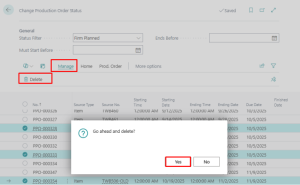
This is the lesser-known functionality of the form. From this page, you can bulk delete Production Orders if there has not been any activity. You can navigate to Change Production Order Status form, choose the production orders that you want to bulk delete and choose Manage > Delete > Yes.
Next Steps
As a proud Microsoft partner, Logan Consulting is committed to ensuring our clients get the most out of their ERPs. Contact us today to learn more about our expertise.


