









Reviews and corrects ledger-to-subledger alignment in D365 by fixing posting configurations, inventory profiles, reconciliation logic, GL mapping, and critical reporting procedures.
3 New Copilot Advancements in Business Central
Posted on: August 19, 2025 | By: Page Wildridge | Microsoft Dynamics Business Central
As Artificial Intelligence adapts and improves, Microsoft has ensuring that the newest technology is embedded into their products. Microsoft’s AI assistant, Copilot, is designed to help businesses take advantage of AI across their day-to-day operations. In this blog, we will cover three of the newest improvements to Copilot.

Autofill with Copilot
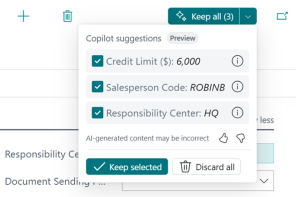
Microsoft’s assistant can automatically fill in fields for you without you having to do any extra searching. The software now can pull information from online, in addition to the data within your system, to make suggestions on the work that you are completing to help you speed up your processes. Turn on “Enable Bing Search” so you can start using this feature . When working with data entry. Copilot will also pull together all of its suggestions in one panel so you can quickly pick and choose which suggestions you would like to save. Alternatively, click “Keep All,” to accept all Copilot recommendations.
Sales Order Agent
Microsoft’s latest release included their new Sales Order Agent, an AI-powered tool that runs in the background and utilize AI to help make your decisions faster and easier. The Agent collects information from your details and your emails to help you whenever you need it most- for example if you are writing an email and need to quickly know your inventory or want a description of a sales order, the Agent can find that information for you without having to leave Outlook. Additionally, the enhanced Sales Order Agent handles multiple “ship-to” addresses, suggests alternatives for unavailable items, and supports more natural-language instructions.
Summarize with Copilot
A “Summary” box will pop up on document pages so you can learn the most important details quickly. This feature is enabled on Customer, Sales Order, and Item pages. The assistant reads the document, distills the information from the document into a few bulletpoints, and gives you the option to click around on the summary to go directly to the data the summary is pulled from. Now, you can copy this information to share it with your coworkers as needed.
Next Steps
Logan Consulting is a proud Microsoft partner. We ensure our clients get the most out of their ERPs. Contact us today to speak to an expert.


